Identificación de Empresas B2B
Característica ScaleDescubre qué empresas visitan tu sitio web. B2B Intelligence identifica organizaciones basándose en sus direcciones IP, ayudándote a priorizar tus esfuerzos de ventas y comprender tu mercado.
La Identificación de Empresas B2B está disponible en los planes Scale y Enterprise. Actualiza tu plan para activar esta característica.
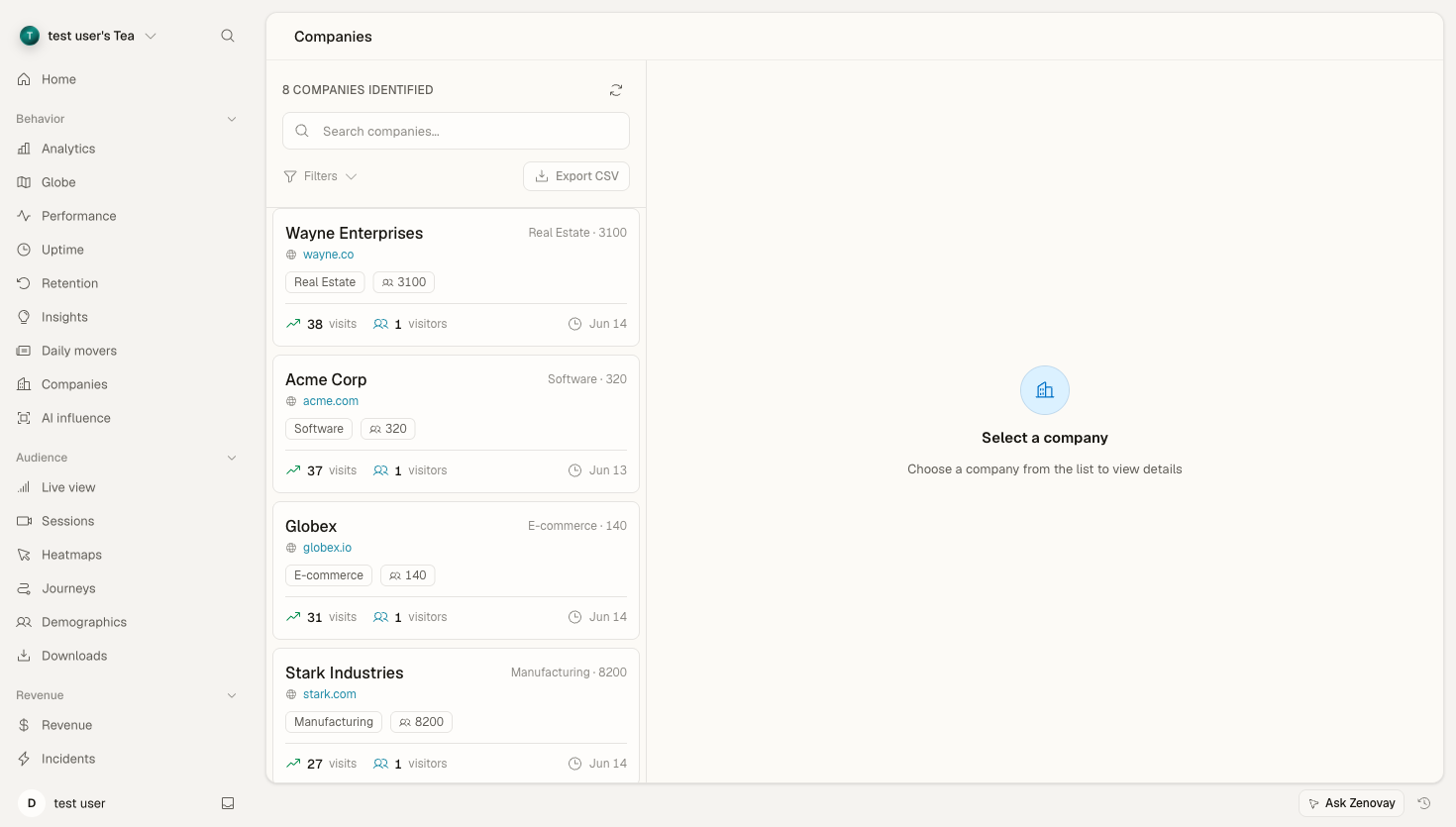
Descripción General
Cuando empresas visitan tu sitio web, generalmente lo hacen desde su red corporativa. B2B Intelligence utiliza coincidencia IP-empresa para identificar estas organizaciones, proporcionando:
- Nombre de empresa: La organización que visita tu sitio
- Industria: El sector en el que operan
- Número de empleados: Categoría de tamaño de la empresa
- Ubicación: Ubicación de la sede central
- Páginas vistas: Qué contenido les interesa
- Frecuencia de visitas: Con qué frecuencia regresan
Cómo Funciona
- Detección de IP: Se captura la dirección IP del visitante (anonimizada)
- Búsqueda de Empresa: La IP se compara con la base de datos de IPs empresariales
- Enriquecimiento: Se obtienen los detalles de la empresa (nombre, tamaño, industria)
- Visualización en Dashboard: La empresa aparece en tu panel B2B
No todos los visitantes pueden ser identificados. Los ISP de consumidor, VPNs y pequeñas empresas a menudo no pueden ser coincididas. Las tasas de identificación típicas son del 10-30% del tráfico B2B.
Habilitar B2B Intelligence
- Abre Domains, haz clic en tu sitio y luego accede a su configuración
- Activa B2B Company Identification
- Guarda los cambios
Los datos de la empresa comenzarán a aparecer en minutos para nuevos visitantes.
Panel B2B
Lista de Empresas
Abre Domains, haz clic en tu sitio y luego selecciona la pestaña Companies para ver organizaciones identificadas:
| Columna | Descripción |
|---|---|
| Company | Nombre de la organización y logo |
| Industry | Sector empresarial |
| Size | Categoría del número de empleados |
| Location | País de la sede central |
| Visits | Número de sesiones |
| Last Seen | Visita más reciente |
| Pages | Páginas vistas en esta visita |
Filtrar Empresas
Filtra por:
- Industria (Tecnología, Finanzas, Sanidad, etc.)
- Tamaño de empresa (1-50, 51-200, 201-500, 500+)
- Ubicación (país)
- Rango de fechas
- Frecuencia de visitas
Ordenar
Ordena por:
- Visitas más recientes
- Mayor número total de visitas
- Empresas más grandes
- Orden alfabético
Detalles de la Empresa
Haz clic en cualquier empresa para ver:
Descripción General
- Nombre de la empresa y logo
- URL del sitio web
- Industria y tamaño
- Ubicación de la sede central
Historial de Visitas
- Todas las visitas de esta empresa
- Páginas vistas por sesión
- Tiempo dedicado en el sitio
- Páginas de entrada y salida
Información
- Contenido más visto
- Visitantes recurrentes vs nuevos
- Tendencias de engagement
Casos de Uso
Inteligencia de Ventas
- Identifica prospectos: Ve qué cuentas objetivo están visitando
- Prioriza tu alcance: Enfócate en empresas que muestren señales de compra
- Personaliza tu propuesta: Sabe qué contenido han consumido
- Cronifica tu contacto: Contacta cuando estén investigando activamente
Marketing Basado en Cuentas (ABM)
- Monitorea cuentas objetivo: Supervisa cuándo visitan cuentas nominadas
- Mide el impacto de campañas: Observa si las campañas generan tráfico de cuentas objetivo
- Identifica interés anónimo: Descubre empresas antes de que completen formularios
Desarrollo de Productos
- Comprende tu mercado: Observa qué industrias están más interesadas
- Identifica casos de uso: El consumo de contenido revela necesidades
- Inteligencia competitiva: Observa cuándo competidores visitan tu sitio
Integración con CRM
Exporta datos de empresa a tu CRM:
Salesforce
Las integraciones de CRM se configuran desde la configuración de tu dominio. Abre Domains, haz clic en tu sitio y busca la sección Integraciones para conectar tu cuenta de Salesforce y mapear los campos de empresa.
HubSpot
Del mismo modo, conecta HubSpot desde la configuración de tu dominio. Una vez conectado, configura la coincidencia de empresa a empresa y habilita los disparadores de flujo de trabajo.
Webhook
Para integraciones de CRM personalizadas:
POST https://your-crm.com/webhooks/zenovay
{
  "event": "company_identified",
  "company": {
    "name": "Acme Corp",
    "domain": "acme.com",
    "industry": "Technology",
    "employee_count": "201-500",
    "country": "US"
  },
  "visit": {
    "pages_viewed": ["/pricing", "/features"],
    "duration": 245,
    "timestamp": "2025-12-30T10:30:00Z"
  }
}
Alertas
Recibe notificaciones cuando cuentas objetivo visitan:
Alertas de Cuenta
- Ve a Configuración → Espacio de trabajo → Notificaciones
- Añade dominios de cuentas objetivo (ej:
apple.com,google.com) - Configura el canal de notificación
- Recibe alertas cuando se identifiquen cuentas objetivo
Alertas de Industria
Desencadena alertas cuando empresas de industrias específicas visitan:
{
  "trigger": "company_visit",
  "conditions": {
    "industry": ["Technology", "Finance"],
    "size": ["201-500", "500+"]
  },
  "notify": "[email protected]"
}
Privacidad y Cumplimiento
Fuentes de Datos
La identificación de empresas utiliza:
- Rangos de IP empresarial (registrados con ARIN, RIPE, etc.)
- Registros de redes corporativas
- Datos de ISP empresariales
NO utilizamos:
- Datos personales de empleados
- Perfiles sociales
- Rastreo de cookies entre sitios
Cumplimiento de GDPR
- Las direcciones IP se procesan, pero no se almacenan permanentemente
- La identificación de empresas se basa en datos de red, no en datos personales
- Sin rastreo individual entre sitios
- Diseñado para preparación de GDPR bajo una base de interés legítimo
Opción de No Participación
Las empresas pueden solicitar ser excluidas de la identificación:
- Contacta a [email protected]
- Incluye el dominio de la empresa y el rango de IP
- Los añadiremos a la lista de exclusión dentro de 48 horas
Acceso a API
Accede a datos de empresa mediante API:
Listar Empresas Identificadas
GET /api/websites/:websiteId/companies
Authorization: Bearer YOUR_API_KEY
Obtener Detalles de Empresa
GET /api/websites/:websiteId/companies/:companyId
Authorization: Bearer YOUR_API_KEY
Ejemplo de Respuesta
{
  "company": {
    "id": "comp_abc123",
    "name": "Acme Corporation",
    "domain": "acme.com",
    "industry": "Technology",
    "employee_count": "201-500",
    "country": "US",
    "city": "San Francisco"
  },
  "visits": {
    "total": 15,
    "first_seen": "2025-11-15T08:00:00Z",
    "last_seen": "2025-12-30T14:30:00Z"
  },
  "engagement": {
    "pages_per_visit": 4.2,
    "avg_duration": 185,
    "top_pages": ["/pricing", "/features", "/demo"]
  }
}
Mejores Prácticas
- Configura alertas de cuenta objetivo: Recibe notificaciones cuando clientes potenciales clave visitan
- Integra con tu CRM: Sincroniza datos de empresa con tu flujo de trabajo de ventas
- Revisa semanalmente: Identifica nuevas oportunidades de ventas
- Correlaciona con campañas: Observa qué marketing impulsa tráfico de cuentas objetivo
- Monitorea en el tiempo: Las visitas recurrentes a menudo indican intención de compra
Próximos Pasos
- Revenue Attribution - Conecta visitas de empresa a ingresos
- Custom Events - Rastrea acciones específicas de empresa
- API Reference - Accede a datos de empresa programáticamente