Ejemplo de Integración de JavaScript Vanilla
Esta guía cubre la integración de análisis de Zenovay usando JavaScript simple sin ningún framework. Funciona para sitios estáticos, aplicaciones web tradicionales, o como referencia para la API principal.
Inicio Rápido
Añade el script de seguimiento de Zenovay a tu HTML:
<!DOCTYPE html>
<html lang="en">
<head>
  <meta charset="UTF-8">
  <meta name="viewport" content="width=device-width, initial-scale=1.0">
  <title>My Website</title>

  <!-- Zenovay Analytics -->
  <script src="https://api.zenovay.com/z.js"
          data-tracking-code="YOUR_TRACKING_CODE"
          async></script>
</head>
<body>
  <h1>Welcome to My Website</h1>
</body>
</html>
¡Eso es todo! Las vistas de página ahora se rastrean automáticamente.
Configuración Básica
1. Instalar Script en HTML
Añade la etiqueta de script a tu sección <head>:
<head>
  <!-- Other head elements -->

  <!-- Zenovay Analytics -->
  <script src="https://api.zenovay.com/z.js"
          data-tracking-code="YOUR_TRACKING_CODE"
          async></script>
</head>
Atributos importantes:
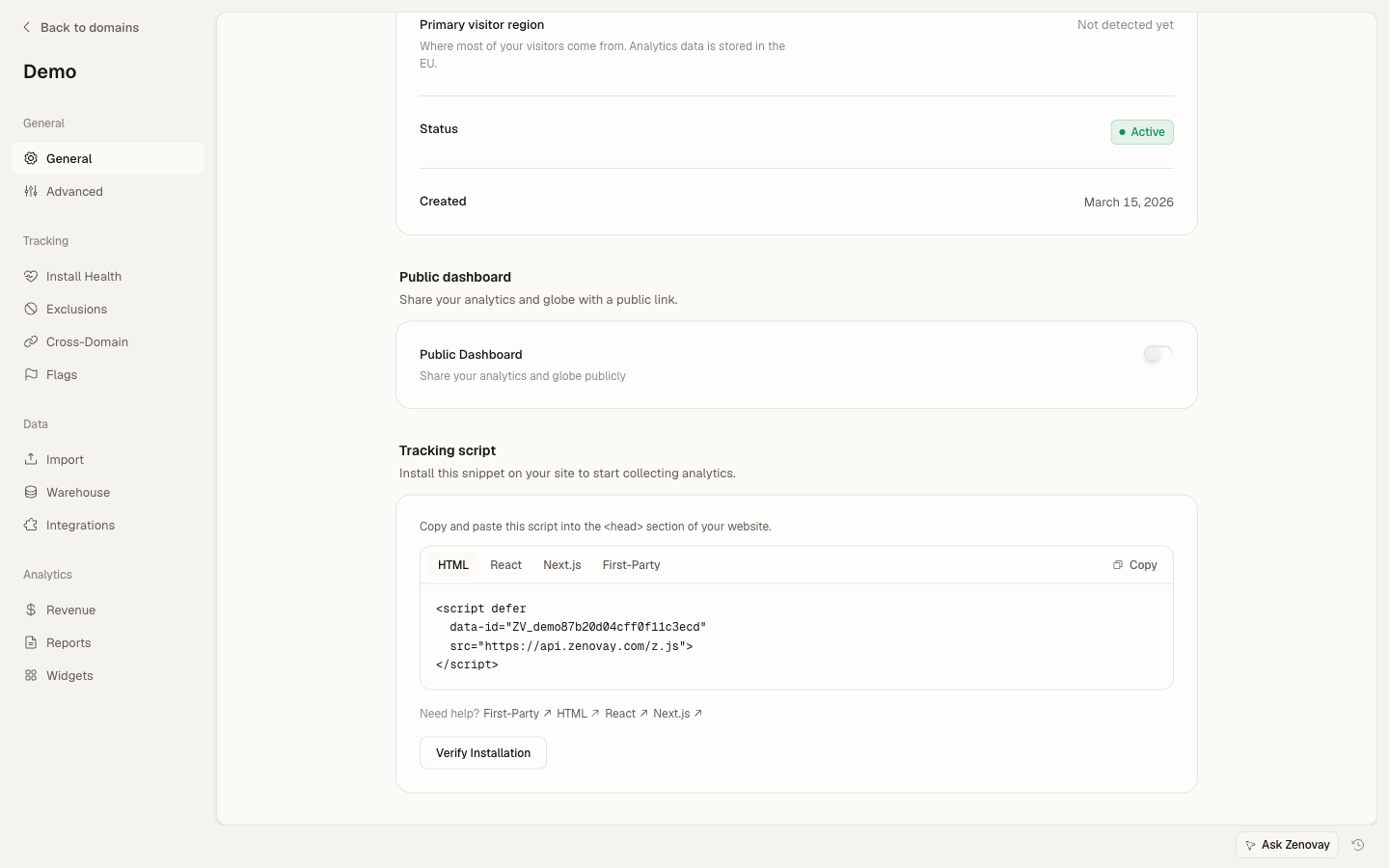
data-tracking-code: Tu ID de sitio único, encontrado en Domains → your site → General (tarjeta Tracking script)async: Carga el script de forma asincrónica para mejor rendimiento
2. Rastrear Eventos Personalizados
Rastrea eventos usando el objeto global window.zenovay:
<button onclick="handleSignup()">Start Free Trial</button>

<script>
  function handleSignup() {
    if (window.zenovay) {
      window.zenovay('track', 'signup_started', {
        plan: 'professional',
        source: 'pricing_page'
      });
    }

    // Continue with signup logic
    window.location.href = '/signup';
  }
</script>
3. Esperar a que el Script se Cargue
Si necesitas asegurar que Zenovay esté cargado:
<script>
  // Wait for Zenovay to be ready
  window.addEventListener('zenovay:ready', function() {
    console.log('Zenovay is ready!');

    // Now safe to track events
    window.zenovay('track', 'page_loaded');
  });
</script>
Ejemplo Completo
Aquí hay una página HTML completa con integración de Zenovay exhaustiva:
<!DOCTYPE html>
<html lang="en">
<head>
  <meta charset="UTF-8">
  <meta name="viewport" content="width=device-width, initial-scale=1.0">
  <title>E-commerce Store - Zenovay Example</title>

  <!-- Zenovay Analytics -->
  <script src="https://api.zenovay.com/z.js"
          data-tracking-code="YOUR_TRACKING_CODE"
          async></script>

  <style>
    body { font-family: Arial, sans-serif; max-width: 1200px; margin: 0 auto; padding: 20px; }
    .product { border: 1px solid #ddd; padding: 20px; margin: 10px; display: inline-block; }
    button { background: #007bff; color: white; border: none; padding: 10px 20px; cursor: pointer; }
    button:hover { background: #0056b3; }
  </style>
</head>
<body>
  <h1>My E-commerce Store</h1>

  <div class="product" data-product-id="prod_123">
    <h2>Premium Headphones</h2>
    <p>Price: $299</p>
    <button onclick="addToCart('prod_123', 'Premium Headphones', 299)">
      Add to Cart
    </button>
  </div>

  <div class="product" data-product-id="prod_456">
    <h2>Wireless Mouse</h2>
    <p>Price: $49</p>
    <button onclick="addToCart('prod_456', 'Wireless Mouse', 49)">
      Add to Cart
    </button>
  </div>

  <script>
    // Wait for Zenovay to load
    window.addEventListener('zenovay:ready', function() {
      console.log('Zenovay analytics ready');

      // Track products viewed on page
      trackProductsViewed();
    });

    // Track product views
    function trackProductsViewed() {
      const products = document.querySelectorAll('.product');

      products.forEach(function(product) {
        const productId = product.getAttribute('data-product-id');
        const productName = product.querySelector('h2').textContent;
        const priceText = product.querySelector('p').textContent;
        const price = parseFloat(priceText.replace(/[^0-9.]/g, ''));

        if (window.zenovay) {
          window.zenovay('track', 'product_viewed', {
            product_id: productId,
            product_name: productName,
            price: price,
            currency: 'USD'
          });
        }
      });
    }

    // Track add to cart
    function addToCart(productId, productName, price) {
      if (window.zenovay) {
        window.zenovay('track', 'product_added_to_cart', {
          product_id: productId,
          product_name: productName,
          price: price,
          quantity: 1,
          total: price
        });
      }

      alert('Added to cart: ' + productName);
    }
  </script>
</body>
</html>
Patrones Avanzados
Ayudante de Rastreo de Eventos
Crea una utilidad de rastreo reutilizable:
<script>
  // Analytics utility object
  var Analytics = (function() {
    var isReady = false;
    var queue = [];

    // Check if Zenovay is loaded
    function checkReady() {
      return typeof window.zenovay !== 'undefined';
    }

    // Process queued events
    function processQueue() {
      while (queue.length > 0) {
        var event = queue.shift();
        track(event.name, event.data);
      }
    }

    // Listen for ready event
    window.addEventListener('zenovay:ready', function() {
      isReady = true;
      processQueue();
    });

    // Track event (with queue fallback)
    function track(eventName, eventData) {
      if (checkReady()) {
        window.zenovay('track',eventName, eventData || {});
      } else {
        queue.push({ name: eventName, data: eventData });
      }
    }

    // Track pageview
    function trackPageview(data) {
      if (checkReady()) {
        window.zenovay('page');
      }
    }

    // Identify user
    function identify(userId, traits) {
      if (checkReady()) {
        window.zenovay('identify',userId, traits || {});
      }
    }

    // Public API
    return {
      track: track,
      trackPageview: trackPageview,
      identify: identify,
      isReady: function() { return isReady; }
    };
  })();

  // Usage
  Analytics.track('button_clicked', { button_name: 'signup' });
</script>
Rastreo de Formularios
Rastrea interacciones de formularios:
<form id="contact-form" onsubmit="return handleFormSubmit(event)">
  <input type="text" name="name" placeholder="Name" required
         onfocus="trackFieldFocus('name')">

  <input type="email" name="email" placeholder="Email" required
         onfocus="trackFieldFocus('email')">

  <textarea name="message" placeholder="Message" required
            onfocus="trackFieldFocus('message')"></textarea>

  <button type="submit">Send Message</button>
</form>

<script>
  function trackFieldFocus(fieldName) {
    if (window.zenovay) {
      window.zenovay('track', 'form_field_focused', {
        form_id: 'contact',
        field_name: fieldName
      });
    }
  }

  function handleFormSubmit(event) {
    event.preventDefault();

    const form = document.getElementById('contact-form');
    const formData = new FormData(form);

    // Track form submission
    if (window.zenovay) {
      window.zenovay('track', 'contact_form_submitted', {
        form_id: 'contact',
        has_message: formData.get('message').length > 0
      });
    }

    // Submit form logic
    console.log('Form submitted:', Object.fromEntries(formData));

    return false;
  }
</script>
Módulo de Rastreo de Comercio Electrónico
Rastreo de comercio electrónico completo:
<script>
  var EcommerceTracking = (function() {
    function trackProductView(product) {
      if (window.zenovay) {
        window.zenovay('track', 'product_viewed', {
          product_id: product.id,
          product_name: product.name,
          category: product.category,
          price: product.price,
          currency: 'USD'
        });
      }
    }

    function trackAddToCart(product, quantity) {
      quantity = quantity || 1;

      if (window.zenovay) {
        window.zenovay('track', 'product_added_to_cart', {
          product_id: product.id,
          product_name: product.name,
          quantity: quantity,
          price: product.price,
          total: product.price * quantity
        });
      }
    }

    function trackCheckout(cart) {
      if (window.zenovay) {
        window.zenovay('track', 'checkout_started', {
          cart_total: cart.total,
          item_count: cart.items.length,
          currency: 'USD'
        });
      }
    }

    function trackPurchase(order) {
      if (window.zenovay) {
        window.zenovay('track', 'purchase_completed', {
          order_id: order.id,
          revenue: order.total,
          tax: order.tax,
          shipping: order.shipping,
          currency: 'USD',
          items: order.items.map(function(item) {
            return {
              product_id: item.id,
              quantity: item.quantity,
              price: item.price
            };
          })
        });
      }
    }

    return {
      trackProductView: trackProductView,
      trackAddToCart: trackAddToCart,
      trackCheckout: trackCheckout,
      trackPurchase: trackPurchase
    };
  })();

  // Usage
  EcommerceTracking.trackProductView({
    id: 'prod_123',
    name: 'Premium Headphones',
    category: 'Electronics',
    price: 299
  });
</script>
Rastreo de Clics
Rastrea automáticamente clics de botones:
<script>
  // Track all button clicks
  document.addEventListener('DOMContentLoaded', function() {
    var buttons = document.querySelectorAll('button[data-track]');

    buttons.forEach(function(button) {
      button.addEventListener('click', function() {
        var eventName = this.getAttribute('data-track');
        var eventData = this.getAttribute('data-track-data');

        if (window.zenovay && eventName) {
          var data = eventData ? JSON.parse(eventData) : {};
          data.button_text = this.textContent;
          data.button_id = this.id || 'unknown';

          window.zenovay('track',eventName, data);
        }
      });
    });
  });
</script>

<!-- Usage -->
<button data-track="cta_clicked"
        data-track-data='{"location":"hero","type":"primary"}'>
  Get Started
</button>
Rastreo de Desplazamiento
Rastrea hasta dónde desplazan los usuarios:
<script>
  (function() {
    var maxScroll = 0;
    var checkpoints = [25, 50, 75, 100];
    var reached = {};

    function calculateScrollPercentage() {
      var windowHeight = window.innerHeight;
      var documentHeight = document.documentElement.scrollHeight;
      var scrollTop = window.pageYOffset || document.documentElement.scrollTop;

      var scrollPercentage = (scrollTop / (documentHeight - windowHeight)) * 100;
      return Math.round(scrollPercentage);
    }

    function trackScrollDepth() {
      var scrollPercentage = calculateScrollPercentage();

      if (scrollPercentage > maxScroll) {
        maxScroll = scrollPercentage;
      }

      checkpoints.forEach(function(checkpoint) {
        if (scrollPercentage >= checkpoint && !reached[checkpoint]) {
          reached[checkpoint] = true;

          if (window.zenovay) {
            window.zenovay('track', 'scroll_depth', {
              percentage: checkpoint,
              page: window.location.pathname
            });
          }
        }
      });
    }

    // Throttle scroll events
    var scrollTimeout;
    window.addEventListener('scroll', function() {
      clearTimeout(scrollTimeout);
      scrollTimeout = setTimeout(trackScrollDepth, 300);
    });
  })();
</script>
Tiempo en la Página
Rastrea cuánto tiempo pasan los usuarios en la página:
<script>
  (function() {
    var startTime = Date.now();
    var intervals = [30, 60, 120, 300]; // seconds
    var tracked = {};

    function trackTimeOnPage() {
      var timeSpent = Math.floor((Date.now() - startTime) / 1000);

      intervals.forEach(function(interval) {
        if (timeSpent >= interval && !tracked[interval]) {
          tracked[interval] = true;

          if (window.zenovay) {
            window.zenovay('track', 'time_on_page', {
              seconds: interval,
              page: window.location.pathname
            });
          }
        }
      });
    }

    // Check every 5 seconds
    setInterval(trackTimeOnPage, 5000);

    // Track on page unload
    window.addEventListener('beforeunload', function() {
      var timeSpent = Math.floor((Date.now() - startTime) / 1000);

      if (window.zenovay && timeSpent >= 5) {
        window.zenovay('track', 'page_exit', {
          time_spent: timeSpent,
          page: window.location.pathname
        });
      }
    });
  })();
</script>
Identificación de Usuario
Identifica usuarios con sesión iniciada:
<script>
  // After user logs in
  function identifyUser(user) {
    if (window.zenovay) {
      window.zenovay('identify',user.id, {
        email: user.email,
        name: user.name,
        plan: user.subscription.plan,
        signup_date: user.createdAt
      });
    }
  }

  // Check if user is logged in on page load
  window.addEventListener('DOMContentLoaded', function() {
    var user = getCurrentUser(); // Your function to get logged-in user

    if (user) {
      identifyUser(user);
    }
  });

  // Example user object
  function getCurrentUser() {
    // This would typically come from your backend
    return {
      id: 'user_123',
      email: '[email protected]',
      name: 'John Doe',
      subscription: { plan: 'professional' },
      createdAt: '2024-01-01'
    };
  }
</script>
Rastreo de Errores
Rastrea automáticamente errores de JavaScript:
<script>
  window.addEventListener('error', function(event) {
    if (window.zenovay) {
      window.zenovay('track', 'javascript_error', {
        error_message: event.message,
        error_filename: event.filename,
        error_line: event.lineno,
        error_column: event.colno,
        page: window.location.pathname,
        user_agent: navigator.userAgent
      });
    }
  });

  // Track unhandled promise rejections
  window.addEventListener('unhandledrejection', function(event) {
    if (window.zenovay) {
      window.zenovay('track', 'promise_rejection', {
        reason: event.reason ? event.reason.toString() : 'Unknown',
        page: window.location.pathname
      });
    }
  });
</script>
Patrón de Aplicación de Una Sola Página (SPA)
Rastrea cambios de ruta en SPAs:
<script>
  // Detect route changes
  (function() {
    var lastPath = window.location.pathname;

    // Override pushState and replaceState
    var originalPushState = history.pushState;
    var originalReplaceState = history.replaceState;

    history.pushState = function() {
      originalPushState.apply(this, arguments);
      trackRouteChange();
    };

    history.replaceState = function() {
      originalReplaceState.apply(this, arguments);
      trackRouteChange();
    };

    // Listen for popstate (back/forward buttons)
    window.addEventListener('popstate', trackRouteChange);

    function trackRouteChange() {
      var currentPath = window.location.pathname;

      if (currentPath !== lastPath) {
        lastPath = currentPath;

        if (window.zenovay) {
          window.zenovay('page');
        }
      }
    }
  })();
</script>
Optimización de Rendimiento
Ayudante de Debounce
Previene rastreo excesivo:
<script>
  // Debounce utility
  function debounce(func, wait) {
    var timeout;
    return function() {
      var context = this;
      var args = arguments;

      clearTimeout(timeout);
      timeout = setTimeout(function() {
        func.apply(context, args);
      }, wait);
    };
  }

  // Usage: Debounce search tracking
  var searchInput = document.getElementById('search');

  var trackSearch = debounce(function(query) {
    if (window.zenovay) {
      window.zenovay('track', 'search_performed', {
        query: query,
        length: query.length
      });
    }
  }, 500);

  searchInput.addEventListener('input', function(e) {
    trackSearch(e.target.value);
  });
</script>
Carga Perezosa del Script
Carga Zenovay solo después de que la página sea interactiva:
<script>
  // Load Zenovay after page is interactive
  window.addEventListener('load', function() {
    var script = document.createElement('script');
    script.src = 'https://api.zenovay.com/z.js';
    script.setAttribute('data-tracking-code', 'YOUR_TRACKING_CODE');
    script.async = true;
    document.head.appendChild(script);
  });
</script>
Integración de Consentimiento de Cookies
Integra con banners de consentimiento de cookies:
<script>
  // Wait for user consent before tracking
  function initializeAnalytics() {
    var script = document.createElement('script');
    script.src = 'https://api.zenovay.com/z.js';
    script.setAttribute('data-tracking-code', 'YOUR_TRACKING_CODE');
    script.async = true;
    document.head.appendChild(script);
  }

  // Check consent (example with localStorage)
  function checkConsent() {
    return localStorage.getItem('analytics_consent') === 'true';
  }

  // Initialize if consent given
  if (checkConsent()) {
    initializeAnalytics();
  }

  // Listen for consent acceptance
  window.addEventListener('consent:accepted', function() {
    localStorage.setItem('analytics_consent', 'true');
    initializeAnalytics();
  });
</script>

<!-- Simple consent banner -->
<div id="consent-banner" style="display: none;">
  <p>We use analytics to improve your experience.</p>
  <button onclick="acceptConsent()">Accept</button>
</div>

<script>
  if (!checkConsent()) {
    document.getElementById('consent-banner').style.display = 'block';
  }

  function acceptConsent() {
    document.getElementById('consent-banner').style.display = 'none';
    window.dispatchEvent(new Event('consent:accepted'));
  }
</script>
Opciones de Configuración
Configuración avanzada del script:
<!-- Custom domain -->
<script src="https://analytics.yourdomain.com/z.js"
        data-tracking-code="YOUR_TRACKING_CODE"
        async></script>

<!-- Debug mode -->
<script src="https://api.zenovay.com/z.js"
        data-tracking-code="YOUR_TRACKING_CODE"
        data-debug="true"
        async></script>
Integración con WordPress
Añade a WordPress sin un plugin:
// Add to your theme's functions.php
function add_zenovay_tracking() {
  ?>
  <script src="https://api.zenovay.com/z.js"
          data-tracking-code="YOUR_TRACKING_CODE"
          async></script>
  <?php
}
add_action('wp_head', 'add_zenovay_tracking');
Integración con Shopify
Añade al tema de Shopify:
<!-- Add to theme.liquid, before </head> -->
<script src="https://api.zenovay.com/z.js"
        data-tracking-code="YOUR_TRACKING_CODE"
        async></script>

<!-- Track purchases on thank you page -->
{% if checkout.id %}
<script>
  window.addEventListener('zenovay:ready', function() {
    window.zenovay('track', 'purchase_completed', {
      order_id: '{{ checkout.order_id }}',
      revenue: {{ checkout.total_price | money_without_currency }},
      currency: '{{ shop.currency }}',
      items: [
        {% for line_item in checkout.line_items %}
        {
          product_id: '{{ line_item.product_id }}',
          quantity: {{ line_item.quantity }},
          price: {{ line_item.price | money_without_currency }}
        }{% unless forloop.last %},{% endunless %}
        {% endfor %}
      ]
    });
  });
</script>
{% endif %}
Pruebas
Prueba tu integración:
<script>
  // Enable debug mode
  window.zenovay('debug');

  // Test tracking
  window.addEventListener('zenovay:ready', function() {
    console.log('Zenovay ready, running tests...');

    // Test 1: Track custom event
    window.zenovay('track', 'test_event', { test: true });
    console.log('Event tracking called');

    // Test 2: Track pageview
    window.zenovay('page');
    console.log('Pageview tracking called');
  });
</script>
Compatibilidad de Navegadores
Zenovay es compatible con todos los navegadores modernos:
- Chrome 90+
- Firefox 88+
- Safari 14+
- Edge 90+
- Opera 76+
Para navegadores más antiguos, considera usar polyfills:
<!-- Polyfill for older browsers -->
<script src="https://polyfill.io/v3/polyfill.min.js?features=Promise%2Cfetch"></script>

<!-- Then load Zenovay -->
<script src="https://api.zenovay.com/z.js"
        data-tracking-code="YOUR_TRACKING_CODE"
        async></script>
Variables de Entorno
Para herramientas de compilación como Webpack o Vite:
<!-- Development -->
<script>
  var ZENOVAY_TRACKING_CODE = 'dev_site_id';
  var ZENOVAY_DEBUG = true;
</script>

<!-- Production (replace with build tool) -->
<script>
  var ZENOVAY_TRACKING_CODE = '<!-- ZENOVAY_TRACKING_CODE -->';
  var ZENOVAY_DEBUG = false;
</script>

<script src="https://api.zenovay.com/z.js"
        data-tracking-code="YOUR_TRACKING_CODE"
        async></script>