Exemplo de Integração Angular
Este guia fornece um exemplo completo e pronto para produção de integração de análises Zenovay em uma aplicação Angular usando padrões Angular modernos, serviços e injeção de dependência.
Início Rápido
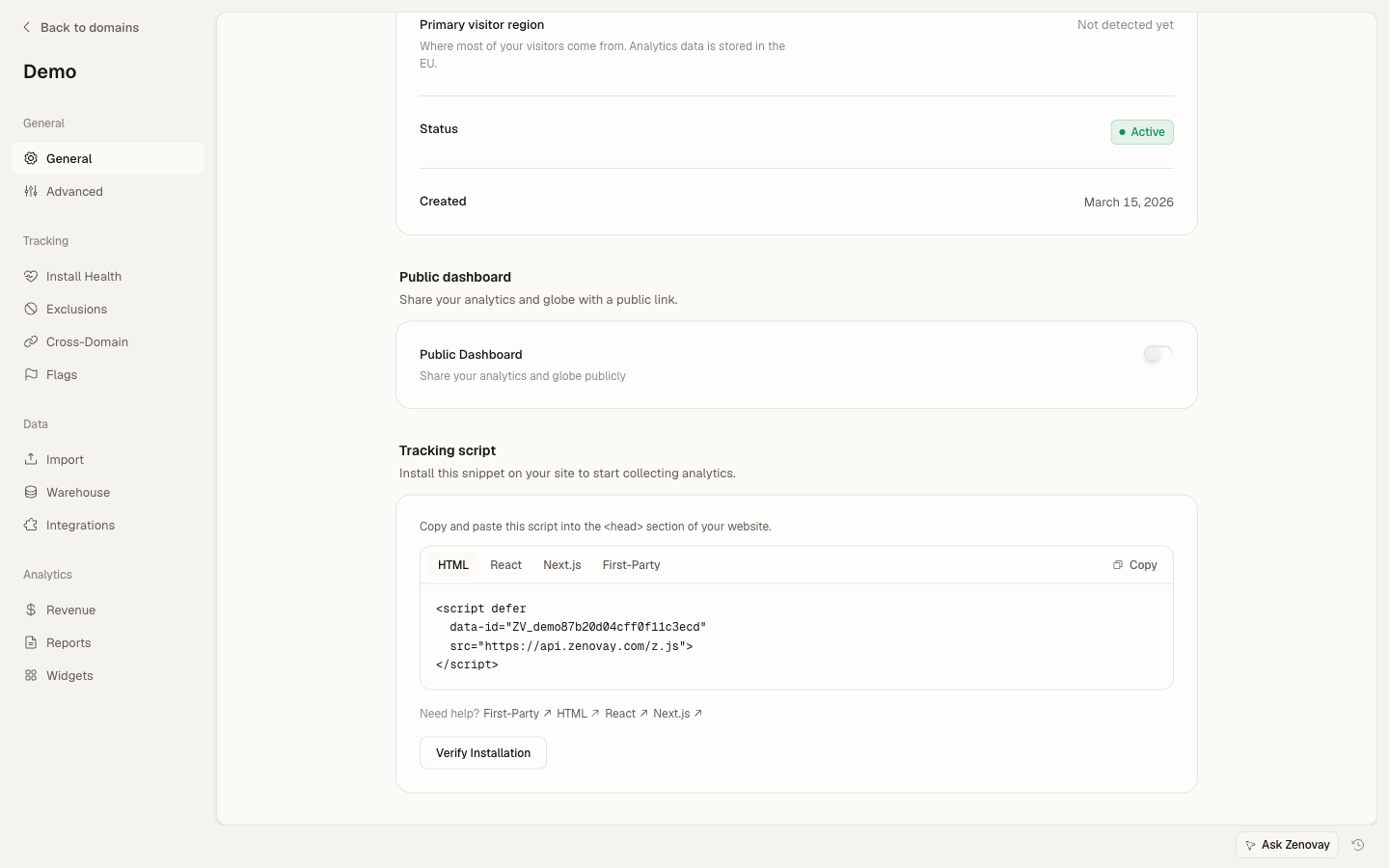
Adicione o script de rastreamento Zenovay ao seu index.html:
<!-- src/index.html -->
<!doctype html>
<html lang="en">
<head>
  <meta charset="utf-8">
  <title>My Angular App</title>
</head>
<body>
  <app-root></app-root>
  <script defer data-tracking-code="YOUR_TRACKING_CODE" src="https://api.zenovay.com/z.js"></script>
</body>
</html>
É isto para rastreamento básico de exibições de página. O script rastreia automaticamente as exibições de página no carregamento.
Configuração Básica
1. Criar um Serviço de Análises
Crie um serviço para envolver o objeto global zenovay com injeção de dependência Angular:
// services/analytics.service.ts
import { Injectable } from '@angular/core';

@Injectable({
  providedIn: 'root'
})
export class AnalyticsService {
  private get zenovay(): any {
    return (window as any).zenovay;
  }

  track(eventName: string, data?: Record<string, any>): void {
    if (this.zenovay) {
      this.zenovay('track', eventName, data);
    }
  }

  identify(userId: string, traits?: Record<string, any>): void {
    if (this.zenovay) {
      this.zenovay('identify', userId, traits);
    }
  }

  trackGoal(goalName: string, data?: Record<string, any>): void {
    if (this.zenovay) {
      this.zenovay('goal', goalName, data);
    }
  }

  trackPurchase(data: { amount: number; currency: string; product: string }): void {
    if (this.zenovay) {
      this.zenovay('revenue', data.amount, data.currency);
    }
  }
}
2. Rastrear Exibições de Página (Angular Router)
Crie um serviço para rastrear mudanças de rota:
// services/page-tracking.service.ts
import { Injectable } from '@angular/core';
import { Router, NavigationEnd } from '@angular/router';
import { AnalyticsService } from './analytics.service';
import { filter } from 'rxjs/operators';

@Injectable({
  providedIn: 'root'
})
export class PageTrackingService {
  constructor(
    private router: Router,
    private analytics: AnalyticsService
  ) {
    this.initPageTracking();
  }

  private initPageTracking(): void {
    this.router.events.pipe(
      filter(event => event instanceof NavigationEnd)
    ).subscribe((event: NavigationEnd) => {
      this.analytics.track('pageview', {
        path: event.urlAfterRedirects,
        referrer: document.referrer,
        title: document.title,
      });
    });
  }
}
Inicialize no seu componente de aplicação:
// app.component.ts
import { Component, OnInit } from '@angular/core';
import { PageTrackingService } from './services/page-tracking.service';

@Component({
  selector: 'app-root',
  template: '<router-outlet></router-outlet>',
})
export class AppComponent implements OnInit {
  constructor(private pageTracking: PageTrackingService) {}

  ngOnInit(): void {
    // Service automatically starts tracking on init
  }
}
3. Rastrear Eventos Personalizados
Use o serviço de análises em seus componentes:
// components/signup-button/signup-button.component.ts
import { Component } from '@angular/core';
import { AnalyticsService } from '../../services/analytics.service';

@Component({
  selector: 'app-signup-button',
  template: `
    <button (click)="handleSignup()">
      Start Free Trial
    </button>
  `
})
export class SignupButtonComponent {
  constructor(private analytics: AnalyticsService) {}

  handleSignup(): void {
    this.analytics.track('signup_started', {
      plan: 'professional',
      source: 'pricing_page'
    });

    // Continue with signup logic
  }
}
Exemplo Completo
Aqui está uma implementação completa com todos os casos de uso comuns:
Serviço de Análises com Configuração
// services/zenovay-analytics.service.ts
import { Injectable } from '@angular/core';
import { environment } from '../environments/environment';

@Injectable({
  providedIn: 'root'
})
export class ZenovayAnalyticsService {
  private get zenovay(): any {
    return (window as any).zenovay;
  }

  // Page tracking
  trackPageView(path: string, title?: string): void {
    if (this.zenovay) {
      this.zenovay('track', 'pageview', {
        path,
        title: title || document.title,
        referrer: document.referrer,
      });
    }
  }

  // Custom events
  trackEvent(eventName: string, data?: Record<string, any>): void {
    if (this.zenovay) {
      this.zenovay('track', eventName, {
        ...data,
        timestamp: new Date().toISOString(),
        environment: environment.production ? 'production' : 'development',
      });
    }
  }

  // User identification
  identifyUser(userId: string, traits?: Record<string, any>): void {
    if (this.zenovay) {
      this.zenovay('identify', userId, traits);
    }
  }

  // Debug mode
  enableDebug(): void {
    if (!environment.production) {
      console.log('[Zenovay] Debug mode enabled');
    }
  }
}
Diretiva de Botão Rastreável
// directives/trackable-button.directive.ts
import { Directive, HostListener, Input } from '@angular/core';
import { AnalyticsService } from '../services/analytics.service';

@Directive({
  selector: '[appTrackableButton]',
  standalone: true
})
export class TrackableButtonDirective {
  @Input() eventName!: string;
  @Input() eventData?: Record<string, any>;

  constructor(private analytics: AnalyticsService) {}

  @HostListener('click', ['$event'])
  onClick(event: MouseEvent): void {
    if (!this.eventName) {
      console.warn('[TrackableButton] No event name provided');
      return;
    }

    this.analytics.track(this.eventName, {
      ...this.eventData,
      button_text: (event.target as HTMLElement).textContent,
      timestamp: Date.now(),
    });
  }
}
Exemplo de Uso
// pages/pricing/pricing.component.ts
import { Component } from '@angular/core';
import { CommonModule } from '@angular/common';
import { TrackableButtonDirective } from '../../directives/trackable-button.directive';

@Component({
  selector: 'app-pricing',
  standalone: true,
  imports: [CommonModule, TrackableButtonDirective],
  template: `
    <div class="pricing-page">
      <h1>Pricing</h1>

      <button
        appTrackableButton
        [eventName]="'plan_selected'"
        [eventData]="{
          plan: 'scale',
          billing: 'monthly',
          price: 90
        }"
        class="btn-primary">
        Choose Scale
      </button>
    </div>
  `
})
export class PricingComponent {}
Padrões Avançados
Rastreamento Condicional
Rastreie eventos apenas quando certas condições são atendidas:
// pages/product/product.component.ts
import { Component, OnInit, Input } from '@angular/core';
import { AnalyticsService } from '../../services/analytics.service';

interface Product {
  id: string;
  name: string;
  price: number;
  category: string;
}

@Component({
  selector: 'app-product',
  template: `<div>{{ product.name }}</div>`
})
export class ProductComponent implements OnInit {
  @Input() product!: Product;

  constructor(private analytics: AnalyticsService) {}

  ngOnInit(): void {
    // Only track if product is high-value
    if (this.product.price > 1000) {
      this.analytics.track('high_value_product_viewed', {
        product_id: this.product.id,
        product_name: this.product.name,
        price: this.product.price,
        category: this.product.category,
      });
    }
  }
}
Rastreamento de Formulário
Rastreie interações e envios de formulário:
// components/contact-form/contact-form.component.ts
import { Component } from '@angular/core';
import { FormBuilder, FormGroup, Validators } from '@angular/forms';
import { AnalyticsService } from '../../services/analytics.service';

@Component({
  selector: 'app-contact-form',
  template: `
    <form [formGroup]="contactForm" (ngSubmit)="onSubmit()">
      <input
        type="text"
        formControlName="name"
        (focus)="onFieldFocus('name')"
        placeholder="Name"
      />
      <input
        type="email"
        formControlName="email"
        (focus)="onFieldFocus('email')"
        placeholder="Email"
      />
      <textarea
        formControlName="message"
        (focus)="onFieldFocus('message')"
        placeholder="Message"
      ></textarea>
      <button type="submit">Send Message</button>
    </form>
  `
})
export class ContactFormComponent {
  contactForm: FormGroup;

  constructor(
    private fb: FormBuilder,
    private analytics: AnalyticsService
  ) {
    this.contactForm = this.fb.group({
      name: ['', Validators.required],
      email: ['', [Validators.required, Validators.email]],
      message: ['', Validators.required],
    });
  }

  onFieldFocus(fieldName: string): void {
    this.analytics.track('form_field_focused', {
      form_id: 'contact',
      field_name: fieldName,
    });
  }

  async onSubmit(): Promise<void> {
    if (this.contactForm.invalid) {
      return;
    }

    const formData = this.contactForm.value;

    // Track form submission
    this.analytics.track('contact_form_submitted', {
      form_id: 'contact',
      has_message: formData.message.length > 0,
    });

    // Submit form logic
  }
}
Rastreamento de E-commerce
Rastreie visualizações de produtos, adições ao carrinho e compras:
// services/ecommerce-tracking.service.ts
import { Injectable } from '@angular/core';
import { AnalyticsService } from './analytics.service';

interface Product {
  id: string;
  name: string;
  category: string;
  price: number;
}

interface CartItem extends Product {
  quantity: number;
}

interface Cart {
  items: CartItem[];
  total: number;
}

interface Order extends Cart {
  id: string;
  tax: number;
  shipping: number;
}

@Injectable({
  providedIn: 'root'
})
export class EcommerceTrackingService {
  constructor(private analytics: AnalyticsService) {}

  trackProductView(product: Product): void {
    this.analytics.track('product_viewed', {
      product_id: product.id,
      product_name: product.name,
      category: product.category,
      price: product.price,
      currency: 'USD',
    });
  }

  trackAddToCart(product: Product, quantity: number = 1): void {
    this.analytics.track('product_added_to_cart', {
      product_id: product.id,
      product_name: product.name,
      quantity,
      price: product.price,
      total: product.price * quantity,
    });
  }

  trackCheckout(cart: Cart): void {
    this.analytics.track('checkout_started', {
      cart_total: cart.total,
      item_count: cart.items.length,
      currency: 'USD',
    });
  }

  trackPurchase(order: Order): void {
    this.analytics.trackPurchase({
      amount: order.total,
      currency: 'USD',
      product: `Order #${order.id}`,
    });

    this.analytics.track('purchase_completed', {
      order_id: order.id,
      revenue: order.total,
      tax: order.tax,
      shipping: order.shipping,
      currency: 'USD',
      items: order.items.map(item => ({
        product_id: item.id,
        quantity: item.quantity,
        price: item.price,
      })),
    });
  }
}
Uso no Componente
// pages/product-detail/product-detail.component.ts
import { Component, OnInit } from '@angular/core';
import { ActivatedRoute } from '@angular/router';
import { EcommerceTrackingService } from '../../services/ecommerce-tracking.service';

@Component({
  selector: 'app-product-detail',
  template: `
    <div *ngIf="product">
      <h1>{{ product.name }}</h1>
      <p>\${{ product.price }}</p>
      <button (click)="addToCart()">Add to Cart</button>
    </div>
  `
})
export class ProductDetailComponent implements OnInit {
  product: any;

  constructor(
    private route: ActivatedRoute,
    private ecommerceTracking: EcommerceTrackingService
  ) {}

  ngOnInit(): void {
    // Load product and track view
    this.route.params.subscribe(params => {
      // Fetch product by params.id
      this.product = {
        id: params['id'],
        name: 'Example Product',
        price: 99.99,
        category: 'Electronics',
      };

      this.ecommerceTracking.trackProductView(this.product);
    });
  }

  addToCart(): void {
    this.ecommerceTracking.trackAddToCart(this.product);
    // Add to cart logic
  }
}
Rastreamento de Erros com ErrorHandler
Rastreie erros automaticamente:
// services/global-error-handler.service.ts
import { ErrorHandler, Injectable } from '@angular/core';

@Injectable()
export class GlobalErrorHandler implements ErrorHandler {
  handleError(error: Error): void {
    // Track error via global zenovay object
    if ((window as any).zenovay) {
      (window as any).zenovay('track', 'error_occurred', {
        error_message: error.message,
        error_stack: error.stack,
        error_name: error.name,
        url: window.location.href,
        user_agent: navigator.userAgent,
      });
    }

    // Log to console
    console.error('Error caught by GlobalErrorHandler:', error);
  }
}
Registre na configuração do aplicativo:
// app.config.ts
import { ApplicationConfig, ErrorHandler } from '@angular/core';
import { GlobalErrorHandler } from './services/global-error-handler.service';

export const appConfig: ApplicationConfig = {
  providers: [
    { provide: ErrorHandler, useClass: GlobalErrorHandler },
    // other providers
  ]
};
Identificação do Usuário
Rastreie usuários identificados:
// services/user-tracking.service.ts
import { Injectable } from '@angular/core';
import { AnalyticsService } from './analytics.service';
import { AuthService } from './auth.service';

@Injectable({
  providedIn: 'root'
})
export class UserTrackingService {
  constructor(
    private analytics: AnalyticsService,
    private auth: AuthService
  ) {
    this.initUserTracking();
  }

  private initUserTracking(): void {
    this.auth.user$.subscribe(user => {
      if (user) {
        this.analytics.identify(user.id, {
          email: user.email,
          name: user.name,
          plan: user.subscription?.plan,
          signup_date: user.createdAt,
        });
      }
    });
  }
}
Inicialize no componente do aplicativo:
// app.component.ts
import { Component } from '@angular/core';
import { UserTrackingService } from './services/user-tracking.service';

@Component({
  selector: 'app-root',
  template: '<router-outlet></router-outlet>',
})
export class AppComponent {
  constructor(private userTracking: UserTrackingService) {
    // Service automatically starts tracking on init
  }
}
Suporte TypeScript
Suporte completo a TypeScript com eventos digitados:
// types/analytics.types.ts
export interface AnalyticsEvents {
  signup_started: {
    plan: 'free' | 'pro' | 'scale' | 'enterprise';
    source: string;
  };
  product_viewed: {
    product_id: string;
    product_name: string;
    price: number;
  };
  purchase_completed: {
    order_id: string;
    revenue: number;
    currency: string;
  };
}

// Declare the global zenovay function for TypeScript
declare global {
  interface Window {
    zenovay: (...args: any[]) => void;
  }
}

// Typed tracking service
import { Injectable } from '@angular/core';
import { AnalyticsEvents } from '../types/analytics.types';

@Injectable({
  providedIn: 'root'
})
export class TypedAnalyticsService {
  private get zenovay(): any {
    return (window as any).zenovay;
  }

  track<K extends keyof AnalyticsEvents>(
    eventName: K,
    data: AnalyticsEvents[K]
  ): void {
    if (this.zenovay) {
      this.zenovay('track', eventName, data);
    }
  }
}
Integração RxJS
Aproveite os padrões reativos do Angular:
// services/analytics-rxjs.service.ts
import { Injectable } from '@angular/core';
import { AnalyticsService } from './analytics.service';
import { Observable, of } from 'rxjs';
import { tap, catchError } from 'rxjs/operators';

@Injectable({
  providedIn: 'root'
})
export class AnalyticsRxjsService {
  constructor(private analytics: AnalyticsService) {}

  trackEvent$(eventName: string, data?: Record<string, any>): Observable<void> {
    return of(this.analytics.track(eventName, data)).pipe(
      tap(() => console.log(`[Analytics] Tracked: ${eventName}`)),
      catchError(error => {
        console.error('[Analytics] Error:', error);
        throw error;
      })
    );
  }
}
Otimização de Desempenho
Debounce Tracking
Evite rastreamento excessivo:
// components/search-box/search-box.component.ts
import { Component } from '@angular/core';
import { FormControl } from '@angular/forms';
import { debounceTime, distinctUntilChanged } from 'rxjs/operators';
import { AnalyticsService } from '../../services/analytics.service';

@Component({
  selector: 'app-search-box',
  template: `
    <input
      type="search"
      [formControl]="searchControl"
      placeholder="Search..."
    />
  `
})
export class SearchBoxComponent {
  searchControl = new FormControl('');

  constructor(private analytics: AnalyticsService) {
    this.searchControl.valueChanges.pipe(
      debounceTime(500),
      distinctUntilChanged()
    ).subscribe(query => {
      if (query) {
        this.analytics.track('search_performed', {
          query,
          length: query.length,
        });
      }
    });
  }
}
Testes
Serviço de Análises Simulado em Testes
// testing/analytics.mock.ts
import { Injectable } from '@angular/core';

@Injectable()
export class MockAnalyticsService {
  track = jasmine.createSpy('track');
  identify = jasmine.createSpy('identify');
  trackGoal = jasmine.createSpy('trackGoal');
  trackPurchase = jasmine.createSpy('trackPurchase');
}
Componente de Teste
// components/signup-button/signup-button.component.spec.ts
import { ComponentFixture, TestBed } from '@angular/core/testing';
import { SignupButtonComponent } from './signup-button.component';
import { AnalyticsService } from '../../services/analytics.service';
import { MockAnalyticsService } from '../../testing/analytics.mock';

describe('SignupButtonComponent', () => {
  let component: SignupButtonComponent;
  let fixture: ComponentFixture<SignupButtonComponent>;
  let analyticsService: MockAnalyticsService;

  beforeEach(async () => {
    await TestBed.configureTestingModule({
      declarations: [SignupButtonComponent],
      providers: [
        { provide: AnalyticsService, useClass: MockAnalyticsService }
      ]
    }).compileComponents();

    fixture = TestBed.createComponent(SignupButtonComponent);
    component = fixture.componentInstance;
    analyticsService = TestBed.inject(AnalyticsService) as any;
    fixture.detectChanges();
  });

  it('should track event on click', async () => {
    const button = fixture.nativeElement.querySelector('button');
    button.click();

    await fixture.whenStable();

    expect(analyticsService.track).toHaveBeenCalledWith('signup_started', {
      plan: 'professional',
      source: 'pricing_page'
    });
  });
});
Componentes Autônomos (Angular 17+)
Integração completa com componentes autônomos:
// app.component.ts
import { Component } from '@angular/core';
import { RouterOutlet } from '@angular/router';

@Component({
  selector: 'app-root',
  standalone: true,
  imports: [RouterOutlet],
  template: '<router-outlet></router-outlet>',
})
export class AppComponent {}
Nenhuma configuração especial de módulo Angular é necessária. O script de rastreamento Zenovay em index.html cuida de tudo. Seu AnalyticsService simplesmente envolve as chamadas window.zenovay e pode ser injetado em qualquer componente.
Configuração de Ambiente
// environments/environment.ts
export const environment = {
  production: false,
};

// environments/environment.prod.ts
export const environment = {
  production: true,
};
O código de rastreamento é configurado diretamente na tag de script index.html. Para diferentes ambientes, você pode usar o recurso de substituição de arquivo do Angular para trocar arquivos index.html, ou simplesmente usar o mesmo código de rastreamento em todos os ambientes (Zenovay cuida da separação de ambiente no painel).