Webhooks
O Zenovay usa webhooks internamente para processamento de pagamentos e gerenciamento de assinaturas. Esta página explica como webhooks funcionam no Zenovay e como criar integrações usando a API Externa.
Como o Zenovay Usa Webhooks
O Zenovay processa webhooks de entrada de provedores de pagamento e serviços de monitoramento. Estes são webhooks de sistema interno que lidam com cobrança de assinatura e verificações de saúde.
Fontes de Webhook de Entrada
| Fonte | Propósito |
|---|---|
| Stripe | Gerenciamento de assinatura, processamento de pagamento, conclusão de checkout |
| Monitoramento de Uptime | Gatilhos de verificação de saúde de serviços de monitoramento externo |
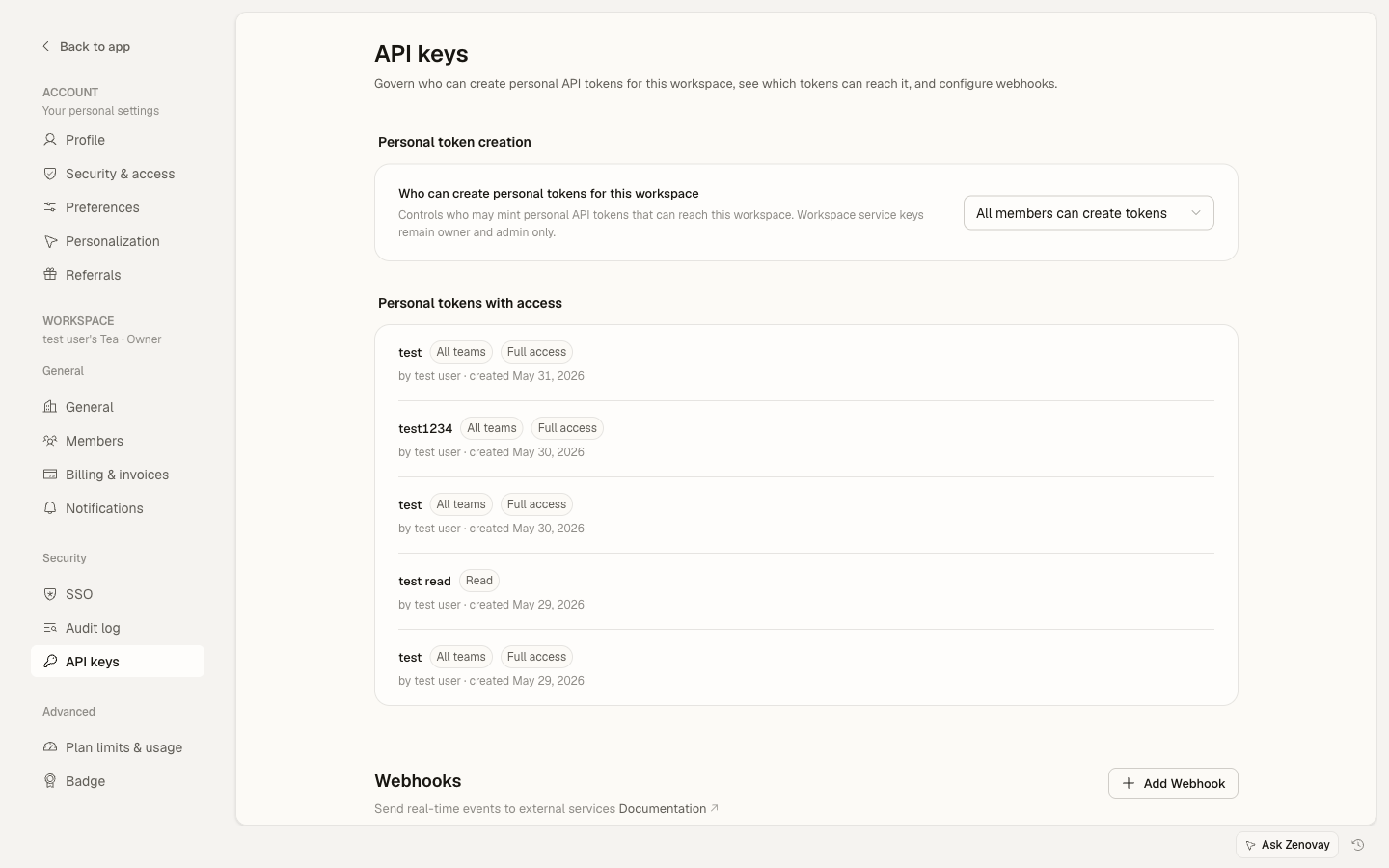
Estes webhooks são manipulados internamente pela API do Zenovay. Para webhooks de saída e chaves de API de equipe, acesse Settings → Security → API keys.
Criando Integrações
Você pode criar integrações usando a API Externa para extrair dados de análise para seus próprios sistemas.
Polling com a API Externa
Use a API Externa para buscar periodicamente dados de análise:
const API_KEY = process.env.ZENOVAY_API_KEY;
const WEBSITE_ID = process.env.ZENOVAY_WEBSITE_ID;

async function checkAnalytics() {
const response = await fetch(
  `https://api.zenovay.com/api/external/v1/analytics/${WEBSITE_ID}?timeRange=24h`,
  {
    headers: { 'X-API-Key': API_KEY }
  }
);

const data = await response.json();

// Processar os dados
if (data.totalVisitors > threshold) {
  await sendNotification(data);
}
}

// Polling a cada 5 minutos
setInterval(checkAnalytics, 5 * 60 * 1000);
Contagem de Visitantes ao Vivo
O endpoint público ao vivo não requer uma chave de API e pode ser feito poll com mais frequência:
async function getLiveVisitors(trackingCode) {
const response = await fetch(
  `https://api.zenovay.com/live/${trackingCode}`
);
return await response.json();
}
Exemplo de Notificação no Slack
Crie um relatório de análise agendado que seja postado no Slack:
async function sendDailyReport() {
const response = await fetch(
  `https://api.zenovay.com/api/external/v1/analytics/${WEBSITE_ID}?timeRange=24h`,
  {
    headers: { 'X-API-Key': API_KEY }
  }
);

const data = await response.json();

await fetch(SLACK_WEBHOOK_URL, {
  method: 'POST',
  headers: { 'Content-Type': 'application/json' },
  body: JSON.stringify({
    text: `Relatório Diário: ${data.totalVisitors} visitantes, ${data.totalPageViews} visualizações de página`
  })
});
}
Limites de Taxa para Integrações
Ao criar integrações de polling, respeite os limites de taxa da API Externa:
| Plano | Requisições/Minuto | Limite Mensal |
|---|---|---|
| Pro | 30 | 10.000 |
| Scale | 60 | 100.000 |
| Enterprise | 120 | 1.000.000 |
O acesso à API Externa requer um plano pago. Contas gratuitas não podem gerar chaves de API ou usar a API Externa.
Melhores Práticas
- Armazene respostas da API em cache localmente para reduzir a frequência de requisições
- Use intervalos de polling apropriados (5 minutos mínimo recomendado)
- Monitore o cabeçalho
X-RateLimit-Remainingpara evitar atingir os limites - Implemente backoff exponencial se receber respostas 429