Intégration React
Ajoutez Zenovay Analytics à votre application React avec une simple balise script. Aucun paquet npm requis.
Vue d'ensemble
Le script de suivi Zenovay fonctionne avec les applications React. Ajoutez la balise script à votre HTML, puis utilisez des appels window.zenovay dans vos composants pour le suivi personnalisé des événements.
Installation
Ajoutez le script de suivi Zenovay à votre fichier HTML :
<!-- index.html (Vite) or public/index.html (Create React App) -->
<script defer data-tracking-code="YOUR_TRACKING_CODE" src="https://api.zenovay.com/z.js"></script>
Placez la balise script dans le <body> de votre fichier HTML. L'attribut defer garantit un chargement sans bloquer le rendu de la page.
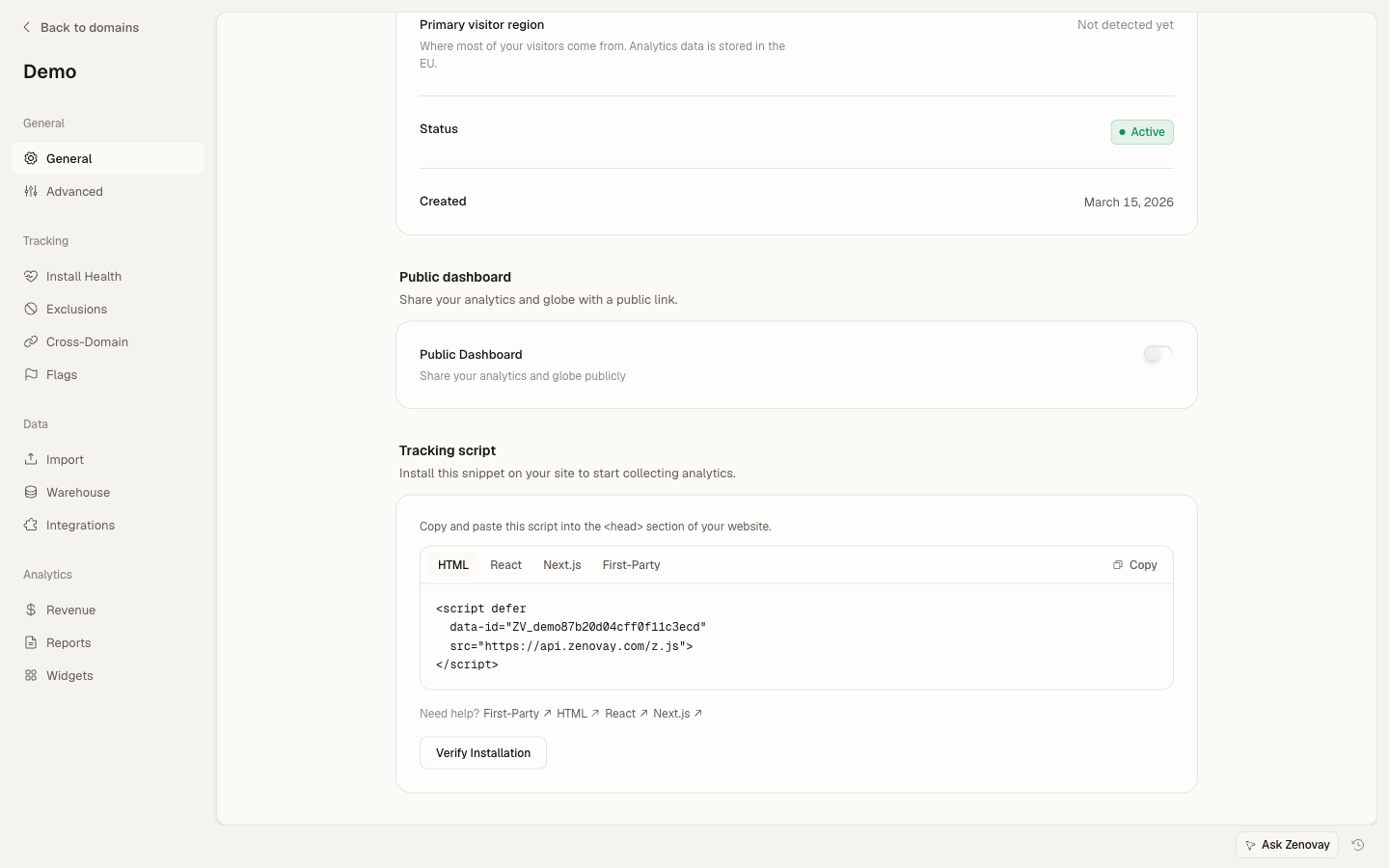
Configuration
Ajouter le script au HTML
Pour les projets Vite, ajoutez à index.html :
<!DOCTYPE html>
<html lang="en">
  <head>
    <meta charset="UTF-8" />
    <title>My React App</title>
  </head>
  <body>
    <div id="root"></div>
    <script defer data-tracking-code="YOUR_TRACKING_CODE" src="https://api.zenovay.com/z.js"></script>
  </body>
</html>
Créer un hook utilitaire
Créez un hook réutilisable pour accéder au suivi Zenovay dans vos composants :
// hooks/useZenovay.ts
export function useZenovay() {
  const track = (eventName: string, data?: Record<string, any>) => {
    if (window.zenovay) {
      window.zenovay('track', eventName, data);
    }
  };

  const identify = (userId: string, traits?: Record<string, any>) => {
    if (window.zenovay) {
      window.zenovay('identify', userId, traits);
    }
  };

  const trackGoal = (goalName: string, data?: Record<string, any>) => {
    if (window.zenovay) {
      window.zenovay('goal', goalName, data);
    }
  };

  const trackPurchase = (data: { amount: number; currency: string; product: string }) => {
    if (window.zenovay) {
      window.zenovay('revenue', data.amount, data.currency);
    }
  };

  return { track, identify, trackGoal, trackPurchase };
}
Suivre les pages vues
Suivez automatiquement les pages vues avec React Router :
import { useLocation } from 'react-router-dom';
import { useEffect } from 'react';

function PageTracker() {
  const location = useLocation();

  useEffect(() => {
    if (window.zenovay) {
      window.zenovay('track', 'pageview', {
        path: location.pathname,
        title: document.title,
      });
    }
  }, [location.pathname]);

  return null;
}
Suivi des événements
Hook useZenovay
Suivez des événements personnalisés avec le hook useZenovay :
import { useZenovay } from './hooks/useZenovay';

function Button() {
  const { track } = useZenovay();

  const handleClick = () => {
    track('button_click', {
      buttonName: 'signup',
      location: 'hero'
    });
  };

  return <button onClick={handleClick}>Sign Up</button>;
}
Composant bouton traçable
Créez un composant bouton traçable réutilisable :
import { useZenovay } from './hooks/useZenovay';

interface TrackableButtonProps {
  eventName: string;
  eventData?: Record<string, any>;
  children: React.ReactNode;
  onClick?: (e: React.MouseEvent) => void;
}

function TrackableButton({ eventName, eventData, children, onClick, ...props }: TrackableButtonProps) {
  const { track } = useZenovay();

  const handleClick = (e: React.MouseEvent) => {
    track(eventName, eventData);
    onClick?.(e);
  };

  return <button onClick={handleClick} {...props}>{children}</button>;
}

// Usage:
<TrackableButton eventName="button_click" eventData={{ buttonName: 'signup' }}>
  Sign Up
</TrackableButton>
Support TypeScript
Ajoutez des déclarations de types pour l'objet global zenovay :
// types/zenovay.d.ts
declare global {
  interface Window {
    zenovay: (...args: any[]) => void;
  }
}

export {};
Vous pouvez également créer un suivi d'événements sécurisé en termes de types :
interface CustomEvents {
  button_click: {
    buttonName: string;
    location: string;
  };
  form_submit: {
    formId: string;
  };
}

// Type-safe tracking function
function trackEvent<K extends keyof CustomEvents>(eventName: K, data: CustomEvents[K]) {
  if (window.zenovay) {
    window.zenovay('track', eventName, data);
  }
}

// Type-safe event tracking
trackEvent('button_click', {
  buttonName: 'signup',
  location: 'hero'
});
Fonctionnalités avancées
Identifier les utilisateurs
Associez des événements à des utilisateurs spécifiques :
import { useZenovay } from './hooks/useZenovay';

function UserProfile({ user }) {
  const { identify } = useZenovay();

  useEffect(() => {
    if (user) {
      identify(user.id, {
        email: user.email,
        plan: user.plan,
      });
    }
  }, [user]);

  return <div>Welcome, {user.name}</div>;
}
Suivre les objectifs
Suivez les objectifs de conversion :
import { useZenovay } from './hooks/useZenovay';

function SignupComplete() {
  const { trackGoal } = useZenovay();

  useEffect(() => {
    trackGoal('signup_completed', {
      source: 'organic',
      value: 99.00
    });
  }, []);

  return <div>Welcome aboard!</div>;
}
Intégration Next.js
Pour les applications Next.js, consultez le guide Démarrage rapide Next.js.
Besoin d'aide ? Consultez nos Exemples React ou contactez [email protected].