Exemple d'intégration Vanilla JavaScript
Ce guide couvre l'intégration d'analytiques Zenovay avec du JavaScript simple sans aucun framework. Il fonctionne pour les sites statiques, les applications web traditionnelles ou en tant que référence pour l'API centrale.
Démarrage rapide
Ajoutez le script de suivi Zenovay à votre HTML :
<!DOCTYPE html>
<html lang="en">
<head>
  <meta charset="UTF-8">
  <meta name="viewport" content="width=device-width, initial-scale=1.0">
  <title>My Website</title>

  <!-- Zenovay Analytics -->
  <script src="https://api.zenovay.com/z.js"
          data-tracking-code="YOUR_TRACKING_CODE"
          async></script>
</head>
<body>
  <h1>Welcome to My Website</h1>
</body>
</html>
C'est tout ! Les pages vues sont maintenant suivies automatiquement.
Configuration de base
1. Installer le script dans le HTML
Ajoutez la balise script à votre section <head> :
<head>
  <!-- Other head elements -->

  <!-- Zenovay Analytics -->
  <script src="https://api.zenovay.com/z.js"
          data-tracking-code="YOUR_TRACKING_CODE"
          async></script>
</head>
Attributs importants :
data-tracking-code: Votre ID de site unique, trouvé sous Domaines → votre site → Général (carte du script de suivi)async: Charge le script de manière asynchrone pour de meilleures performances
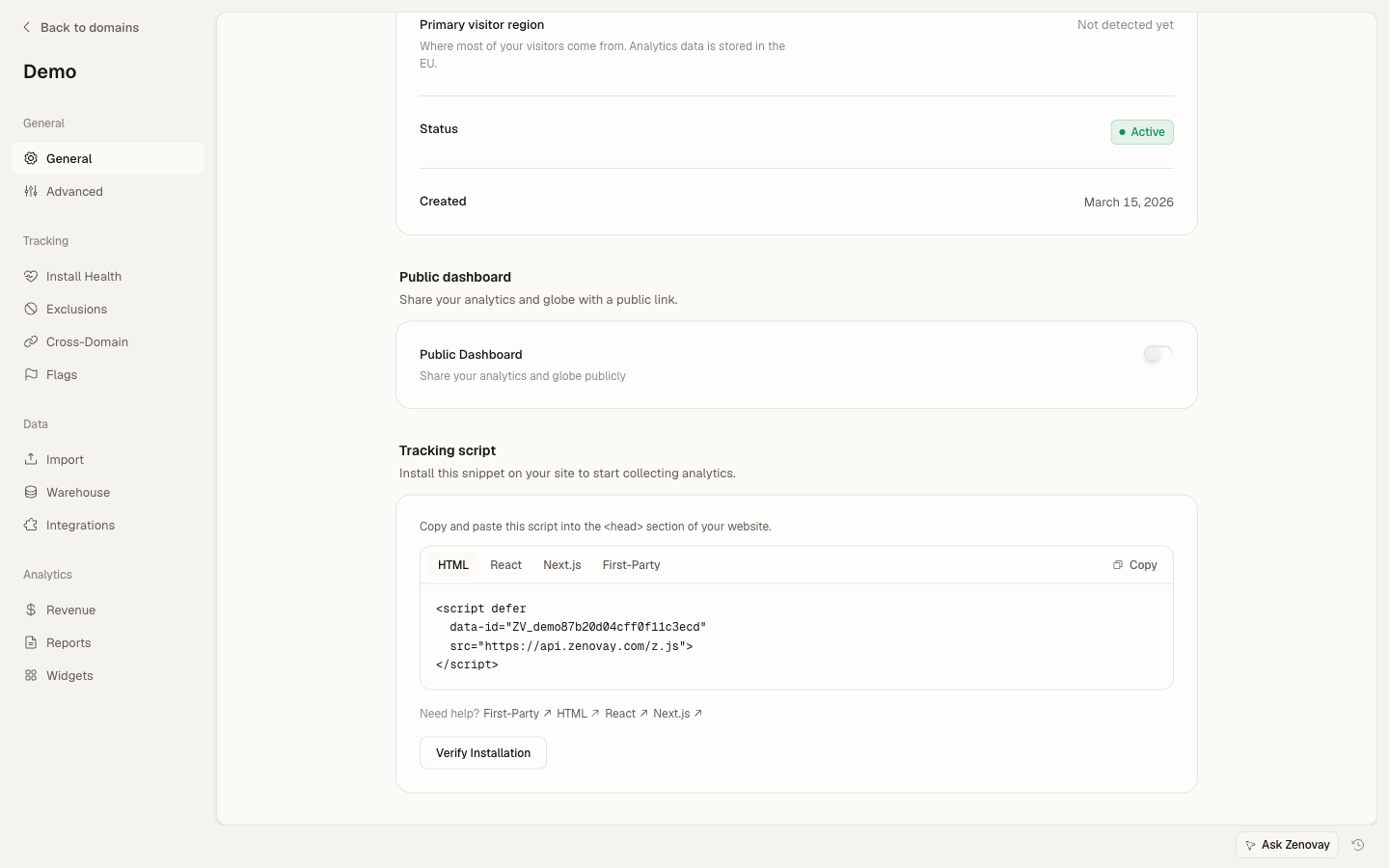
2. Suivre les événements personnalisés
Suivez les événements en utilisant l'objet global window.zenovay :
<button onclick="handleSignup()">Start Free Trial</button>

<script>
  function handleSignup() {
    if (window.zenovay) {
      window.zenovay('track', 'signup_started', {
        plan: 'professional',
        source: 'pricing_page'
      });
    }

    // Continue with signup logic
    window.location.href = '/signup';
  }
</script>
3. Attendre le chargement du script
Si vous devez vous assurer que Zenovay est chargé :
<script>
  // Wait for Zenovay to be ready
  window.addEventListener('zenovay:ready', function() {
    console.log('Zenovay is ready!');

    // Now safe to track events
    window.zenovay('track', 'page_loaded');
  });
</script>
Exemple complet
Voici une page HTML complète avec une intégration Zenovay complète :
<!DOCTYPE html>
<html lang="en">
<head>
  <meta charset="UTF-8">
  <meta name="viewport" content="width=device-width, initial-scale=1.0">
  <title>E-commerce Store - Zenovay Example</title>

  <!-- Zenovay Analytics -->
  <script src="https://api.zenovay.com/z.js"
          data-tracking-code="YOUR_TRACKING_CODE"
          async></script>

  <style>
    body { font-family: Arial, sans-serif; max-width: 1200px; margin: 0 auto; padding: 20px; }
    .product { border: 1px solid #ddd; padding: 20px; margin: 10px; display: inline-block; }
    button { background: #007bff; color: white; border: none; padding: 10px 20px; cursor: pointer; }
    button:hover { background: #0056b3; }
  </style>
</head>
<body>
  <h1>My E-commerce Store</h1>

  <div class="product" data-product-id="prod_123">
    <h2>Premium Headphones</h2>
    <p>Price: $299</p>
    <button onclick="addToCart('prod_123', 'Premium Headphones', 299)">
      Add to Cart
    </button>
  </div>

  <div class="product" data-product-id="prod_456">
    <h2>Wireless Mouse</h2>
    <p>Price: $49</p>
    <button onclick="addToCart('prod_456', 'Wireless Mouse', 49)">
      Add to Cart
    </button>
  </div>

  <script>
    // Wait for Zenovay to load
    window.addEventListener('zenovay:ready', function() {
      console.log('Zenovay analytics ready');

      // Track products viewed on page
      trackProductsViewed();
    });

    // Track product views
    function trackProductsViewed() {
      const products = document.querySelectorAll('.product');

      products.forEach(function(product) {
        const productId = product.getAttribute('data-product-id');
        const productName = product.querySelector('h2').textContent;
        const priceText = product.querySelector('p').textContent;
        const price = parseFloat(priceText.replace(/[^0-9.]/g, ''));

        if (window.zenovay) {
          window.zenovay('track', 'product_viewed', {
            product_id: productId,
            product_name: productName,
            price: price,
            currency: 'USD'
          });
        }
      });
    }

    // Track add to cart
    function addToCart(productId, productName, price) {
      if (window.zenovay) {
        window.zenovay('track', 'product_added_to_cart', {
          product_id: productId,
          product_name: productName,
          price: price,
          quantity: 1,
          total: price
        });
      }

      alert('Added to cart: ' + productName);
    }
  </script>
</body>
</html>
Modèles avancés
Assistant de suivi des événements
Créez un utilitaire de suivi réutilisable :
<script>
  // Analytics utility object
  var Analytics = (function() {
    var isReady = false;
    var queue = [];

    // Check if Zenovay is loaded
    function checkReady() {
      return typeof window.zenovay !== 'undefined';
    }

    // Process queued events
    function processQueue() {
      while (queue.length > 0) {
        var event = queue.shift();
        track(event.name, event.data);
      }
    }

    // Listen for ready event
    window.addEventListener('zenovay:ready', function() {
      isReady = true;
      processQueue();
    });

    // Track event (with queue fallback)
    function track(eventName, eventData) {
      if (checkReady()) {
        window.zenovay('track',eventName, eventData || {});
      } else {
        queue.push({ name: eventName, data: eventData });
      }
    }

    // Track pageview
    function trackPageview(data) {
      if (checkReady()) {
        window.zenovay('page');
      }
    }

    // Identify user
    function identify(userId, traits) {
      if (checkReady()) {
        window.zenovay('identify',userId, traits || {});
      }
    }

    // Public API
    return {
      track: track,
      trackPageview: trackPageview,
      identify: identify,
      isReady: function() { return isReady; }
    };
  })();

  // Usage
  Analytics.track('button_clicked', { button_name: 'signup' });
</script>
Suivi des formulaires
Suivez les interactions avec les formulaires :
<form id="contact-form" onsubmit="return handleFormSubmit(event)">
  <input type="text" name="name" placeholder="Name" required
         onfocus="trackFieldFocus('name')">

  <input type="email" name="email" placeholder="Email" required
         onfocus="trackFieldFocus('email')">

  <textarea name="message" placeholder="Message" required
            onfocus="trackFieldFocus('message')"></textarea>

  <button type="submit">Send Message</button>
</form>

<script>
  function trackFieldFocus(fieldName) {
    if (window.zenovay) {
      window.zenovay('track', 'form_field_focused', {
        form_id: 'contact',
        field_name: fieldName
      });
    }
  }

  function handleFormSubmit(event) {
    event.preventDefault();

    const form = document.getElementById('contact-form');
    const formData = new FormData(form);

    // Track form submission
    if (window.zenovay) {
      window.zenovay('track', 'contact_form_submitted', {
        form_id: 'contact',
        has_message: formData.get('message').length > 0
      });
    }

    // Submit form logic
    console.log('Form submitted:', Object.fromEntries(formData));

    return false;
  }
</script>
Module de suivi du e-commerce
Suivi complet du e-commerce :
<script>
  var EcommerceTracking = (function() {
    function trackProductView(product) {
      if (window.zenovay) {
        window.zenovay('track', 'product_viewed', {
          product_id: product.id,
          product_name: product.name,
          category: product.category,
          price: product.price,
          currency: 'USD'
        });
      }
    }

    function trackAddToCart(product, quantity) {
      quantity = quantity || 1;

      if (window.zenovay) {
        window.zenovay('track', 'product_added_to_cart', {
          product_id: product.id,
          product_name: product.name,
          quantity: quantity,
          price: product.price,
          total: product.price * quantity
        });
      }
    }

    function trackCheckout(cart) {
      if (window.zenovay) {
        window.zenovay('track', 'checkout_started', {
          cart_total: cart.total,
          item_count: cart.items.length,
          currency: 'USD'
        });
      }
    }

    function trackPurchase(order) {
      if (window.zenovay) {
        window.zenovay('track', 'purchase_completed', {
          order_id: order.id,
          revenue: order.total,
          tax: order.tax,
          shipping: order.shipping,
          currency: 'USD',
          items: order.items.map(function(item) {
            return {
              product_id: item.id,
              quantity: item.quantity,
              price: item.price
            };
          })
        });
      }
    }

    return {
      trackProductView: trackProductView,
      trackAddToCart: trackAddToCart,
      trackCheckout: trackCheckout,
      trackPurchase: trackPurchase
    };
  })();

  // Usage
  EcommerceTracking.trackProductView({
    id: 'prod_123',
    name: 'Premium Headphones',
    category: 'Electronics',
    price: 299
  });
</script>
Suivi des clics
Suivez automatiquement les clics sur les boutons :
<script>
  // Track all button clicks
  document.addEventListener('DOMContentLoaded', function() {
    var buttons = document.querySelectorAll('button[data-track]');

    buttons.forEach(function(button) {
      button.addEventListener('click', function() {
        var eventName = this.getAttribute('data-track');
        var eventData = this.getAttribute('data-track-data');

        if (window.zenovay && eventName) {
          var data = eventData ? JSON.parse(eventData) : {};
          data.button_text = this.textContent;
          data.button_id = this.id || 'unknown';

          window.zenovay('track',eventName, data);
        }
      });
    });
  });
</script>

<!-- Usage -->
<button data-track="cta_clicked"
        data-track-data='{"location":"hero","type":"primary"}'>
  Get Started
</button>
Suivi du défilement
Suivez jusqu'où les utilisateurs font défiler :
<script>
  (function() {
    var maxScroll = 0;
    var checkpoints = [25, 50, 75, 100];
    var reached = {};

    function calculateScrollPercentage() {
      var windowHeight = window.innerHeight;
      var documentHeight = document.documentElement.scrollHeight;
      var scrollTop = window.pageYOffset || document.documentElement.scrollTop;

      var scrollPercentage = (scrollTop / (documentHeight - windowHeight)) * 100;
      return Math.round(scrollPercentage);
    }

    function trackScrollDepth() {
      var scrollPercentage = calculateScrollPercentage();

      if (scrollPercentage > maxScroll) {
        maxScroll = scrollPercentage;
      }

      checkpoints.forEach(function(checkpoint) {
        if (scrollPercentage >= checkpoint && !reached[checkpoint]) {
          reached[checkpoint] = true;

          if (window.zenovay) {
            window.zenovay('track', 'scroll_depth', {
              percentage: checkpoint,
              page: window.location.pathname
            });
          }
        }
      });
    }

    // Throttle scroll events
    var scrollTimeout;
    window.addEventListener('scroll', function() {
      clearTimeout(scrollTimeout);
      scrollTimeout = setTimeout(trackScrollDepth, 300);
    });
  })();
</script>
Temps passé sur la page
Suivez le temps que les utilisateurs passent sur la page :
<script>
  (function() {
    var startTime = Date.now();
    var intervals = [30, 60, 120, 300]; // seconds
    var tracked = {};

    function trackTimeOnPage() {
      var timeSpent = Math.floor((Date.now() - startTime) / 1000);

      intervals.forEach(function(interval) {
        if (timeSpent >= interval && !tracked[interval]) {
          tracked[interval] = true;

          if (window.zenovay) {
            window.zenovay('track', 'time_on_page', {
              seconds: interval,
              page: window.location.pathname
            });
          }
        }
      });
    }

    // Check every 5 seconds
    setInterval(trackTimeOnPage, 5000);

    // Track on page unload
    window.addEventListener('beforeunload', function() {
      var timeSpent = Math.floor((Date.now() - startTime) / 1000);

      if (window.zenovay && timeSpent >= 5) {
        window.zenovay('track', 'page_exit', {
          time_spent: timeSpent,
          page: window.location.pathname
        });
      }
    });
  })();
</script>
Identification de l'utilisateur
Identifiez les utilisateurs connectés :
<script>
  // After user logs in
  function identifyUser(user) {
    if (window.zenovay) {
      window.zenovay('identify',user.id, {
        email: user.email,
        name: user.name,
        plan: user.subscription.plan,
        signup_date: user.createdAt
      });
    }
  }

  // Check if user is logged in on page load
  window.addEventListener('DOMContentLoaded', function() {
    var user = getCurrentUser(); // Your function to get logged-in user

    if (user) {
      identifyUser(user);
    }
  });

  // Example user object
  function getCurrentUser() {
    // This would typically come from your backend
    return {
      id: 'user_123',
      email: '[email protected]',
      name: 'John Doe',
      subscription: { plan: 'professional' },
      createdAt: '2024-01-01'
    };
  }
</script>
Suivi des erreurs
Suivez automatiquement les erreurs JavaScript :
<script>
  window.addEventListener('error', function(event) {
    if (window.zenovay) {
      window.zenovay('track', 'javascript_error', {
        error_message: event.message,
        error_filename: event.filename,
        error_line: event.lineno,
        error_column: event.colno,
        page: window.location.pathname,
        user_agent: navigator.userAgent
      });
    }
  });

  // Track unhandled promise rejections
  window.addEventListener('unhandledrejection', function(event) {
    if (window.zenovay) {
      window.zenovay('track', 'promise_rejection', {
        reason: event.reason ? event.reason.toString() : 'Unknown',
        page: window.location.pathname
      });
    }
  });
</script>
Modèle d'application sur une seule page (SPA)
Suivez les changements d'itinéraire dans les SPA :
<script>
  // Detect route changes
  (function() {
    var lastPath = window.location.pathname;

    // Override pushState and replaceState
    var originalPushState = history.pushState;
    var originalReplaceState = history.replaceState;

    history.pushState = function() {
      originalPushState.apply(this, arguments);
      trackRouteChange();
    };

    history.replaceState = function() {
      originalReplaceState.apply(this, arguments);
      trackRouteChange();
    };

    // Listen for popstate (back/forward buttons)
    window.addEventListener('popstate', trackRouteChange);

    function trackRouteChange() {
      var currentPath = window.location.pathname;

      if (currentPath !== lastPath) {
        lastPath = currentPath;

        if (window.zenovay) {
          window.zenovay('page');
        }
      }
    }
  })();
</script>
Optimisation des performances
Utilitaire de debounce
Empêchez le suivi excessif :
<script>
  // Debounce utility
  function debounce(func, wait) {
    var timeout;
    return function() {
      var context = this;
      var args = arguments;

      clearTimeout(timeout);
      timeout = setTimeout(function() {
        func.apply(context, args);
      }, wait);
    };
  }

  // Usage: Debounce search tracking
  var searchInput = document.getElementById('search');

  var trackSearch = debounce(function(query) {
    if (window.zenovay) {
      window.zenovay('track', 'search_performed', {
        query: query,
        length: query.length
      });
    }
  }, 500);

  searchInput.addEventListener('input', function(e) {
    trackSearch(e.target.value);
  });
</script>
Charger le script de manière différée
Chargez Zenovay uniquement après que la page soit interactive :
<script>
  // Load Zenovay after page is interactive
  window.addEventListener('load', function() {
    var script = document.createElement('script');
    script.src = 'https://api.zenovay.com/z.js';
    script.setAttribute('data-tracking-code', 'YOUR_TRACKING_CODE');
    script.async = true;
    document.head.appendChild(script);
  });
</script>
Intégration du consentement aux cookies
Intégrez les bannières de consentement aux cookies :
<script>
  // Wait for user consent before tracking
  function initializeAnalytics() {
    var script = document.createElement('script');
    script.src = 'https://api.zenovay.com/z.js';
    script.setAttribute('data-tracking-code', 'YOUR_TRACKING_CODE');
    script.async = true;
    document.head.appendChild(script);
  }

  // Check consent (example with localStorage)
  function checkConsent() {
    return localStorage.getItem('analytics_consent') === 'true';
  }

  // Initialize if consent given
  if (checkConsent()) {
    initializeAnalytics();
  }

  // Listen for consent acceptance
  window.addEventListener('consent:accepted', function() {
    localStorage.setItem('analytics_consent', 'true');
    initializeAnalytics();
  });
</script>

<!-- Simple consent banner -->
<div id="consent-banner" style="display: none;">
  <p>We use analytics to improve your experience.</p>
  <button onclick="acceptConsent()">Accept</button>
</div>

<script>
  if (!checkConsent()) {
    document.getElementById('consent-banner').style.display = 'block';
  }

  function acceptConsent() {
    document.getElementById('consent-banner').style.display = 'none';
    window.dispatchEvent(new Event('consent:accepted'));
  }
</script>
Options de configuration
Configuration avancée du script :
<!-- Custom domain -->
<script src="https://analytics.yourdomain.com/z.js"
        data-tracking-code="YOUR_TRACKING_CODE"
        async></script>

<!-- Debug mode -->
<script src="https://api.zenovay.com/z.js"
        data-tracking-code="YOUR_TRACKING_CODE"
        data-debug="true"
        async></script>
Intégration WordPress
Ajoutez à WordPress sans plugin :
// Add to your theme's functions.php
function add_zenovay_tracking() {
  ?>
  <script src="https://api.zenovay.com/z.js"
          data-tracking-code="YOUR_TRACKING_CODE"
          async></script>
  <?php
}
add_action('wp_head', 'add_zenovay_tracking');
Intégration Shopify
Ajoutez au thème Shopify :
<!-- Add to theme.liquid, before </head> -->
<script src="https://api.zenovay.com/z.js"
        data-tracking-code="YOUR_TRACKING_CODE"
        async></script>

<!-- Track purchases on thank you page -->
{% if checkout.id %}
<script>
  window.addEventListener('zenovay:ready', function() {
    window.zenovay('track', 'purchase_completed', {
      order_id: '{{ checkout.order_id }}',
      revenue: {{ checkout.total_price | money_without_currency }},
      currency: '{{ shop.currency }}',
      items: [
        {% for line_item in checkout.line_items %}
        {
          product_id: '{{ line_item.product_id }}',
          quantity: {{ line_item.quantity }},
          price: {{ line_item.price | money_without_currency }}
        }{% unless forloop.last %},{% endunless %}
        {% endfor %}
      ]
    });
  });
</script>
{% endif %}
Test
Testez votre intégration :
<script>
  // Enable debug mode
  window.zenovay('debug');

  // Test tracking
  window.addEventListener('zenovay:ready', function() {
    console.log('Zenovay ready, running tests...');

    // Test 1: Track custom event
    window.zenovay('track', 'test_event', { test: true });
    console.log('Event tracking called');

    // Test 2: Track pageview
    window.zenovay('page');
    console.log('Pageview tracking called');
  });
</script>
Compatibilité des navigateurs
Zenovay prend en charge tous les navigateurs modernes :
- Chrome 90+
- Firefox 88+
- Safari 14+
- Edge 90+
- Opera 76+
Pour les navigateurs plus anciens, envisagez d'utiliser des polyfills :
<!-- Polyfill for older browsers -->
<script src="https://polyfill.io/v3/polyfill.min.js?features=Promise%2Cfetch"></script>

<!-- Then load Zenovay -->
<script src="https://api.zenovay.com/z.js"
        data-tracking-code="YOUR_TRACKING_CODE"
        async></script>
Variables d'environnement
Pour les outils de construction comme Webpack ou Vite :
<!-- Development -->
<script>
  var ZENOVAY_TRACKING_CODE = 'dev_site_id';
  var ZENOVAY_DEBUG = true;
</script>

<!-- Production (replace with build tool) -->
<script>
  var ZENOVAY_TRACKING_CODE = '<!-- ZENOVAY_TRACKING_CODE -->';
  var ZENOVAY_DEBUG = false;
</script>

<script src="https://api.zenovay.com/z.js"
        data-tracking-code="YOUR_TRACKING_CODE"
        async></script>