Exemple d'intégration Angular
Ce guide fournit un exemple complet et prêt pour la production d'intégration des analyses Zenovay dans une application Angular à l'aide des modèles Angular modernes, des services et de l'injection de dépendances.
Démarrage rapide
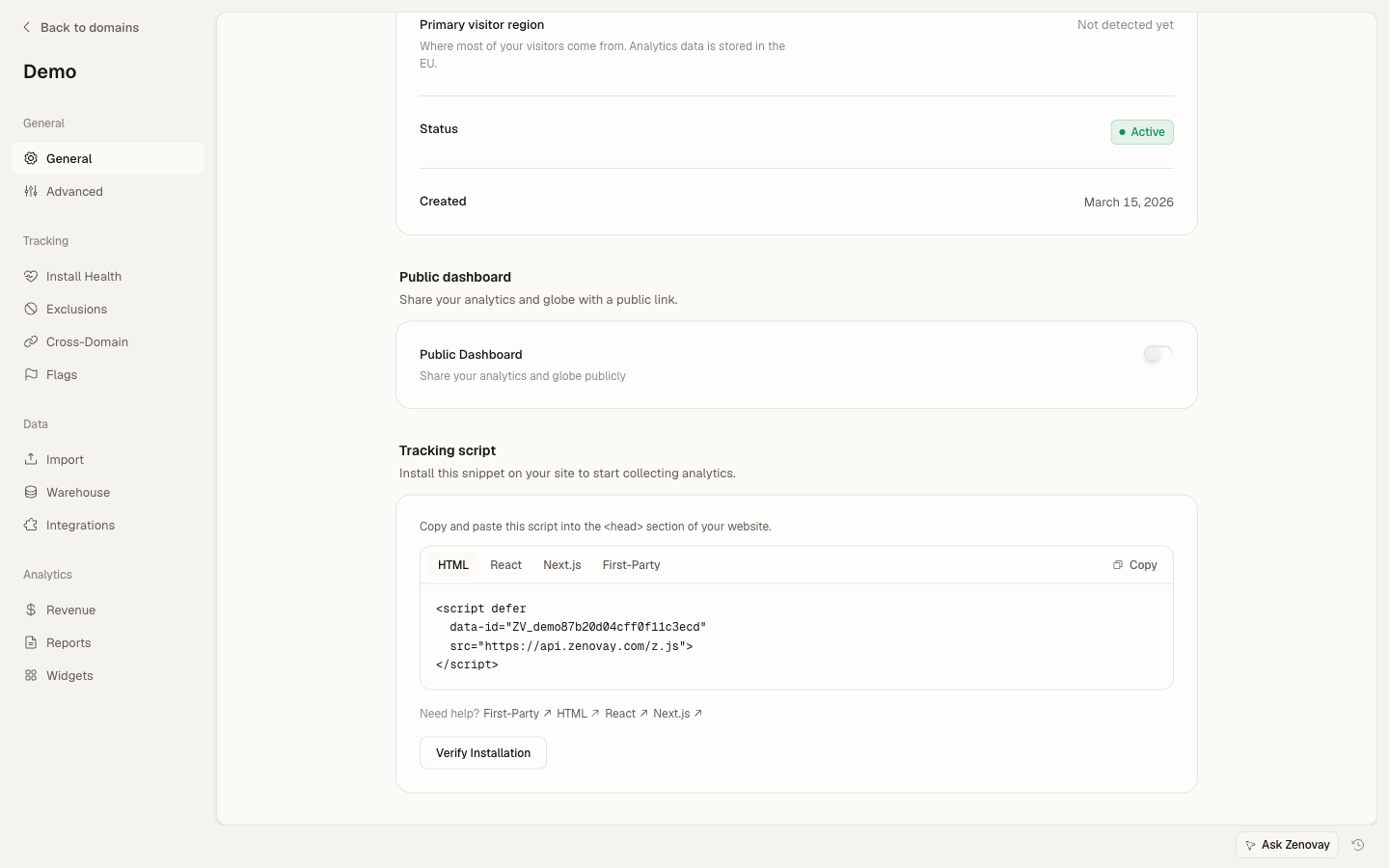
Ajoutez le script de suivi Zenovay à votre index.html :
<!-- src/index.html -->
<!doctype html>
<html lang="en">
<head>
  <meta charset="utf-8">
  <title>My Angular App</title>
</head>
<body>
  <app-root></app-root>
  <script defer data-tracking-code="YOUR_TRACKING_CODE" src="https://api.zenovay.com/z.js"></script>
</body>
</html>
C'est tout ce qui est nécessaire pour le suivi basique des pages vues. Le script suit automatiquement les pages vues lors du chargement.
Configuration de base
1. Créer un service d'analyse
Créez un service pour envelopper l'objet global zenovay avec l'injection de dépendances Angular :
// services/analytics.service.ts
import { Injectable } from '@angular/core';

@Injectable({
  providedIn: 'root'
})
export class AnalyticsService {
  private get zenovay(): any {
    return (window as any).zenovay;
  }

  track(eventName: string, data?: Record<string, any>): void {
    if (this.zenovay) {
      this.zenovay('track', eventName, data);
    }
  }

  identify(userId: string, traits?: Record<string, any>): void {
    if (this.zenovay) {
      this.zenovay('identify', userId, traits);
    }
  }

  trackGoal(goalName: string, data?: Record<string, any>): void {
    if (this.zenovay) {
      this.zenovay('goal', goalName, data);
    }
  }

  trackPurchase(data: { amount: number; currency: string; product: string }): void {
    if (this.zenovay) {
      this.zenovay('revenue', data.amount, data.currency);
    }
  }
}
2. Suivre les pages vues (Angular Router)
Créez un service pour suivre les changements de route :
// services/page-tracking.service.ts
import { Injectable } from '@angular/core';
import { Router, NavigationEnd } from '@angular/router';
import { AnalyticsService } from './analytics.service';
import { filter } from 'rxjs/operators';

@Injectable({
  providedIn: 'root'
})
export class PageTrackingService {
  constructor(
    private router: Router,
    private analytics: AnalyticsService
  ) {
    this.initPageTracking();
  }

  private initPageTracking(): void {
    this.router.events.pipe(
      filter(event => event instanceof NavigationEnd)
    ).subscribe((event: NavigationEnd) => {
      this.analytics.track('pageview', {
        path: event.urlAfterRedirects,
        referrer: document.referrer,
        title: document.title,
      });
    });
  }
}
Initialisez dans votre composant d'application :
// app.component.ts
import { Component, OnInit } from '@angular/core';
import { PageTrackingService } from './services/page-tracking.service';

@Component({
  selector: 'app-root',
  template: '<router-outlet></router-outlet>',
})
export class AppComponent implements OnInit {
  constructor(private pageTracking: PageTrackingService) {}

  ngOnInit(): void {
    // Service automatically starts tracking on init
  }
}
3. Suivre les événements personnalisés
Utilisez le service d'analyse dans vos composants :
// components/signup-button/signup-button.component.ts
import { Component } from '@angular/core';
import { AnalyticsService } from '../../services/analytics.service';

@Component({
  selector: 'app-signup-button',
  template: `
    <button (click)="handleSignup()">
      Start Free Trial
    </button>
  `
})
export class SignupButtonComponent {
  constructor(private analytics: AnalyticsService) {}

  handleSignup(): void {
    this.analytics.track('signup_started', {
      plan: 'professional',
      source: 'pricing_page'
    });

    // Continue with signup logic
  }
}
Exemple complet
Voici une implémentation complète avec tous les cas d'usage courants :
Service d'analyse avec configuration
// services/zenovay-analytics.service.ts
import { Injectable } from '@angular/core';
import { environment } from '../environments/environment';

@Injectable({
  providedIn: 'root'
})
export class ZenovayAnalyticsService {
  private get zenovay(): any {
    return (window as any).zenovay;
  }

  // Page tracking
  trackPageView(path: string, title?: string): void {
    if (this.zenovay) {
      this.zenovay('track', 'pageview', {
        path,
        title: title || document.title,
        referrer: document.referrer,
      });
    }
  }

  // Custom events
  trackEvent(eventName: string, data?: Record<string, any>): void {
    if (this.zenovay) {
      this.zenovay('track', eventName, {
        ...data,
        timestamp: new Date().toISOString(),
        environment: environment.production ? 'production' : 'development',
      });
    }
  }

  // User identification
  identifyUser(userId: string, traits?: Record<string, any>): void {
    if (this.zenovay) {
      this.zenovay('identify', userId, traits);
    }
  }

  // Debug mode
  enableDebug(): void {
    if (!environment.production) {
      console.log('[Zenovay] Debug mode enabled');
    }
  }
}
Directive de bouton traçable
// directives/trackable-button.directive.ts
import { Directive, HostListener, Input } from '@angular/core';
import { AnalyticsService } from '../services/analytics.service';

@Directive({
  selector: '[appTrackableButton]',
  standalone: true
})
export class TrackableButtonDirective {
  @Input() eventName!: string;
  @Input() eventData?: Record<string, any>;

  constructor(private analytics: AnalyticsService) {}

  @HostListener('click', ['$event'])
  onClick(event: MouseEvent): void {
    if (!this.eventName) {
      console.warn('[TrackableButton] No event name provided');
      return;
    }

    this.analytics.track(this.eventName, {
      ...this.eventData,
      button_text: (event.target as HTMLElement).textContent,
      timestamp: Date.now(),
    });
  }
}
Exemple d'utilisation
// pages/pricing/pricing.component.ts
import { Component } from '@angular/core';
import { CommonModule } from '@angular/common';
import { TrackableButtonDirective } from '../../directives/trackable-button.directive';

@Component({
  selector: 'app-pricing',
  standalone: true,
  imports: [CommonModule, TrackableButtonDirective],
  template: `
    <div class="pricing-page">
      <h1>Pricing</h1>

      <button
        appTrackableButton
        [eventName]="'plan_selected'"
        [eventData]="{
          plan: 'scale',
          billing: 'monthly',
          price: 90
        }"
        class="btn-primary">
        Choose Scale
      </button>
    </div>
  `
})
export class PricingComponent {}
Modèles avancés
Suivi conditionnel
Suivez les événements uniquement lorsque certaines conditions sont remplies :
// pages/product/product.component.ts
import { Component, OnInit, Input } from '@angular/core';
import { AnalyticsService } from '../../services/analytics.service';

interface Product {
  id: string;
  name: string;
  price: number;
  category: string;
}

@Component({
  selector: 'app-product',
  template: `<div>{{ product.name }}</div>`
})
export class ProductComponent implements OnInit {
  @Input() product!: Product;

  constructor(private analytics: AnalyticsService) {}

  ngOnInit(): void {
    // Only track if product is high-value
    if (this.product.price > 1000) {
      this.analytics.track('high_value_product_viewed', {
        product_id: this.product.id,
        product_name: this.product.name,
        price: this.product.price,
        category: this.product.category,
      });
    }
  }
}
Suivi des formulaires
Suivez les interactions et les soumissions de formulaires :
// components/contact-form/contact-form.component.ts
import { Component } from '@angular/core';
import { FormBuilder, FormGroup, Validators } from '@angular/forms';
import { AnalyticsService } from '../../services/analytics.service';

@Component({
  selector: 'app-contact-form',
  template: `
    <form [formGroup]="contactForm" (ngSubmit)="onSubmit()">
      <input
        type="text"
        formControlName="name"
        (focus)="onFieldFocus('name')"
        placeholder="Name"
      />
      <input
        type="email"
        formControlName="email"
        (focus)="onFieldFocus('email')"
        placeholder="Email"
      />
      <textarea
        formControlName="message"
        (focus)="onFieldFocus('message')"
        placeholder="Message"
      ></textarea>
      <button type="submit">Send Message</button>
    </form>
  `
})
export class ContactFormComponent {
  contactForm: FormGroup;

  constructor(
    private fb: FormBuilder,
    private analytics: AnalyticsService
  ) {
    this.contactForm = this.fb.group({
      name: ['', Validators.required],
      email: ['', [Validators.required, Validators.email]],
      message: ['', Validators.required],
    });
  }

  onFieldFocus(fieldName: string): void {
    this.analytics.track('form_field_focused', {
      form_id: 'contact',
      field_name: fieldName,
    });
  }

  async onSubmit(): Promise<void> {
    if (this.contactForm.invalid) {
      return;
    }

    const formData = this.contactForm.value;

    // Track form submission
    this.analytics.track('contact_form_submitted', {
      form_id: 'contact',
      has_message: formData.message.length > 0,
    });

    // Submit form logic
  }
}
Suivi du commerce électronique
Suivez les vues de produits, les ajouts au panier et les achats :
// services/ecommerce-tracking.service.ts
import { Injectable } from '@angular/core';
import { AnalyticsService } from './analytics.service';

interface Product {
  id: string;
  name: string;
  category: string;
  price: number;
}

interface CartItem extends Product {
  quantity: number;
}

interface Cart {
  items: CartItem[];
  total: number;
}

interface Order extends Cart {
  id: string;
  tax: number;
  shipping: number;
}

@Injectable({
  providedIn: 'root'
})
export class EcommerceTrackingService {
  constructor(private analytics: AnalyticsService) {}

  trackProductView(product: Product): void {
    this.analytics.track('product_viewed', {
      product_id: product.id,
      product_name: product.name,
      category: product.category,
      price: product.price,
      currency: 'USD',
    });
  }

  trackAddToCart(product: Product, quantity: number = 1): void {
    this.analytics.track('product_added_to_cart', {
      product_id: product.id,
      product_name: product.name,
      quantity,
      price: product.price,
      total: product.price * quantity,
    });
  }

  trackCheckout(cart: Cart): void {
    this.analytics.track('checkout_started', {
      cart_total: cart.total,
      item_count: cart.items.length,
      currency: 'USD',
    });
  }

  trackPurchase(order: Order): void {
    this.analytics.trackPurchase({
      amount: order.total,
      currency: 'USD',
      product: `Order #${order.id}`,
    });

    this.analytics.track('purchase_completed', {
      order_id: order.id,
      revenue: order.total,
      tax: order.tax,
      shipping: order.shipping,
      currency: 'USD',
      items: order.items.map(item => ({
        product_id: item.id,
        quantity: item.quantity,
        price: item.price,
      })),
    });
  }
}
Utilisation dans un composant
// pages/product-detail/product-detail.component.ts
import { Component, OnInit } from '@angular/core';
import { ActivatedRoute } from '@angular/router';
import { EcommerceTrackingService } from '../../services/ecommerce-tracking.service';

@Component({
  selector: 'app-product-detail',
  template: `
    <div *ngIf="product">
      <h1>{{ product.name }}</h1>
      <p>\${{ product.price }}</p>
      <button (click)="addToCart()">Add to Cart</button>
    </div>
  `
})
export class ProductDetailComponent implements OnInit {
  product: any;

  constructor(
    private route: ActivatedRoute,
    private ecommerceTracking: EcommerceTrackingService
  ) {}

  ngOnInit(): void {
    // Load product and track view
    this.route.params.subscribe(params => {
      // Fetch product by params.id
      this.product = {
        id: params['id'],
        name: 'Example Product',
        price: 99.99,
        category: 'Electronics',
      };

      this.ecommerceTracking.trackProductView(this.product);
    });
  }

  addToCart(): void {
    this.ecommerceTracking.trackAddToCart(this.product);
    // Add to cart logic
  }
}
Suivi des erreurs avec ErrorHandler
Suivez les erreurs automatiquement :
// services/global-error-handler.service.ts
import { ErrorHandler, Injectable } from '@angular/core';

@Injectable()
export class GlobalErrorHandler implements ErrorHandler {
  handleError(error: Error): void {
    // Track error via global zenovay object
    if ((window as any).zenovay) {
      (window as any).zenovay('track', 'error_occurred', {
        error_message: error.message,
        error_stack: error.stack,
        error_name: error.name,
        url: window.location.href,
        user_agent: navigator.userAgent,
      });
    }

    // Log to console
    console.error('Error caught by GlobalErrorHandler:', error);
  }
}
Enregistrez dans la configuration de l'application :
// app.config.ts
import { ApplicationConfig, ErrorHandler } from '@angular/core';
import { GlobalErrorHandler } from './services/global-error-handler.service';

export const appConfig: ApplicationConfig = {
  providers: [
    { provide: ErrorHandler, useClass: GlobalErrorHandler },
    // other providers
  ]
};
Identification des utilisateurs
Suivez les utilisateurs identifiés :
// services/user-tracking.service.ts
import { Injectable } from '@angular/core';
import { AnalyticsService } from './analytics.service';
import { AuthService } from './auth.service';

@Injectable({
  providedIn: 'root'
})
export class UserTrackingService {
  constructor(
    private analytics: AnalyticsService,
    private auth: AuthService
  ) {
    this.initUserTracking();
  }

  private initUserTracking(): void {
    this.auth.user$.subscribe(user => {
      if (user) {
        this.analytics.identify(user.id, {
          email: user.email,
          name: user.name,
          plan: user.subscription?.plan,
          signup_date: user.createdAt,
        });
      }
    });
  }
}
Initialisez dans le composant de l'application :
// app.component.ts
import { Component } from '@angular/core';
import { UserTrackingService } from './services/user-tracking.service';

@Component({
  selector: 'app-root',
  template: '<router-outlet></router-outlet>',
})
export class AppComponent {
  constructor(private userTracking: UserTrackingService) {
    // Service automatically starts tracking on init
  }
}
Support TypeScript
Support TypeScript complet avec des événements typés :
// types/analytics.types.ts
export interface AnalyticsEvents {
  signup_started: {
    plan: 'free' | 'pro' | 'scale' | 'enterprise';
    source: string;
  };
  product_viewed: {
    product_id: string;
    product_name: string;
    price: number;
  };
  purchase_completed: {
    order_id: string;
    revenue: number;
    currency: string;
  };
}

// Declare the global zenovay function for TypeScript
declare global {
  interface Window {
    zenovay: (...args: any[]) => void;
  }
}

// Typed tracking service
import { Injectable } from '@angular/core';
import { AnalyticsEvents } from '../types/analytics.types';

@Injectable({
  providedIn: 'root'
})
export class TypedAnalyticsService {
  private get zenovay(): any {
    return (window as any).zenovay;
  }

  track<K extends keyof AnalyticsEvents>(
    eventName: K,
    data: AnalyticsEvents[K]
  ): void {
    if (this.zenovay) {
      this.zenovay('track', eventName, data);
    }
  }
}
Intégration RxJS
Exploitez les modèles réactifs d'Angular :
// services/analytics-rxjs.service.ts
import { Injectable } from '@angular/core';
import { AnalyticsService } from './analytics.service';
import { Observable, of } from 'rxjs';
import { tap, catchError } from 'rxjs/operators';

@Injectable({
  providedIn: 'root'
})
export class AnalyticsRxjsService {
  constructor(private analytics: AnalyticsService) {}

  trackEvent$(eventName: string, data?: Record<string, any>): Observable<void> {
    return of(this.analytics.track(eventName, data)).pipe(
      tap(() => console.log(`[Analytics] Tracked: ${eventName}`)),
      catchError(error => {
        console.error('[Analytics] Error:', error);
        throw error;
      })
    );
  }
}
Optimisation des performances
Debounce du suivi
Empêchez le suivi excessif :
// components/search-box/search-box.component.ts
import { Component } from '@angular/core';
import { FormControl } from '@angular/forms';
import { debounceTime, distinctUntilChanged } from 'rxjs/operators';
import { AnalyticsService } from '../../services/analytics.service';

@Component({
  selector: 'app-search-box',
  template: `
    <input
      type="search"
      [formControl]="searchControl"
      placeholder="Search..."
    />
  `
})
export class SearchBoxComponent {
  searchControl = new FormControl('');

  constructor(private analytics: AnalyticsService) {
    this.searchControl.valueChanges.pipe(
      debounceTime(500),
      distinctUntilChanged()
    ).subscribe(query => {
      if (query) {
        this.analytics.track('search_performed', {
          query,
          length: query.length,
        });
      }
    });
  }
}
Tests
Service d'analyse fictif dans les tests
// testing/analytics.mock.ts
import { Injectable } from '@angular/core';

@Injectable()
export class MockAnalyticsService {
  track = jasmine.createSpy('track');
  identify = jasmine.createSpy('identify');
  trackGoal = jasmine.createSpy('trackGoal');
  trackPurchase = jasmine.createSpy('trackPurchase');
}
Composant de test
// components/signup-button/signup-button.component.spec.ts
import { ComponentFixture, TestBed } from '@angular/core/testing';
import { SignupButtonComponent } from './signup-button.component';
import { AnalyticsService } from '../../services/analytics.service';
import { MockAnalyticsService } from '../../testing/analytics.mock';

describe('SignupButtonComponent', () => {
  let component: SignupButtonComponent;
  let fixture: ComponentFixture<SignupButtonComponent>;
  let analyticsService: MockAnalyticsService;

  beforeEach(async () => {
    await TestBed.configureTestingModule({
      declarations: [SignupButtonComponent],
      providers: [
        { provide: AnalyticsService, useClass: MockAnalyticsService }
      ]
    }).compileComponents();

    fixture = TestBed.createComponent(SignupButtonComponent);
    component = fixture.componentInstance;
    analyticsService = TestBed.inject(AnalyticsService) as any;
    fixture.detectChanges();
  });

  it('should track event on click', async () => {
    const button = fixture.nativeElement.querySelector('button');
    button.click();

    await fixture.whenStable();

    expect(analyticsService.track).toHaveBeenCalledWith('signup_started', {
      plan: 'professional',
      source: 'pricing_page'
    });
  });
});
Composants autonomes (Angular 17+)
Intégration complète avec les composants autonomes :
// app.component.ts
import { Component } from '@angular/core';
import { RouterOutlet } from '@angular/router';

@Component({
  selector: 'app-root',
  standalone: true,
  imports: [RouterOutlet],
  template: '<router-outlet></router-outlet>',
})
export class AppComponent {}
Aucune configuration de module Angular spéciale n'est nécessaire. Le script de suivi Zenovay dans index.html gère tout. Votre AnalyticsService enveloppe simplement les appels window.zenovay et peut être injecté dans n'importe quel composant.
Configuration de l'environnement
// environments/environment.ts
export const environment = {
  production: false,
};

// environments/environment.prod.ts
export const environment = {
  production: true,
};
Le code de suivi est configuré directement dans la balise de script index.html. Pour différents environnements, vous pouvez utiliser la fonction de remplacement de fichiers d'Angular pour permuter les fichiers index.html, ou simplement utiliser le même code de suivi dans tous les environnements (Zenovay gère la séparation des environnements dans le tableau de bord).