Session Replay
Pro-FeatureSehen Sie genau, wie Benutzer mit Ihrer Website interagieren. Session Replay zeichnet Mausbewegungen, Klicks, Scrolls und Seiteninteraktionen auf, damit Sie das Benutzerverhalten auf individueller Ebene verstehen können.
Session Replay ist in den Plänen Pro, Scale und Enterprise verfügbar. Upgraden Sie Ihren Plan, um diese Funktion zu aktivieren.
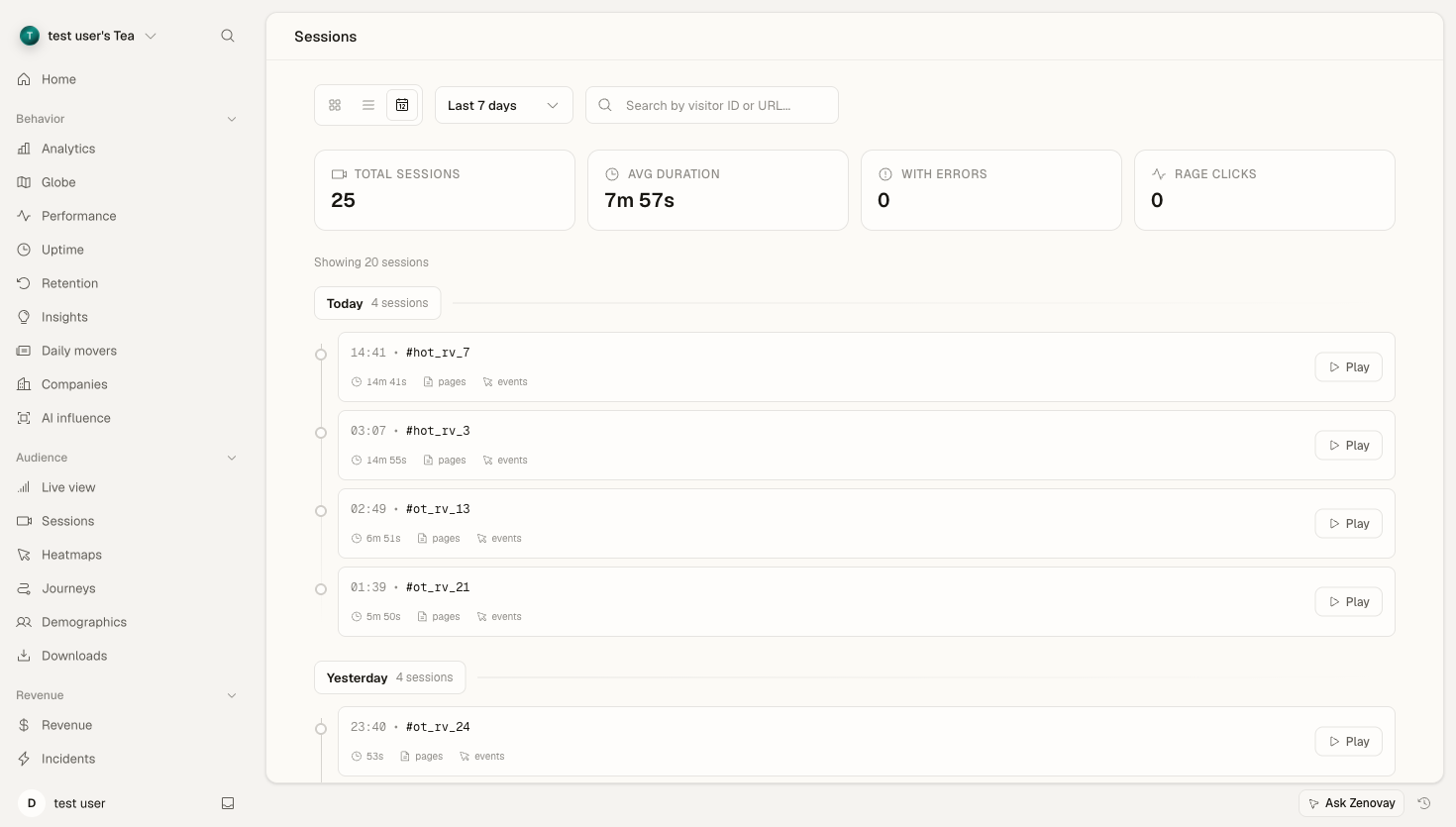
Übersicht
Session Replay erfasst eine videoleichte Aufzeichnung von Benutzersitzungen, ohne tatsächlich Video aufzuzeichnen. Mit DOM-Snapshots und inkrementellen Änderungen sind Wiederholungen leichtgewichtig (~50–100 KB pro Sitzung), bieten aber dennoch vollständige Treue des Benutzererlebnisses.
Wichtige Vorteile
- Schneller debuggen: Sehen Sie genau, was Benutzer erlebt haben, bevor sie einen Fehler melden
- UX-Probleme identifizieren: Beobachten Sie, wie Benutzer mit verwirrenden Schnittstellen kämpfen
- Konversionen verbessern: Verstehen Sie, warum Benutzer Checkout- oder Anmeldungsflüsse abbrechen
- Änderungen validieren: Bestätigen Sie, dass neue Funktionen wie erwartet in der Produktion funktionieren
- Datenschutz zuerst: Maskiert automatisch sensible Daten wie Passwörter und Kreditkarten
Session Replay aktivieren
Schritt 1: Im Dashboard aktivieren
- Öffnen Sie Domains, klicken Sie auf Ihre Website und gehen Sie dann zum Bereich Configure und wählen Sie Feature flags
- Schalten Sie Session Replay auf aktiviert
- Konfigurieren Sie Ihren Aufzeichnungsmodus (siehe Trigger-Modi)
- Speichern Sie die Änderungen
Schritt 2: Installation überprüfen
Das Tracking-Skript startet die Aufzeichnung automatisch, sobald es aktiviert ist. Überprüfen Sie, ob es funktioniert:
- Besuchen Sie Ihre Website
- Führen Sie einige Interaktionen durch (Klicks, Scrollen, Eingabe)
- Öffnen Sie Domains → Ihre Website → Registerkarte Sessions in Ihrem Zenovay-Dashboard
- Ihre Sitzung sollte innerhalb von 30 Sekunden angezeigt werden
Sitzungen werden nur nach dem Hochladen angezeigt. Abhängig von Ihrem Trigger-Modus geschieht dies möglicherweise erst, wenn die Sitzung endet oder ein Triggerereignis auftritt.
Trigger-Modi
Steuern Sie, wann Sitzungen aufgezeichnet und hochgeladen werden, um den Speicher zu optimieren und sich auf das Wesentliche zu konzentrieren.
Alle Sitzungen (all)
Zeichnet und lädt jede Sitzung auf.
Ideal für:
- Frühstadiumprodukte, die maximale Sichtbarkeit benötigen
- Websites mit geringem Datenverkehr
- Test- und QA-Umgebungen
Konfiguration:
{
  "session_replay_trigger": "all"
}
Nur Fehler (errors_only)
Zeichnet immer im Hintergrund auf, lädt aber nur Sitzungen hoch, in denen JavaScript-Fehler auftreten. Verwendet retroaktive Erfassung, um Ereignisse vor dem Fehler einzubeziehen.
Ideal für:
- Produktionsumgebungen mit hohem Datenverkehr
- Teams, die sich auf Debugging konzentrieren
- Kostenbewusste Nutzung
Konfiguration:
{
  "session_replay_trigger": "errors_only"
}
So funktioniert es:
- Die Aufzeichnung startet sofort im Speicherpuffer
- Wenn ein Fehler auftritt, wird der Puffer geleert und hochgeladen
- Sie erhalten den vollständigen Kontext, was vor dem Fehler passiert ist
Smart Mode (smart)
Lädt Sitzungen intelligent auf der Grundlage mehrerer Signale hoch:
- JavaScript-Fehler: Jede unbehandelte Ausnahme
- Frustrationssignale: Wutklicks, tote Klicks, Formularabbruch
- Hochwertige Besucher: Besucher, die Kaufabsicht oder Engagement zeigen
Ideal für:
- Ausgewogene Abdeckung ohne Datenflut
- Produktteams, die sich auf UX-Optimierung konzentrieren
- E-Commerce-Konversionsoptimierung
Konfiguration:
{
  "session_replay_trigger": "smart"
}
Frustrationserkennung umfasst:
- Wutklicks: 3+ Klicks in der gleichen Fläche innerhalb von 500 ms
- Tote Klicks: Klicks auf nicht-interaktive Elemente
- Formularfrustration: Mehrere fehlgeschlagene Formulareinreichungen
- Scroll-Thrashing: Schnelles Auf- und Abwärts-Scrollen
Datenschutzkontrollen
Session Replay ist mit Datenschutz als Kernprinzip konzipiert. Sensible Informationen werden automatisch geschützt.
Automatische Maskierung
Standardmäßig maskiert Zenovay:
- Passwort-Eingabefelder (
<input type="password">) - Kreditkartenfelder (
<input type="cc-number">usw.) - Sozialversicherungsnummern
- E-Mail-Felder (konfigurierbar)
- Alle Elemente mit
data-private
Manuelle Maskierung
Fügen Sie das Maskierungsattribut zu jedem Element hinzu:
<!-- Sensible Inhalte maskieren -->
<div data-private>
  Dieser Inhalt wird in Wiederholungen verborgen
</div>

<!-- Formularfeld maskieren -->
<input type="text" name="ssn" data-private />
Aufzeichnung vollständig blockieren
Schließen Sie bestimmte Elemente oder Abschnitte von der Aufzeichnung aus:
<!-- Diesen Abschnitt nicht aufzeichnen -->
<div data-private>
  <video><!-- Videoinhalt wird nicht aufgezeichnet --></video>
</div>
GDPR-Compliance
- Keine Cookies erforderlich: Session Replay funktioniert nur mit First-Party-Daten
- Dataminimierung: Nur DOM-Änderungen werden aufgezeichnet, nicht tatsächliche Werte
- Recht auf Vergessenwerden: Sitzungen können auf Anfrage gelöscht werden
- Zustimmungsintegration: Beachten Sie die Zustimmungspräferenzen der Besucher
Siehe GDPR-Compliance für detaillierte Konfiguration.
Sitzungen anzeigen
Sitzungsliste
Öffnen Sie Domains → Ihre Website → Registerkarte Sessions, um alle aufgezeichneten Sitzungen zu sehen.
Filtern nach:
- Datumsbereich
- Gerätetyp
- Land
- Hat Fehler
- Hat Frustrationssignale
- Sitzungsdauer
Sortieren nach:
- Am neuesten
- Längste Dauer
- Die meisten Fehler
- Höchste Frustrationsbewertung
Session Player
Klicken Sie auf eine Sitzung, um den Replay-Player zu öffnen.
Player-Funktionen:
- Play/Pause: Standard-Wiedergabesteuerelemente
- Geschwindigkeit: 1x, 2x, 4x Wiedergabegeschwindigkeit
- Zeitlinie: Gehen Sie zu einem beliebigen Punkt in der Sitzung
- Ereignismarkierungen: Sehen Sie Klicks, Fehler und Frustrationsereignisse auf der Zeitlinie
- Konsole: JavaScript-Fehler anzeigen, die aufgetreten sind
- Netzwerk: Fehlgeschlagene API-Anfragen anzeigen (Enterprise)
Tastaturkürzel:
Leertaste: Play/Pause←/→: 5 Sekunden überspringen1/2/4: Wiedergabegeschwindigkeit einstellenF: Vollbildschirm umschalten
Sitzungs-Metadaten
Jede Sitzung erfasst Kontextinformationen:
| Feld | Beschreibung |
|---|---|
sessionId | Eindeutige Sitzungs-ID |
visitorId | Anonyme Besucher-ID |
startedAt | Sitzungsstartzeit |
duration | Gesamte Sitzungsdauer |
pageViews | Anzahl der besuchten Seiten |
hasErrors | Ob JS-Fehler aufgetreten sind |
hasFrustration | Ob Frustrationssignale erkannt wurden |
viewport | Bildschirmauflösung |
device | Gerätetyp und Modell |
browser | Browsername und Version |
country | Geografischer Standort |
initialUrl | Einstiegsseiten-URL |
Integration mit Error Tracking
Wenn Error Tracking aktiviert ist, werden Session Replays automatisch mit Fehlern verknüpft.
Fehlerkontext
Von einem beliebigen Fehler in Ihrem Fehler-Dashboard:
- Klicken Sie auf View Session
- Die Wiedergabe öffnet sich zum Zeitpunkt des Fehlers
- Gehen Sie rückwärts, um zu sehen, was zum Fehler führte
Stack-Trace-Korrelation
Error Stack Traces werden neben der Replay-Zeitlinie angezeigt und zeigen genau, wann und wo Code fehlgeschlagen ist.
Speicherung und Aufbewahrung
Datenspeicherung
Session-Replay-Daten werden in Cloudflare R2 (S3-kompatiblem Speicher) mit folgenden Merkmalen gespeichert:
- Verschlüsselung im Ruhezustand: AES-256
- Geografische Redundanz: Multi-Region-Replikation
- Edge-Caching: Schnelle Wiedergabe vom nächsten Standort
Aufbewahrungszeiträume
| Plan | Aufbewahrung |
|---|---|
| Pro | 60 Tage |
| Scale | 120 Tage |
| Enterprise | 180 Tage |
Sitzungen werden nach der Aufbewahrungsdauer automatisch bereinigt.
Performance-Auswirkungen
Session Replay ist für minimale Auswirkungen konzipiert:
| Metrik | Auswirkung |
|---|---|
| Seitenladezeit | < 5 ms hinzugefügt |
| Speichernutzung | ~2–5 MB Puffer |
| Netzwerk | ~50–100 KB pro Sitzung (komprimiert) |
| CPU | Vernachlässigbar (nur inkrementelle Änderungen) |
Optimierungstipps
- Verwenden Sie den geeigneten Trigger-Modus:
errors_onlyodersmartfür Websites mit hohem Datenverkehr - Blockieren Sie schwere Elemente: Schließen Sie Videos, komplexe Animationen, iframes aus
- Sample-Aufzeichnung: Verwenden Sie die Sampling-Rate für sehr hohen Datenverkehr
Konfigurationsreferenz
Konfigurieren Sie Session Replay über Website-Einstellungen:
{
  "feature_flags": {
    "enable_session_replay": true,
    "session_replay_trigger": "smart",
    "replay_sampling_rate": 0.02
  }
}
Optionen
| Option | Typ | Standard | Beschreibung |
|---|---|---|---|
enable_session_replay | boolean | false | Aufzeichnung aktivieren/deaktivieren |
session_replay_trigger | string | "smart" | Trigger-Modus: "all", "errors_only", "smart" |
replay_sampling_rate | number | 0.02 | Sampling-Rate (0,02 = 2 % der Sitzungen) |
Die Sampling-Rate gilt nur für den all-Modus. Die Modi errors_only und smart erfassen 100 % der ausgelösten Sitzungen.
Fehlerbehebung
Sitzungen werden nicht angezeigt
- Überprüfen Sie, ob die Funktion aktiviert ist: Domains → Ihre Website → Configure → Feature flags → Session Replay
- Überprüfen Sie den Trigger-Modus:
errors_onlywird nicht hochgeladen, bis ein Fehler auftritt - Überprüfen Sie die Browser-Konsole: Suchen Sie nach Zenovay-Initialisierungsmeldungen
- Warten Sie auf den Upload: Sitzungen werden hochgeladen, wenn der Benutzer die Seite verlässt oder nach 2 Minuten
Wiedergabe wird nicht wiedergegeben
- Überprüfen Sie die Datenintegrität: Die Sitzung kann unvollständige Daten haben
- Probieren Sie einen anderen Browser: Einige ältere Browser haben Wiedergabeprobleme
- Laden Sie die Seite neu: Leeren Sie den Browser-Cache und versuchen Sie es erneut
Datenschutzmaskierung funktioniert nicht
- Überprüfen Sie die Attribut-Syntax: Verwenden Sie
data-private(nichtdata-mask) - Überprüfen Sie übergeordnete Elemente: Die Maskierung wird nicht von übergeordneten Elementen geerbt
- Überprüfen Sie das DOM: Stellen Sie sicher, dass das Attribut im gerenderten HTML vorhanden ist
API-Zugriff
Greifen Sie programmgesteuert auf Sitzungsdaten über die Sessions API zu.
Sitzungen auflisten
GET /api/websites/:websiteId/sessions
Authorization: Bearer YOUR_API_KEY
Sitzungsereignisse abrufen
GET /api/replay/:sessionId
Authorization: Bearer YOUR_API_KEY
Empfehlungen
- Beginnen Sie mit dem
smart-Modus – Erhalten Sie die wertvollsten Sitzungen ohne Datenfülle - Maskieren Sie aggressiv – Im Zweifelsfall sensible Inhalte maskieren
- Überprüfen Sie regelmäßig – Planen Sie wöchentliche Sitzungsüberprüfungen für UX-Erkenntnisse
- Mit dem Team teilen – Verwenden Sie Sitzungslinks, um Probleme mitzuteilen
- Mit Analysen kombinieren – Verwenden Sie quantitative Daten, um Sitzungen zu finden, die Sie ansehen möchten
Nächste Schritte
- Error Tracking – Erfassen Sie automatisch JavaScript-Fehler
- Heatmaps – Sehen Sie aggregierte Klick- und Scrollmuster
- GDPR-Compliance – Konfigurieren Sie Datenschutzeinstellungen