First-Party-Proxy-Setup
Stellen Sie das Zenovay-Tracking über Ihre eigene Domain bereit, um Browser-Tracking-Schutz und Adblocker zu umgehen.
Ein First-Party-Proxy leitet das Tracking über Ihre Domain weiter, sodass Browser es als First-Party erkennen und zulassen. Dies kann 15–30 % mehr Besucher zurückgewinnen.
Warum einen First-Party-Proxy verwenden?
Moderne Browser blockieren Tracking-Skripte von Drittanbietern. Hier ist das, was jeder Browser blockiert:
| Browser | Schutz | Blockiert api.zenovay.com? |
|---|---|---|
| Firefox | Enhanced Tracking Protection (ETP) | Ja |
| Brave | Shields | Ja |
| Edge | Tracking Prevention | Ja |
| Opera | Built-in Blocker | Ja |
| Safari | Intelligent Tracking Prevention (ITP) | Teilweise |
| Chrome | Begrenzt (vorerst) | Einige Erweiterungen |
Wie funktioniert es?
Ohne Proxy (blockiert):
Browser → api.zenovay.com ❌ (Drittanbieter = von Browsern blockiert)

Mit Proxy (funktioniert):
Browser → yourdomain.com/api/_z/* ✅ (First-Party = zugelassen)
     ↓
Ihr Server → api.zenovay.com/fp/* (Server-zu-Server = funktioniert immer)
Der Browser sieht nur Anfragen an Ihre Domain, daher gilt der Tracking-Schutz nicht.
Same-Origin verstehen (Kritisch!)
Dies ist das wichtigste Konzept, das Sie verstehen müssen.
Nicht alle „First-Party"-Ansätze sind gleich. Es gibt einen kritischen Unterschied zwischen Same-Domain-Proxy und Custom-Subdomain.
Die zwei Ansätze
| Ansatz | Beispiel | Firefox ETP | Warum |
|---|---|---|---|
| Same-Domain-Proxy | /api/_z/script.js | ✅ FUNKTIONIERT | Gleiche Origin |
| Custom-Subdomain | z.yourdomain.com | ❌ BLOCKIERT | Unterschiedliche Origin |
Was ist „Same Origin"?
Browser definieren „gleiche Origin" als: gleiches Protokoll + gleiche Domain + gleicher Port
https://yourdomain.com (Ihre Website)

❌ https://z.yourdomain.com    → Unterschiedliche Origin (unterschiedliche Subdomain)
❌ https://api.yourdomain.com  → Unterschiedliche Origin (unterschiedliche Subdomain)
✅ https://yourdomain.com/api/ → GLEICHE Origin (nur ein Pfad)
Warum Subdomains für Firefox nicht funktionieren
Obwohl z.yourdomain.com „First-Party" aussieht, behandelt Firefox ETP es als Drittanbieter, weil:
- Origin-Prüfung:
z.yourdomain.com≠yourdomain.com - Cross-Origin-Anfrage: Browser stellt eine Anfrage an eine andere Origin
- ETP blockiert: Firefox blockiert Cross-Origin-Tracking-Anfragen
Warum Same-Domain-Proxy funktioniert
Mit /api/_z/script.js:
- Origin-Prüfung:
yourdomain.com/api/_z/=yourdomain.com✅ - Same-Origin-Anfrage: Browser stellt eine First-Party-Anfrage
- ETP erlaubt: Firefox erlaubt Same-Origin-Anfragen
- Server proxied weiter: Ihr Server leitet an Zenovay weiter (Browser sieht dies nie)
Fazit: Wenn Sie Firefox-Kompatibilität benötigen, verwenden Sie den Same-Domain-Proxy-Ansatz (Vercel, Netlify, Next.js, Cloudflare Pages, nginx, Apache, Astro).
Der Cloudflare-Workers-Ansatz mit Custom-Subdomain (z.yourdomain.com) umgeht Firefox ETP NICHT – er umgeht nur einige Adblocker.
Wählen Sie Ihre Plattform
Wählen Sie Ihre Hosting-Plattform, um mit einem detaillierten Schritt-für-Schritt-Leitfaden zu beginnen:
Next.js
Verwenden Sie next.config.js-Umschreibungen. Die einfachste Option für Next.js-Projekte.
Cloudflare Workers
Perfekt für Shared-Hosting-Benutzer. Erstellen Sie einen kostenlosen Worker in 5 Minuten.
Cloudflare Pages
Verwenden Sie Pages Functions, wenn Sie bereits auf Cloudflare Pages hosten.
Vercel
Verwenden Sie vercel.json-Umschreibungen oder Edge Middleware. Funktioniert mit jedem Framework.
Netlify
Einfache _redirects-Datei oder netlify.toml-Konfiguration.
nginx / Apache
Selbst gehostete Server mit Reverse-Proxy-Konfiguration.
Astro
API-Routen für Astro-Projekte mit aktiviertem SSR.
Kurzreferenz
| Ihr Setup | Beste Option | Leitfaden |
|---|---|---|
| Next.js-Projekt | next.config.js Umschreibungen | Next.js-Leitfaden |
| Vercel (jedes Framework) | vercel.json Umschreibungen | Vercel-Leitfaden |
| Netlify | _redirects Datei | Netlify-Leitfaden |
| Cloudflare Pages | Pages Functions | CF Pages Leitfaden |
| Cloudflare (allgemein) | Cloudflare Workers | CF Workers Leitfaden |
| Selbst gehosteter Server | nginx/Apache-Proxy | nginx/Apache Leitfaden |
| Astro | API-Routen | Astro-Leitfaden |
| Shared Hosting (Hostinger, GoDaddy, etc.) | Cloudflare Workers (kostenlos) | CF Workers Leitfaden |
Verwenden Sie Shared Hosting (Hostinger, GoDaddy, Bluehost)?
Diese Plattformen unterstützen das serverseitige Proxying nicht. Erstellen Sie ein KOSTENLOSES Cloudflare-Konto und verwenden Sie stattdessen Cloudflare Workers. Es dauert 5 Minuten und funktioniert perfekt.
Nach dem Setup: Aktualisieren Sie Ihr Skript
Nachdem Sie den Proxy eingerichtet haben, aktualisieren Sie Ihr Tracking-Skript. Sie finden den First-Party-Snippet in Ihren Domain-Einstellungen: Öffnen Sie Domains, klicken Sie auf Ihre Website, gehen Sie zur Seite General und wählen Sie die Registerkarte First-Party in der Tracking-Skript-Karte.
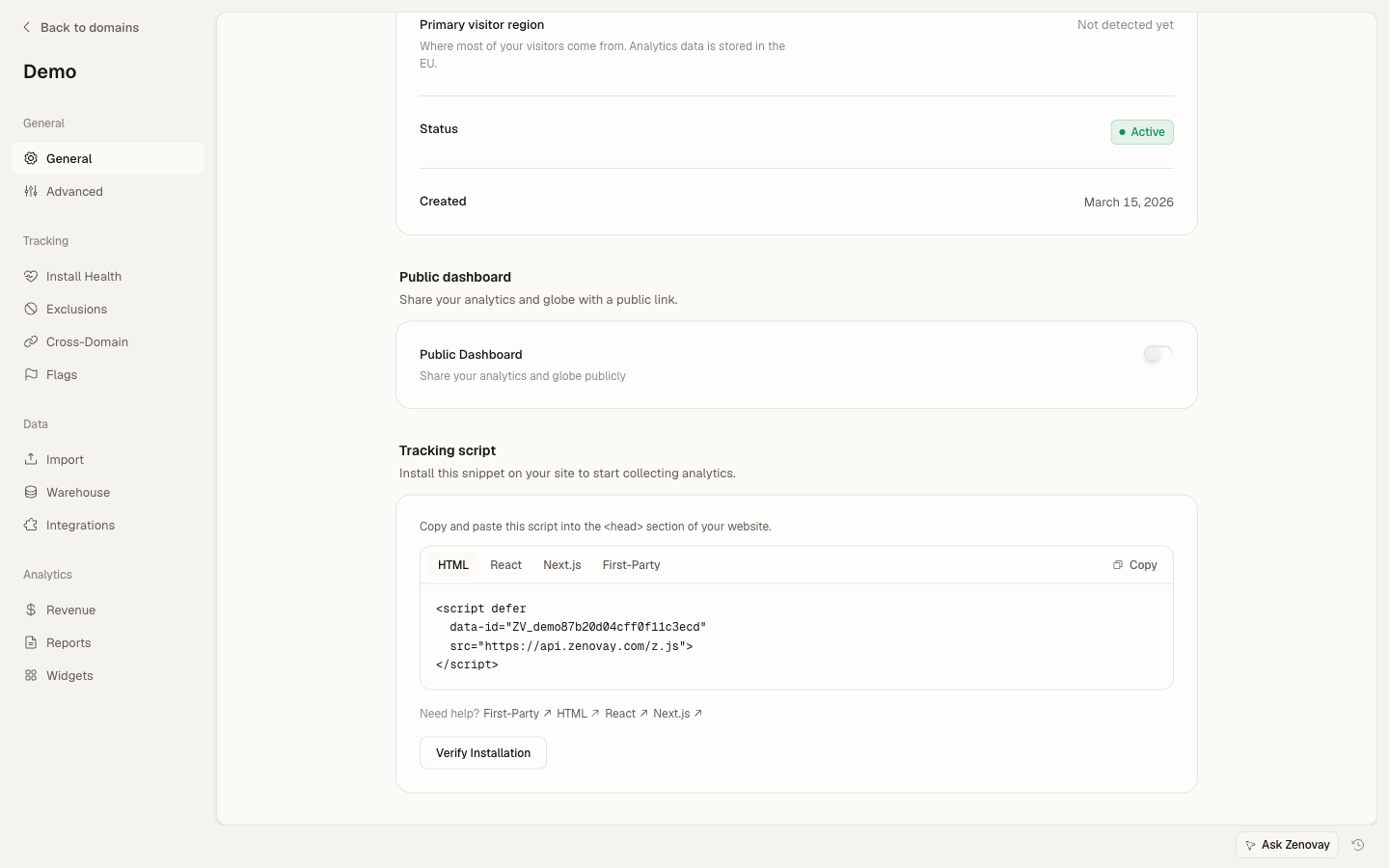
<script defer
data-tracking-code="YOUR_TRACKING_CODE"
src="https://api.zenovay.com/z.js">
</script><script defer
data-tracking-code="YOUR_TRACKING_CODE"
src="/api/_z/script.js">
</script>WICHTIG: Cloudflare Workers Einschränkung
Der Cloudflare-Workers-Ansatz (z.yourdomain.com) umgeht Firefox ETP NICHT, da Subdomains immer noch unterschiedliche Origins sind.
Für Firefox-Kompatibilität verwenden Sie stattdessen eine dieser Same-Domain-Proxy-Optionen:
Überprüfen Sie, ob es funktioniert
Überprüfen Sie nach dem Setup, ob der Proxy funktioniert:
1. Netzwerk-Tab prüfen
- Öffnen Sie DevTools (F12 oder Cmd+Option+I)
- Gehen Sie zur Registerkarte Network
- Laden Sie Ihre Seite neu
- Suchen Sie nach
/api/_z/script.js(oder Ihrem benutzerdefinierten Domain-Pfad) - Sollte den Status 200 von Ihrer Domain anzeigen
2. In Firefox testen (am strengsten)
Firefox hat den strengsten Tracking-Schutz:
- Öffnen Sie Firefox
- Einstellungen → Datenschutz & Sicherheit → Enhanced Tracking Protection: Strict
- Besuchen Sie Ihre Website
- Überprüfen Sie, ob das Skript erfolgreich geladen wird
Falls es im Firefox Strict-Modus funktioniert, funktioniert es überall.
API-Endpunkte Referenz
Ihr Proxy sollte diese Pfade weiterleiten:
| Ihr Pfad | Zenovay API | Zweck |
|---|---|---|
/api/_z/script.js | /fp/script.js | Tracking-Skript |
/api/_z/e/:code | /fp/e/:code | Seitenaufrufs-Ereignisse |
/api/_z/settings/:code | /fp/settings/:code | Website-Einstellungen |
/api/_z/load | /fp/load | Dynamischer Loader |
Fehlerbehebung
Haben Sie Probleme? Überprüfen Sie diese häufigen Probleme:
- Skript gibt 404 zurück – Überprüfen Sie Ihre Proxy-Pfad-Konfiguration
- CORS-Fehler – Stellen Sie sicher, dass Ihr Proxy CORS-Header hinzufügt
- Geolocation falsch – Leiten Sie die Client-IP mit dem Header
X-Zenovay-Real-IPweiter - Immer noch blockiert – Stellen Sie sicher, dass Sie den Proxy-Pfad verwenden, nicht die direkte URL
Für eine detaillierte Fehlerbehebung siehe jeden plattformspezifischen Leitfaden oder die allgemeine Seite zur Fehlerbehebung.
Nächste Schritte
- Benutzerdefinierte Ereignisse – Verfolgen Sie Schaltflächen-Klicks und Formulareinreichungen
- Besucherkennung – Verbinden Sie Analytics mit Benutzerkonten
- Fehlerbehebung – Häufige Probleme und Lösungen