Angular-Integrations-Beispiel
Dieser Leitfaden bietet ein vollständiges, produktionsreifes Beispiel für die Integration von Zenovay-Analysen in eine Angular-Anwendung mithilfe moderner Angular-Muster, Services und Dependency Injection.
Schnellstart
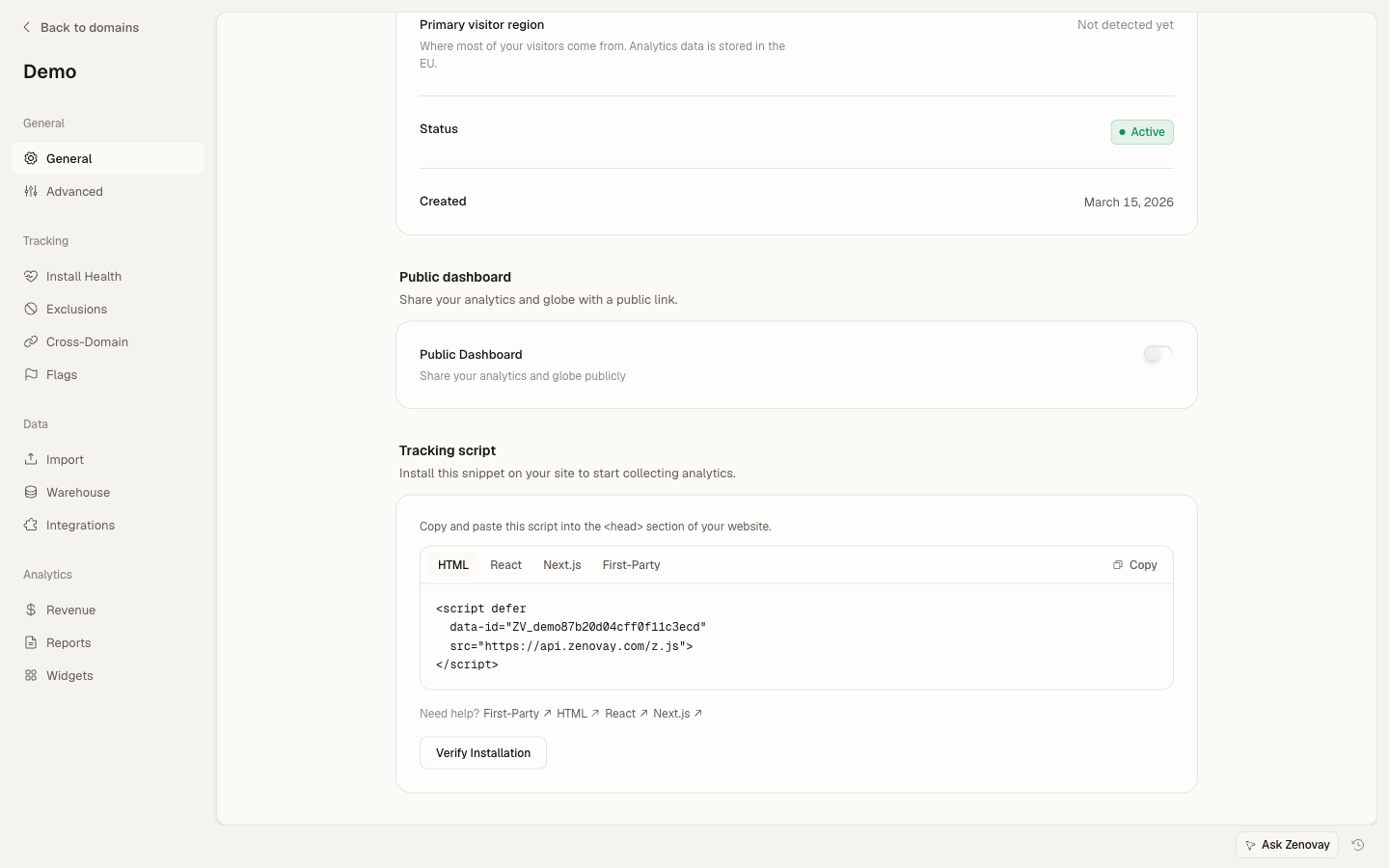
Fügen Sie das Zenovay-Tracking-Skript zu Ihrer index.html hinzu:
<!-- src/index.html -->
<!doctype html>
<html lang="en">
<head>
  <meta charset="utf-8">
  <title>My Angular App</title>
</head>
<body>
  <app-root></app-root>
  <script defer data-tracking-code="YOUR_TRACKING_CODE" src="https://api.zenovay.com/z.js"></script>
</body>
</html>
Das ist alles, was für das grundlegende Tracking von Seitenaufrufen erforderlich ist. Das Skript verfolgt Seitenaufrufe automatisch beim Laden.
Grundlegende Einrichtung
1. Erstellen Sie einen Analytics Service
Erstellen Sie einen Service, um das globale zenovay-Objekt mit Angular-Dependency-Injection zu wrappen:
// services/analytics.service.ts
import { Injectable } from '@angular/core';

@Injectable({
  providedIn: 'root'
})
export class AnalyticsService {
  private get zenovay(): any {
    return (window as any).zenovay;
  }

  track(eventName: string, data?: Record<string, any>): void {
    if (this.zenovay) {
      this.zenovay('track', eventName, data);
    }
  }

  identify(userId: string, traits?: Record<string, any>): void {
    if (this.zenovay) {
      this.zenovay('identify', userId, traits);
    }
  }

  trackGoal(goalName: string, data?: Record<string, any>): void {
    if (this.zenovay) {
      this.zenovay('goal', goalName, data);
    }
  }

  trackPurchase(data: { amount: number; currency: string; product: string }): void {
    if (this.zenovay) {
      this.zenovay('revenue', data.amount, data.currency);
    }
  }
}
2. Verfolgen Sie Seitenaufrufe (Angular Router)
Erstellen Sie einen Service zum Verfolgen von Routenänderungen:
// services/page-tracking.service.ts
import { Injectable } from '@angular/core';
import { Router, NavigationEnd } from '@angular/router';
import { AnalyticsService } from './analytics.service';
import { filter } from 'rxjs/operators';

@Injectable({
  providedIn: 'root'
})
export class PageTrackingService {
  constructor(
    private router: Router,
    private analytics: AnalyticsService
  ) {
    this.initPageTracking();
  }

  private initPageTracking(): void {
    this.router.events.pipe(
      filter(event => event instanceof NavigationEnd)
    ).subscribe((event: NavigationEnd) => {
      this.analytics.track('pageview', {
        path: event.urlAfterRedirects,
        referrer: document.referrer,
        title: document.title,
      });
    });
  }
}
Initialisieren Sie es in Ihrer App-Komponente:
// app.component.ts
import { Component, OnInit } from '@angular/core';
import { PageTrackingService } from './services/page-tracking.service';

@Component({
  selector: 'app-root',
  template: '<router-outlet></router-outlet>',
})
export class AppComponent implements OnInit {
  constructor(private pageTracking: PageTrackingService) {}

  ngOnInit(): void {
    // Service automatically starts tracking on init
  }
}
3. Verfolgen Sie benutzerdefinierte Ereignisse
Verwenden Sie den Analytics-Service in Ihren Komponenten:
// components/signup-button/signup-button.component.ts
import { Component } from '@angular/core';
import { AnalyticsService } from '../../services/analytics.service';

@Component({
  selector: 'app-signup-button',
  template: `
    <button (click)="handleSignup()">
      Start Free Trial
    </button>
  `
})
export class SignupButtonComponent {
  constructor(private analytics: AnalyticsService) {}

  handleSignup(): void {
    this.analytics.track('signup_started', {
      plan: 'professional',
      source: 'pricing_page'
    });

    // Continue with signup logic
  }
}
Vollständiges Beispiel
Hier ist eine vollständige Implementierung mit allen gängigen Anwendungsfällen:
Analytics Service mit Konfiguration
// services/zenovay-analytics.service.ts
import { Injectable } from '@angular/core';
import { environment } from '../environments/environment';

@Injectable({
  providedIn: 'root'
})
export class ZenovayAnalyticsService {
  private get zenovay(): any {
    return (window as any).zenovay;
  }

  // Page tracking
  trackPageView(path: string, title?: string): void {
    if (this.zenovay) {
      this.zenovay('track', 'pageview', {
        path,
        title: title || document.title,
        referrer: document.referrer,
      });
    }
  }

  // Custom events
  trackEvent(eventName: string, data?: Record<string, any>): void {
    if (this.zenovay) {
      this.zenovay('track', eventName, {
        ...data,
        timestamp: new Date().toISOString(),
        environment: environment.production ? 'production' : 'development',
      });
    }
  }

  // User identification
  identifyUser(userId: string, traits?: Record<string, any>): void {
    if (this.zenovay) {
      this.zenovay('identify', userId, traits);
    }
  }

  // Debug mode
  enableDebug(): void {
    if (!environment.production) {
      console.log('[Zenovay] Debug mode enabled');
    }
  }
}
Nachverfolgbare Button-Direktive
// directives/trackable-button.directive.ts
import { Directive, HostListener, Input } from '@angular/core';
import { AnalyticsService } from '../services/analytics.service';

@Directive({
  selector: '[appTrackableButton]',
  standalone: true
})
export class TrackableButtonDirective {
  @Input() eventName!: string;
  @Input() eventData?: Record<string, any>;

  constructor(private analytics: AnalyticsService) {}

  @HostListener('click', ['$event'])
  onClick(event: MouseEvent): void {
    if (!this.eventName) {
      console.warn('[TrackableButton] No event name provided');
      return;
    }

    this.analytics.track(this.eventName, {
      ...this.eventData,
      button_text: (event.target as HTMLElement).textContent,
      timestamp: Date.now(),
    });
  }
}
Anwendungsbeispiel
// pages/pricing/pricing.component.ts
import { Component } from '@angular/core';
import { CommonModule } from '@angular/common';
import { TrackableButtonDirective } from '../../directives/trackable-button.directive';

@Component({
  selector: 'app-pricing',
  standalone: true,
  imports: [CommonModule, TrackableButtonDirective],
  template: `
    <div class="pricing-page">
      <h1>Pricing</h1>

      <button
        appTrackableButton
        [eventName]="'plan_selected'"
        [eventData]="{
          plan: 'scale',
          billing: 'monthly',
          price: 90
        }"
        class="btn-primary">
        Choose Scale
      </button>
    </div>
  `
})
export class PricingComponent {}
Erweiterte Muster
Bedingtes Tracking
Verfolgen Sie Ereignisse nur, wenn bestimmte Bedingungen erfüllt sind:
// pages/product/product.component.ts
import { Component, OnInit, Input } from '@angular/core';
import { AnalyticsService } from '../../services/analytics.service';

interface Product {
  id: string;
  name: string;
  price: number;
  category: string;
}

@Component({
  selector: 'app-product',
  template: `<div>{{ product.name }}</div>`
})
export class ProductComponent implements OnInit {
  @Input() product!: Product;

  constructor(private analytics: AnalyticsService) {}

  ngOnInit(): void {
    // Only track if product is high-value
    if (this.product.price > 1000) {
      this.analytics.track('high_value_product_viewed', {
        product_id: this.product.id,
        product_name: this.product.name,
        price: this.product.price,
        category: this.product.category,
      });
    }
  }
}
Formulartracking
Verfolgen Sie Formularinteraktionen und Eingaben:
// components/contact-form/contact-form.component.ts
import { Component } from '@angular/core';
import { FormBuilder, FormGroup, Validators } from '@angular/forms';
import { AnalyticsService } from '../../services/analytics.service';

@Component({
  selector: 'app-contact-form',
  template: `
    <form [formGroup]="contactForm" (ngSubmit)="onSubmit()">
      <input
        type="text"
        formControlName="name"
        (focus)="onFieldFocus('name')"
        placeholder="Name"
      />
      <input
        type="email"
        formControlName="email"
        (focus)="onFieldFocus('email')"
        placeholder="Email"
      />
      <textarea
        formControlName="message"
        (focus)="onFieldFocus('message')"
        placeholder="Message"
      ></textarea>
      <button type="submit">Send Message</button>
    </form>
  `
})
export class ContactFormComponent {
  contactForm: FormGroup;

  constructor(
    private fb: FormBuilder,
    private analytics: AnalyticsService
  ) {
    this.contactForm = this.fb.group({
      name: ['', Validators.required],
      email: ['', [Validators.required, Validators.email]],
      message: ['', Validators.required],
    });
  }

  onFieldFocus(fieldName: string): void {
    this.analytics.track('form_field_focused', {
      form_id: 'contact',
      field_name: fieldName,
    });
  }

  async onSubmit(): Promise<void> {
    if (this.contactForm.invalid) {
      return;
    }

    const formData = this.contactForm.value;

    // Track form submission
    this.analytics.track('contact_form_submitted', {
      form_id: 'contact',
      has_message: formData.message.length > 0,
    });

    // Submit form logic
  }
}
E-Commerce-Tracking
Verfolgen Sie Produktansichten, zum Warenkorb hinzufügen und Käufe:
// services/ecommerce-tracking.service.ts
import { Injectable } from '@angular/core';
import { AnalyticsService } from './analytics.service';

interface Product {
  id: string;
  name: string;
  category: string;
  price: number;
}

interface CartItem extends Product {
  quantity: number;
}

interface Cart {
  items: CartItem[];
  total: number;
}

interface Order extends Cart {
  id: string;
  tax: number;
  shipping: number;
}

@Injectable({
  providedIn: 'root'
})
export class EcommerceTrackingService {
  constructor(private analytics: AnalyticsService) {}

  trackProductView(product: Product): void {
    this.analytics.track('product_viewed', {
      product_id: product.id,
      product_name: product.name,
      category: product.category,
      price: product.price,
      currency: 'USD',
    });
  }

  trackAddToCart(product: Product, quantity: number = 1): void {
    this.analytics.track('product_added_to_cart', {
      product_id: product.id,
      product_name: product.name,
      quantity,
      price: product.price,
      total: product.price * quantity,
    });
  }

  trackCheckout(cart: Cart): void {
    this.analytics.track('checkout_started', {
      cart_total: cart.total,
      item_count: cart.items.length,
      currency: 'USD',
    });
  }

  trackPurchase(order: Order): void {
    this.analytics.trackPurchase({
      amount: order.total,
      currency: 'USD',
      product: `Order #${order.id}`,
    });

    this.analytics.track('purchase_completed', {
      order_id: order.id,
      revenue: order.total,
      tax: order.tax,
      shipping: order.shipping,
      currency: 'USD',
      items: order.items.map(item => ({
        product_id: item.id,
        quantity: item.quantity,
        price: item.price,
      })),
    });
  }
}
Verwendung in einer Komponente
// pages/product-detail/product-detail.component.ts
import { Component, OnInit } from '@angular/core';
import { ActivatedRoute } from '@angular/router';
import { EcommerceTrackingService } from '../../services/ecommerce-tracking.service';

@Component({
  selector: 'app-product-detail',
  template: `
    <div *ngIf="product">
      <h1>{{ product.name }}</h1>
      <p>\${{ product.price }}</p>
      <button (click)="addToCart()">Add to Cart</button>
    </div>
  `
})
export class ProductDetailComponent implements OnInit {
  product: any;

  constructor(
    private route: ActivatedRoute,
    private ecommerceTracking: EcommerceTrackingService
  ) {}

  ngOnInit(): void {
    // Load product and track view
    this.route.params.subscribe(params => {
      // Fetch product by params.id
      this.product = {
        id: params['id'],
        name: 'Example Product',
        price: 99.99,
        category: 'Electronics',
      };

      this.ecommerceTracking.trackProductView(this.product);
    });
  }

  addToCart(): void {
    this.ecommerceTracking.trackAddToCart(this.product);
    // Add to cart logic
  }
}
Fehlertracking mit ErrorHandler
Verfolgen Sie Fehler automatisch:
// services/global-error-handler.service.ts
import { ErrorHandler, Injectable } from '@angular/core';

@Injectable()
export class GlobalErrorHandler implements ErrorHandler {
  handleError(error: Error): void {
    // Track error via global zenovay object
    if ((window as any).zenovay) {
      (window as any).zenovay('track', 'error_occurred', {
        error_message: error.message,
        error_stack: error.stack,
        error_name: error.name,
        url: window.location.href,
        user_agent: navigator.userAgent,
      });
    }

    // Log to console
    console.error('Error caught by GlobalErrorHandler:', error);
  }
}
Registrieren Sie es in der App-Konfiguration:
// app.config.ts
import { ApplicationConfig, ErrorHandler } from '@angular/core';
import { GlobalErrorHandler } from './services/global-error-handler.service';

export const appConfig: ApplicationConfig = {
  providers: [
    { provide: ErrorHandler, useClass: GlobalErrorHandler },
    // other providers
  ]
};
Benutzeridentifikation
Verfolgen Sie identifizierte Benutzer:
// services/user-tracking.service.ts
import { Injectable } from '@angular/core';
import { AnalyticsService } from './analytics.service';
import { AuthService } from './auth.service';

@Injectable({
  providedIn: 'root'
})
export class UserTrackingService {
  constructor(
    private analytics: AnalyticsService,
    private auth: AuthService
  ) {
    this.initUserTracking();
  }

  private initUserTracking(): void {
    this.auth.user$.subscribe(user => {
      if (user) {
        this.analytics.identify(user.id, {
          email: user.email,
          name: user.name,
          plan: user.subscription?.plan,
          signup_date: user.createdAt,
        });
      }
    });
  }
}
Initialisieren Sie es in Ihrer App-Komponente:
// app.component.ts
import { Component } from '@angular/core';
import { UserTrackingService } from './services/user-tracking.service';

@Component({
  selector: 'app-root',
  template: '<router-outlet></router-outlet>',
})
export class AppComponent {
  constructor(private userTracking: UserTrackingService) {
    // Service automatically starts tracking on init
  }
}
TypeScript-Unterstützung
Vollständige TypeScript-Unterstützung mit typisierten Ereignissen:
// types/analytics.types.ts
export interface AnalyticsEvents {
  signup_started: {
    plan: 'free' | 'pro' | 'scale' | 'enterprise';
    source: string;
  };
  product_viewed: {
    product_id: string;
    product_name: string;
    price: number;
  };
  purchase_completed: {
    order_id: string;
    revenue: number;
    currency: string;
  };
}

// Declare the global zenovay function for TypeScript
declare global {
  interface Window {
    zenovay: (...args: any[]) => void;
  }
}

// Typed tracking service
import { Injectable } from '@angular/core';
import { AnalyticsEvents } from '../types/analytics.types';

@Injectable({
  providedIn: 'root'
})
export class TypedAnalyticsService {
  private get zenovay(): any {
    return (window as any).zenovay;
  }

  track<K extends keyof AnalyticsEvents>(
    eventName: K,
    data: AnalyticsEvents[K]
  ): void {
    if (this.zenovay) {
      this.zenovay('track', eventName, data);
    }
  }
}
RxJS-Integration
Nutzen Sie Angulars reaktive Muster:
// services/analytics-rxjs.service.ts
import { Injectable } from '@angular/core';
import { AnalyticsService } from './analytics.service';
import { Observable, of } from 'rxjs';
import { tap, catchError } from 'rxjs/operators';

@Injectable({
  providedIn: 'root'
})
export class AnalyticsRxjsService {
  constructor(private analytics: AnalyticsService) {}

  trackEvent$(eventName: string, data?: Record<string, any>): Observable<void> {
    return of(this.analytics.track(eventName, data)).pipe(
      tap(() => console.log(`[Analytics] Tracked: ${eventName}`)),
      catchError(error => {
        console.error('[Analytics] Error:', error);
        throw error;
      })
    );
  }
}
Leistungsoptimierung
Debounce Tracking
Verhindern Sie zu häufiges Tracking:
// components/search-box/search-box.component.ts
import { Component } from '@angular/core';
import { FormControl } from '@angular/forms';
import { debounceTime, distinctUntilChanged } from 'rxjs/operators';
import { AnalyticsService } from '../../services/analytics.service';

@Component({
  selector: 'app-search-box',
  template: `
    <input
      type="search"
      [formControl]="searchControl"
      placeholder="Search..."
    />
  `
})
export class SearchBoxComponent {
  searchControl = new FormControl('');

  constructor(private analytics: AnalyticsService) {
    this.searchControl.valueChanges.pipe(
      debounceTime(500),
      distinctUntilChanged()
    ).subscribe(query => {
      if (query) {
        this.analytics.track('search_performed', {
          query,
          length: query.length,
        });
      }
    });
  }
}
Testen
Mock Analytics Service in Tests
// testing/analytics.mock.ts
import { Injectable } from '@angular/core';

@Injectable()
export class MockAnalyticsService {
  track = jasmine.createSpy('track');
  identify = jasmine.createSpy('identify');
  trackGoal = jasmine.createSpy('trackGoal');
  trackPurchase = jasmine.createSpy('trackPurchase');
}
Test-Komponente
// components/signup-button/signup-button.component.spec.ts
import { ComponentFixture, TestBed } from '@angular/core/testing';
import { SignupButtonComponent } from './signup-button.component';
import { AnalyticsService } from '../../services/analytics.service';
import { MockAnalyticsService } from '../../testing/analytics.mock';

describe('SignupButtonComponent', () => {
  let component: SignupButtonComponent;
  let fixture: ComponentFixture<SignupButtonComponent>;
  let analyticsService: MockAnalyticsService;

  beforeEach(async () => {
    await TestBed.configureTestingModule({
      declarations: [SignupButtonComponent],
      providers: [
        { provide: AnalyticsService, useClass: MockAnalyticsService }
      ]
    }).compileComponents();

    fixture = TestBed.createComponent(SignupButtonComponent);
    component = fixture.componentInstance;
    analyticsService = TestBed.inject(AnalyticsService) as any;
    fixture.detectChanges();
  });

  it('should track event on click', async () => {
    const button = fixture.nativeElement.querySelector('button');
    button.click();

    await fixture.whenStable();

    expect(analyticsService.track).toHaveBeenCalledWith('signup_started', {
      plan: 'professional',
      source: 'pricing_page'
    });
  });
});
Standalone-Komponenten (Angular 17+)
Vollständige Integration mit Standalone-Komponenten:
// app.component.ts
import { Component } from '@angular/core';
import { RouterOutlet } from '@angular/router';

@Component({
  selector: 'app-root',
  standalone: true,
  imports: [RouterOutlet],
  template: '<router-outlet></router-outlet>',
})
export class AppComponent {}
Es ist keine spezielle Angular-Modulkonfiguration erforderlich. Das Zenovay-Tracking-Skript in index.html kümmert sich um alles. Ihr AnalyticsService wrappet einfach window.zenovay-Aufrufe und kann in jede Komponente injiziert werden.
Umgebungskonfiguration
// environments/environment.ts
export const environment = {
  production: false,
};

// environments/environment.prod.ts
export const environment = {
  production: true,
};
Der Tracking-Code wird direkt im index.html-Skript-Tag konfiguriert. Für verschiedene Umgebungen können Sie Angulars File-Replacement-Funktion verwenden, um index.html-Dateien zu tauschen, oder einfach denselben Tracking-Code in allen Umgebungen verwenden (Zenovay kümmert sich um die Umgebungstrennung im Dashboard).