4分で読めます
React クイックスタート
Zenovay分析をReactアプリケーションに統合します。npmパッケージは不要で、シンプルなスクリプトタグだけです。
インストール
ZenovayトラッキングスクリプトをHTMLファイルに追加します:
index.html (Vite) または public/index.html (CRA)HTML
<!DOCTYPE html>
<html lang="en">
<head>
  <meta charset="UTF-8" />
  <title>My React App</title>
</head>
<body>
  <div id="root"></div>
  <script defer data-tracking-code="YOUR_TRACKING_CODE" src="https://api.zenovay.com/z.js"></script>
</body>
</html>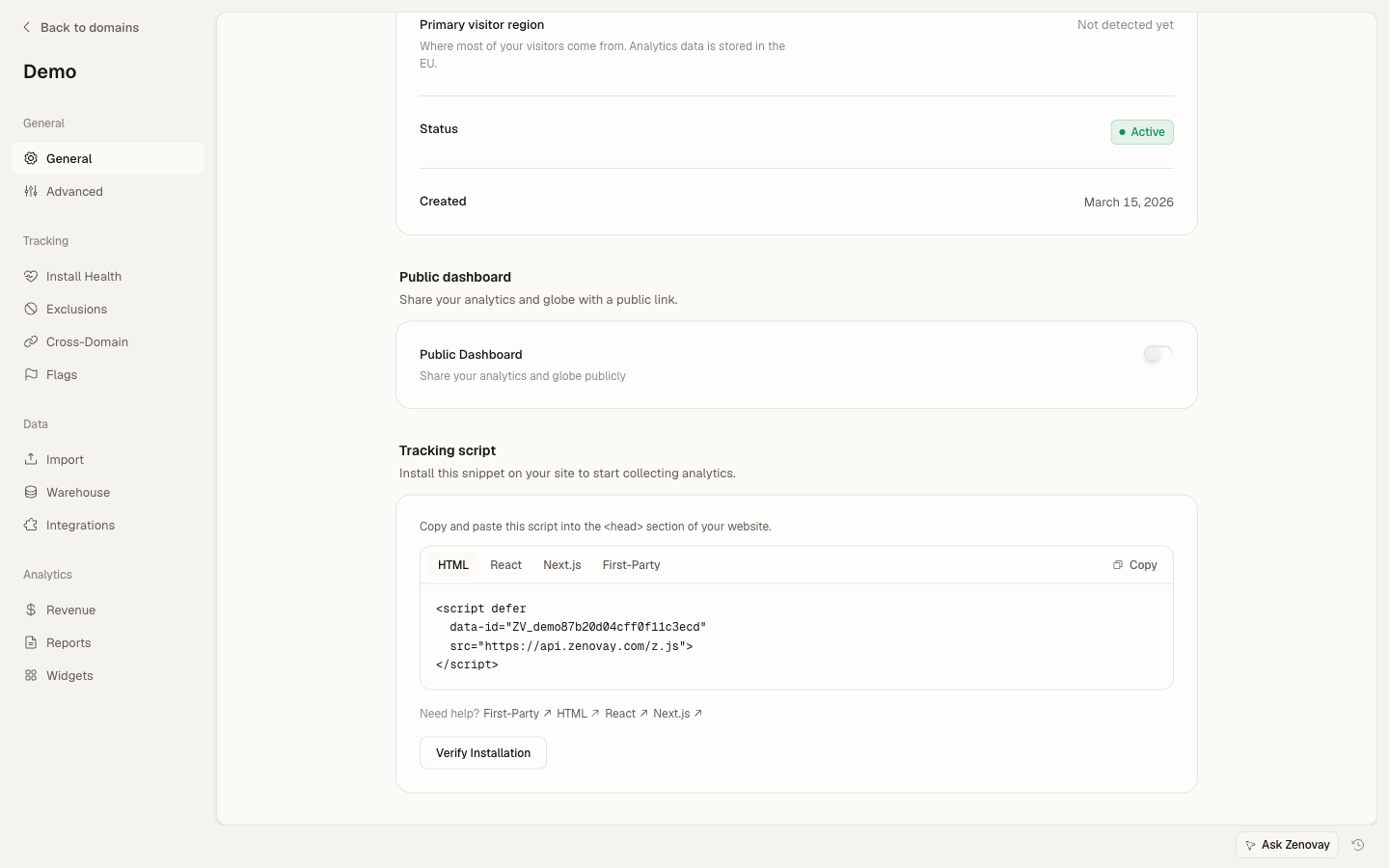
基本的なセットアップはこれで完了です。Zenovayは自動的にページビューをトラッキングします。
セットアップヘルパーフック
カスタムイベントのトラッキング用に再利用可能なフックを作成します:
src/hooks/useZenovay.tsTSX
export function useZenovay() {
const track = (eventName: string, data?: Record<string, any>) => {
  if (window.zenovay) {
    window.zenovay('track', eventName, data);
  }
};

const identify = (userId: string, traits?: Record<string, any>) => {
  if (window.zenovay) {
    window.zenovay('identify', userId, traits);
  }
};

const trackGoal = (goalName: string, data?: Record<string, any>) => {
  if (window.zenovay) {
    window.zenovay('goal', goalName, data);
  }
};

const trackRevenue = (data: { order_id: string; value: number; currency?: string }) => {
  if (window.zenovay) {
    window.zenovay('revenue', data.value, data.currency || 'USD');
  }
};

return { track, identify, trackGoal, trackRevenue };
}
環境変数
.envBash
# No special environment variables needed for Zenovay!
# The tracking code is embedded directly in the script tag.
# Replace YOUR_TRACKING_CODE in index.html with your actual
# tracking code from the Zenovay dashboard (app.zenovay.com).Zenovaダッシュボードからドメインを選択し、サイトを選択して、一般タブ(トラッキングスクリプトカード)を開いてトラッキングコードを見つけます。
フックでイベントをトラッキング
useZenovayフックを使用してカスタムイベントをトラッキングします:
components/SignupForm.tsxTSX
import { useZenovay } from '../hooks/useZenovay';
import { useState } from 'react';

export function SignupForm() {
const { track, identify } = useZenovay();
const [email, setEmail] = useState('');

const handleSubmit = async (e: React.FormEvent) => {
  e.preventDefault();

  // Your signup logic
  const user = await signup(email);

  // Track the signup
  track('user_signup', {
    email,
    source: 'signup_form',
    plan: 'free',
  });

  // Identify the user
  identify(user.id, {
    email: user.email,
    created_at: new Date().toISOString(),
  });
};

return (
  <form onSubmit={handleSubmit}>
    <input
      type="email"
      value={email}
      onChange={(e) => setEmail(e.target.value)}
      placeholder="Enter your email"
    />
    <button type="submit">Sign Up</button>
  </form>
);
}
ボタンクリックをトラッキング
ボタンとのユーザーインタラクションをトラッキングします:
components/PricingCard.tsxTSX
import { useZenovay } from '../hooks/useZenovay';

export function PricingCard({ plan }: { plan: string }) {
const { track } = useZenovay();

const handleUpgrade = () => {
  track('upgrade_clicked', {
    plan,
    location: 'pricing_page',
  });

  // Navigate to checkout
  window.location.href = '/checkout?plan=' + plan;
};

return (
  <div className="pricing-card">
    <h3>{plan} Plan</h3>
    <button onClick={handleUpgrade}>
      Upgrade Now
    </button>
  </div>
);
}
ページビューをトラッキング
React Routerを使用してページビューを自動的にトラッキングします:
src/App.tsxTSX
import { BrowserRouter, Routes, Route, useLocation } from 'react-router-dom';
import { useEffect } from 'react';

function PageTracker() {
const location = useLocation();

useEffect(() => {
  if (window.zenovay) {
    window.zenovay('track', 'pageview', {
      path: location.pathname,
      search: location.search,
    });
  }
}, [location.pathname]);

return null;
}

function App() {
return (
  <BrowserRouter>
    <PageTracker />
    <Routes>
      <Route path="/" element={<Home />} />
      <Route path="/dashboard" element={<Dashboard />} />
    </Routes>
  </BrowserRouter>
);
}
ユーザーを識別
ユーザーがログインしたときに識別します:
components/UserProfile.tsxTSX
import { useZenovay } from '../hooks/useZenovay';
import { useEffect } from 'react';

export function UserProfile({ user }: { user: User }) {
const { identify } = useZenovay();

useEffect(() => {
  if (user) {
    identify(user.id, {
      email: user.email,
      name: user.name,
      plan: user.subscription?.plan || 'free',
      created_at: user.createdAt,
    });
  }
}, [user]);

return <div>Welcome, {user.name}!</div>;
}
フォーム送信をトラッキング
フォームのインタラクションと完了をトラッキングします:
components/ContactForm.tsxTSX
import { useZenovay } from '../hooks/useZenovay';
import { useState } from 'react';

export function ContactForm() {
const { track } = useZenovay();
const [formData, setFormData] = useState({ name: '', email: '', message: '' });

const handleChange = (field: string, value: string) => {
  setFormData(prev => ({ ...prev, [field]: value }));

  // Track form field interactions
  track('form_field_filled', {
    form_name: 'contact_form',
    field_name: field,
  });
};

const handleSubmit = async (e: React.FormEvent) => {
  e.preventDefault();

  track('form_submitted', {
    form_name: 'contact_form',
    has_message: formData.message.length > 0,
  });

  // Submit form logic
  await submitContact(formData);
};

return (
  <form onSubmit={handleSubmit}>
    <input
      type="text"
      value={formData.name}
      onChange={(e) => handleChange('name', e.target.value)}
      placeholder="Name"
    />
    <input
      type="email"
      value={formData.email}
      onChange={(e) => handleChange('email', e.target.value)}
      placeholder="Email"
    />
    <textarea
      value={formData.message}
      onChange={(e) => handleChange('message', e.target.value)}
      placeholder="Message"
    />
    <button type="submit">Send Message</button>
  </form>
);
}
TypeScript サポート
グローバルzenovayオブジェクトの型宣言を追加します:
types/zenovay.d.tsTypeScript
declare global {
interface Window {
  zenovay?: (...args: any[]) => void;
}
}

export {};
開発中のテスト
ブラウザの開発者ツールのネットワークタブをチェックして、api.zenovay.comへのリクエストを確認することで、イベントが送信されていることを検証できます。Zenovayダッシュボードもリアルタイムのイベント監視を提供しています。
index.htmlのYOUR_TRACKING_CODEを、Zenovayダッシュボードの実際のトラッキングコードに置き換えてください。
次のステップ
Reactアプリはこれでゼノベイで追跡されています!ダッシュボードで分析を確認してください。
さらに学習を進めます:
- カスタムイベント - 高度なイベントトラッキング
- 訪問者識別 - ユーザートラッキングのベストプラクティス
- プライバシーコンプライアンス - GDPRおよびCCPA設定
このページは役に立ちましたか?