3分で読めます
React インテグレーション
シンプルなスクリプトタグで React アプリケーションに Zenovay アナリティクスを追加します。npm パッケージは不要です。
概要
Zenovay のトラッキングスクリプトは React アプリケーションと連携します。HTML ファイルにスクリプトタグを追加し、コンポーネント内でカスタムイベントトラッキングに window.zenovay を呼び出します。
インストール
Zenovay のトラッキングスクリプトを HTML ファイルに追加します。
<!-- index.html (Vite) or public/index.html (Create React App) -->
<script defer data-tracking-code="YOUR_TRACKING_CODE" src="https://api.zenovay.com/z.js"></script>
スクリプトタグを HTML ファイルの <body> に配置します。defer 属性により、ページのレンダリングをブロックせずに読み込まれます。
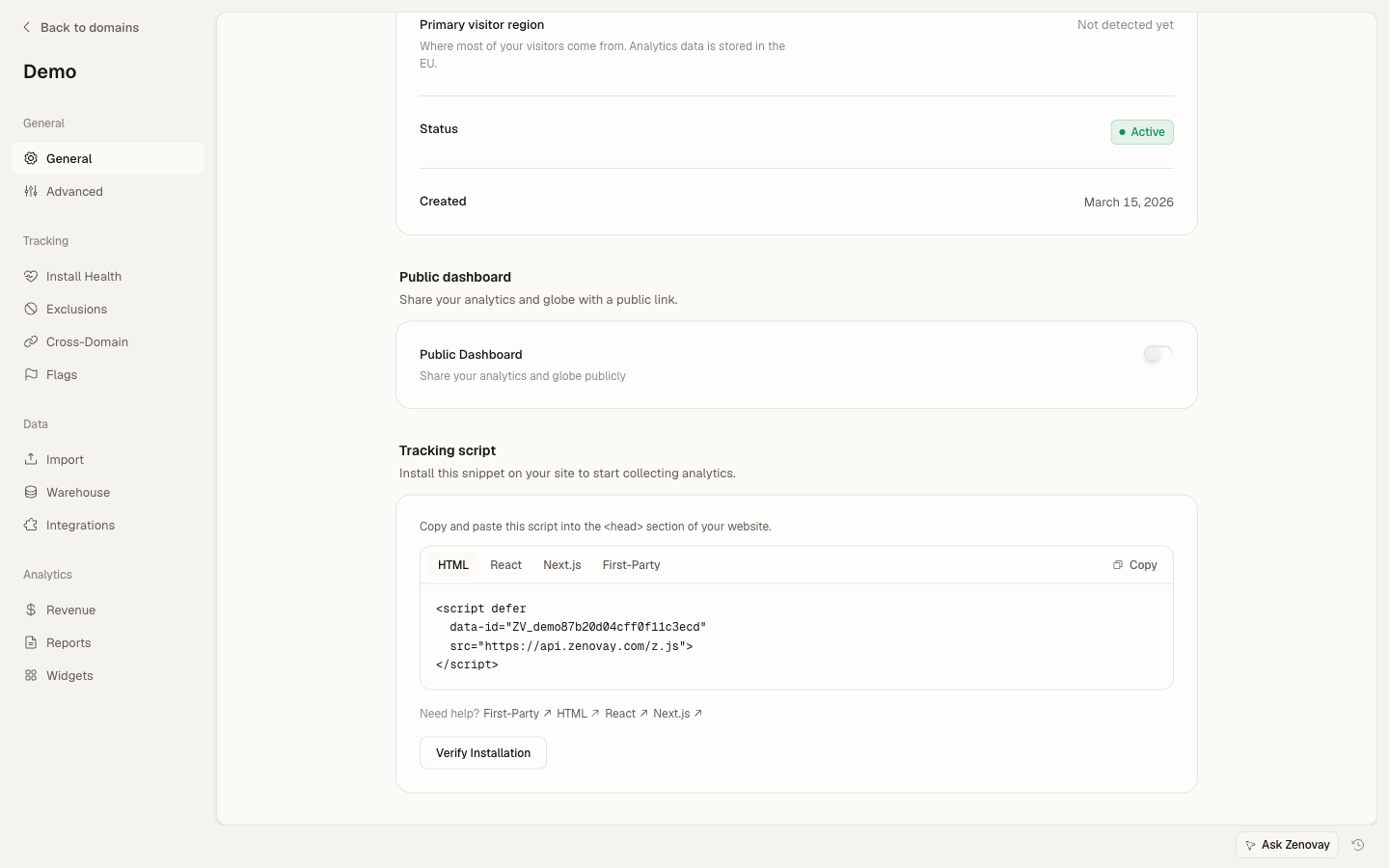
セットアップ
HTML にスクリプトを追加する
Vite プロジェクトの場合、index.html に追加します。
<!DOCTYPE html>
<html lang="en">
  <head>
    <meta charset="UTF-8" />
    <title>My React App</title>
  </head>
  <body>
    <div id="root"></div>
    <script defer data-tracking-code="YOUR_TRACKING_CODE" src="https://api.zenovay.com/z.js"></script>
  </body>
</html>
ヘルパーフックを作成する
コンポーネントで Zenovay トラッキングにアクセスするための再利用可能なフックを作成します。
// hooks/useZenovay.ts
export function useZenovay() {
  const track = (eventName: string, data?: Record<string, any>) => {
    if (window.zenovay) {
      window.zenovay('track', eventName, data);
    }
  };

  const identify = (userId: string, traits?: Record<string, any>) => {
    if (window.zenovay) {
      window.zenovay('identify', userId, traits);
    }
  };

  const trackGoal = (goalName: string, data?: Record<string, any>) => {
    if (window.zenovay) {
      window.zenovay('goal', goalName, data);
    }
  };

  const trackPurchase = (data: { amount: number; currency: string; product: string }) => {
    if (window.zenovay) {
      window.zenovay('revenue', data.amount, data.currency);
    }
  };

  return { track, identify, trackGoal, trackPurchase };
}
ページビューをトラッキングする
React Router でページビューを自動的にトラッキングします。
import { useLocation } from 'react-router-dom';
import { useEffect } from 'react';

function PageTracker() {
  const location = useLocation();

  useEffect(() => {
    if (window.zenovay) {
      window.zenovay('track', 'pageview', {
        path: location.pathname,
        title: document.title,
      });
    }
  }, [location.pathname]);

  return null;
}
イベントトラッキング
useZenovay フック
useZenovay フックを使ってカスタムイベントをトラッキングします。
import { useZenovay } from './hooks/useZenovay';

function Button() {
  const { track } = useZenovay();

  const handleClick = () => {
    track('button_click', {
      buttonName: 'signup',
      location: 'hero'
    });
  };

  return <button onClick={handleClick}>Sign Up</button>;
}
トラッキング可能なボタンコンポーネント
再利用可能なトラッキング可能なボタンコンポーネントを作成します。
import { useZenovay } from './hooks/useZenovay';

interface TrackableButtonProps {
  eventName: string;
  eventData?: Record<string, any>;
  children: React.ReactNode;
  onClick?: (e: React.MouseEvent) => void;
}

function TrackableButton({ eventName, eventData, children, onClick, ...props }: TrackableButtonProps) {
  const { track } = useZenovay();

  const handleClick = (e: React.MouseEvent) => {
    track(eventName, eventData);
    onClick?.(e);
  };

  return <button onClick={handleClick} {...props}>{children}</button>;
}

// Usage:
<TrackableButton eventName="button_click" eventData={{ buttonName: 'signup' }}>
  Sign Up
</TrackableButton>
TypeScript サポート
グローバルな zenovay オブジェクトの型宣言を追加します。
// types/zenovay.d.ts
declare global {
  interface Window {
    zenovay: (...args: any[]) => void;
  }
}

export {};
タイプセーフなイベントトラッキングも作成できます。
interface CustomEvents {
  button_click: {
    buttonName: string;
    location: string;
  };
  form_submit: {
    formId: string;
  };
}

// Type-safe tracking function
function trackEvent<K extends keyof CustomEvents>(eventName: K, data: CustomEvents[K]) {
  if (window.zenovay) {
    window.zenovay('track', eventName, data);
  }
}

// Type-safe event tracking
trackEvent('button_click', {
  buttonName: 'signup',
  location: 'hero'
});
高度な機能
ユーザーの識別
特定のユーザーとイベントを関連付けます。
import { useZenovay } from './hooks/useZenovay';

function UserProfile({ user }) {
  const { identify } = useZenovay();

  useEffect(() => {
    if (user) {
      identify(user.id, {
        email: user.email,
        plan: user.plan,
      });
    }
  }, [user]);

  return <div>Welcome, {user.name}</div>;
}
ゴールのトラッキング
コンバージョンゴールをトラッキングします。
import { useZenovay } from './hooks/useZenovay';

function SignupComplete() {
  const { trackGoal } = useZenovay();

  useEffect(() => {
    trackGoal('signup_completed', {
      source: 'organic',
      value: 99.00
    });
  }, []);

  return <div>Welcome aboard!</div>;
}
Next.js インテグレーション
Next.js アプリケーションについては、Next.js クイックスタートガイドをご覧ください。
サポートが必要ですか? React インテグレーションの例を参照するか、[email protected] までご連絡ください。
このページは役に立ちましたか?