B2B Company Identification
Scale FeatureKnow which companies are visiting your website. B2B Intelligence identifies organizations based on their IP addresses, helping you prioritize sales outreach and understand your market.
B2B Company Identification is available on Scale and Enterprise plans. Upgrade your plan to enable this feature.
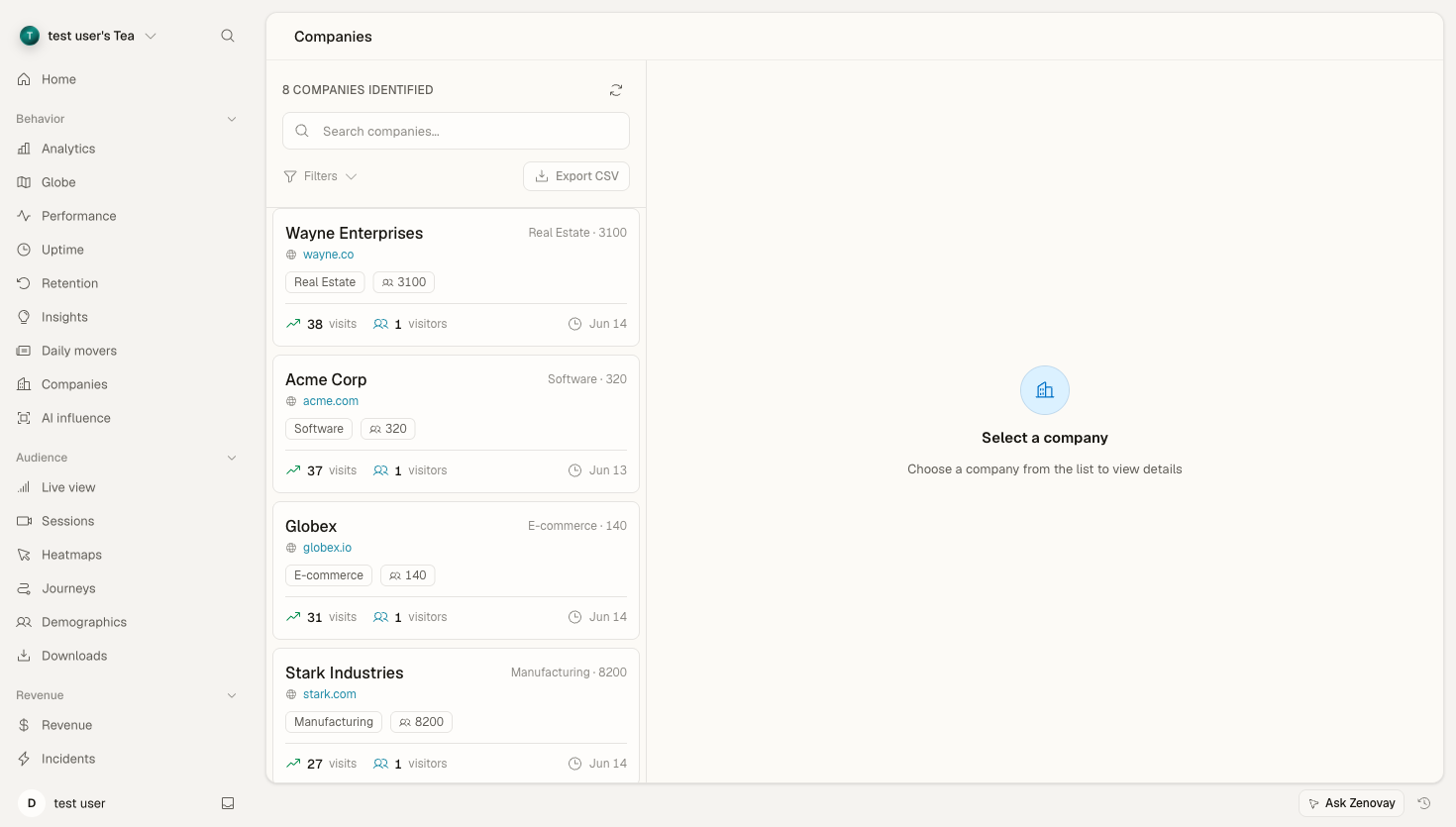
Overview
When businesses visit your website, they often do so from their corporate network. B2B Intelligence uses IP-to-company matching to identify these organizations, providing:
- Company name: The organization visiting your site
- Industry: What sector they operate in
- Employee count: Company size tier
- Location: Headquarters location
- Pages viewed: What content they're interested in
- Visit frequency: How often they return
How It Works
- IP Detection: Visitor IP address is captured (anonymized)
- Company Lookup: IP matched against business IP database
- Enrichment: Company details retrieved (name, size, industry)
- Dashboard Display: Company appears in your B2B dashboard
Not all visitors can be identified. Consumer ISPs, VPNs, and small businesses often can't be matched. Typical identification rates are 10-30% of B2B traffic.
Enabling B2B Intelligence
- Open Domains, click your site, then navigate to its settings
- Toggle B2B Company Identification to enabled
- Save changes
Company data starts appearing within minutes for new visitors.
B2B Dashboard
Company List
Open Domains, click your site, then select the Companies tab to see identified organizations:
| Column | Description |
|---|---|
| Company | Organization name and logo |
| Industry | Business sector |
| Size | Employee count tier |
| Location | Headquarters country |
| Visits | Number of sessions |
| Last Seen | Most recent visit |
| Pages | Pages viewed this visit |
Filtering Companies
Filter by:
- Industry (Technology, Finance, Healthcare, etc.)
- Company size (1-50, 51-200, 201-500, 500+)
- Location (country)
- Date range
- Visit frequency
Sorting
Sort by:
- Most recent visits
- Most total visits
- Largest companies
- Alphabetically
Company Details
Click any company to see:
Overview
- Company name and logo
- Website URL
- Industry and size
- Headquarters location
Visit History
- All visits from this company
- Pages viewed per session
- Time spent on site
- Entry and exit pages
Insights
- Most viewed content
- Returning vs new visitors
- Engagement trends
Use Cases
Sales Intelligence
- Identify prospects: See which target accounts are visiting
- Prioritize outreach: Focus on companies showing buying signals
- Personalize pitch: Know what content they've consumed
- Time outreach: Reach out when they're actively researching
Account-Based Marketing (ABM)
- Track target accounts: Monitor when named accounts visit
- Measure campaign impact: See if campaigns drive target account traffic
- Identify anonymous interest: Discover companies before they fill out forms
Product Development
- Understand your market: See which industries are most interested
- Identify use cases: Content consumption reveals needs
- Competitive intelligence: See when competitors visit your site
CRM Integration
Export company data to your CRM:
Salesforce
CRM integrations are configured from your domain settings. Open Domains, click your site, and look for the Integrations section to connect your Salesforce account and map company fields.
HubSpot
Similarly, connect HubSpot from your domain settings. Once connected, configure company-to-company matching and enable workflow triggers.
Webhook
For custom CRM integrations:
POST https://your-crm.com/webhooks/zenovay
{
  "event": "company_identified",
  "company": {
    "name": "Acme Corp",
    "domain": "acme.com",
    "industry": "Technology",
    "employee_count": "201-500",
    "country": "US"
  },
  "visit": {
    "pages_viewed": ["/pricing", "/features"],
    "duration": 245,
    "timestamp": "2025-12-30T10:30:00Z"
  }
}
Alerts
Get notified when target accounts visit:
Account Alerts
- Go to Settings → Workspace → Notifications
- Add target account domains (e.g.,
apple.com,google.com) - Configure notification channel
- Receive alerts when target accounts are identified
Industry Alerts
Trigger alerts when companies from specific industries visit:
{
  "trigger": "company_visit",
  "conditions": {
    "industry": ["Technology", "Finance"],
    "size": ["201-500", "500+"]
  },
  "notify": "[email protected]"
}
Privacy & Compliance
Data Sources
Company identification uses:
- Business IP ranges (registered with ARIN, RIPE, etc.)
- Corporate network registrations
- Business ISP data
We do NOT use:
- Personal employee data
- Social profiles
- Cookie tracking across sites
GDPR Compliance
- IP addresses are processed, not stored permanently
- Company identification is based on network data, not personal data
- No individual tracking across websites
- Designed for GDPR readiness under a legitimate interest basis
Opt-Out
Companies can request to be excluded from identification:
- Contact [email protected]
- Include company domain and IP range
- We'll add to exclusion list within 48 hours
API Access
Access company data via API:
List Identified Companies
GET /api/websites/:websiteId/companies
Authorization: Bearer YOUR_API_KEY
Get Company Details
GET /api/websites/:websiteId/companies/:companyId
Authorization: Bearer YOUR_API_KEY
Response Example
{
  "company": {
    "id": "comp_abc123",
    "name": "Acme Corporation",
    "domain": "acme.com",
    "industry": "Technology",
    "employee_count": "201-500",
    "country": "US",
    "city": "San Francisco"
  },
  "visits": {
    "total": 15,
    "first_seen": "2025-11-15T08:00:00Z",
    "last_seen": "2025-12-30T14:30:00Z"
  },
  "engagement": {
    "pages_per_visit": 4.2,
    "avg_duration": 185,
    "top_pages": ["/pricing", "/features", "/demo"]
  }
}
Best Practices
- Set up target account alerts: Get notified when key prospects visit
- Integrate with CRM: Sync company data with your sales workflow
- Review weekly: Identify new sales opportunities
- Correlate with campaigns: See which marketing drives target account traffic
- Track over time: Returning visits often indicate buying intent
Next Steps
- Revenue Attribution - Connect company visits to revenue
- Custom Events - Track company-specific actions
- API Reference - Access company data programmatically