A/B Experimentation
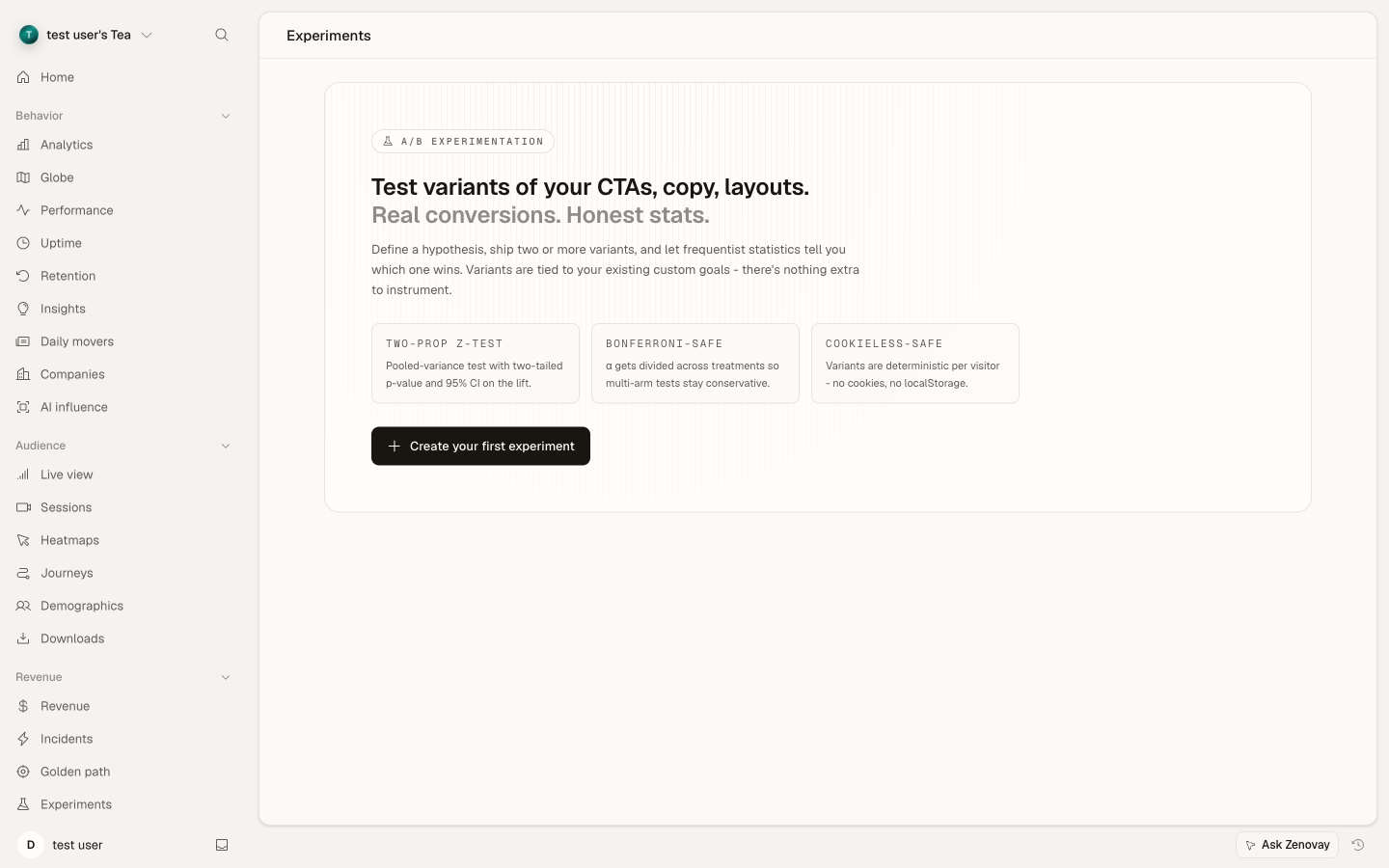
Pro FeatureDefine an experiment in the dashboard, embed one line of JavaScript on your site, and Zenovay assigns a deterministic variant to each visitor and reports per-variant conversion rates plus a 95% confidence interval on the lift over control.
A/B Experimentation is available on Pro, Scale, and Enterprise plans. Upgrade your plan to enable this feature.
How it works
Visitor assignment is computed locally by the tracker using a deterministic hash of the visitor ID, so the same visitor always sees the same variant — even across page reloads and (when cookies are enabled) across sessions. In cookieless mode (the default for sites that load the tracker with data-cookieless="true"), the assignment is window-scoped and resets when the tab closes.
Set up an experiment
- Open Domains → your site → Experiments tab → Create your first experiment (or New experiment if you already have experiments).
- Name the experiment, optionally describe a hypothesis, and pick a target goal from your existing custom goals.
- Add 2–N variants, mark one as the control, and set a traffic-split percentage per variant.
- Save as draft, then click Launch when ready.
Embed the code
const variant = window.zenovay('experiment', 'checkout-cta-color', ['control', 'green', 'orange']);
if (variant === 'green')   document.querySelector('.cta').style.background = '#22c55e';
if (variant === 'orange')  document.querySelector('.cta').style.background = '#f97316';
That's the entire client-side integration. The tracker handles assignment, exposure logging, and conversion attribution automatically — when the visitor later triggers the target goal (via your existing goal-tracking call), Zenovay attributes the conversion to the variant they were assigned.
The window.zenovay('experiment', …) call is idempotent — calling it multiple times on the same page returns the same variant and logs at most one exposure per visitor per experiment per session. Always pass the same variants array in the same order across pages; the order is part of the deterministic hash.
Framework examples
The snippet above is plain JavaScript and runs in any browser environment. Below are framework-specific patterns for the most common stacks.
Plain HTML
Drop this anywhere below the Zenovay tracker <script> tag:
<button class="cta">Buy now</button>

<script>
  // Wait for the tracker to load (it sets window.zenovay on init).
  function applyVariant() {
    if (!window.zenovay) { setTimeout(applyVariant, 50); return; }
    var variant = window.zenovay('experiment', 'checkout-cta-color', ['control', 'green', 'orange']);
    var cta = document.querySelector('.cta');
    if (variant === 'green')  cta.style.background = '#22c55e';
    if (variant === 'orange') cta.style.background = '#f97316';
  }
  applyVariant();
</script>
React / Next.js (client component)
In Next.js App Router, mark the component 'use client' and call inside useEffect so the assignment runs after hydration:
'use client';
import { useEffect, useState } from 'react';

export default function CheckoutCTA() {
  const [variant, setVariant] = useState('control');

  useEffect(() => {
    if (typeof window === 'undefined' || !window.zenovay) return;
    const v = window.zenovay('experiment', 'checkout-cta-color', ['control', 'green', 'orange']);
    setVariant(v);
  }, []);

  const bg = variant === 'green' ? '#22c55e' : variant === 'orange' ? '#f97316' : undefined;
  return <button className="cta" style={{ background: bg }}>Buy now</button>;
}
To minimise a control flash on first paint, render the control by default and let useEffect swap in the treatment after mount. The exposure is logged the first time window.zenovay('experiment', …) is called.
Vue / Nuxt
In a <script setup> component, run the call from onMounted:
<script setup>
import { ref, onMounted } from 'vue';

const variant = ref('control');

onMounted(() => {
  if (!window.zenovay) return;
  variant.value = window.zenovay('experiment', 'checkout-cta-color', ['control', 'green', 'orange']);
});
</script>

<template>
  <button
    class="cta"
    :style="{ background: variant === 'green' ? '#22c55e' : variant === 'orange' ? '#f97316' : null }"
  >
    Buy now
  </button>
</template>
Server-Side Rendering (Next.js, Remix, Nuxt SSR)
Variant assignment is window-scoped — the tracker only exists in the browser, so any server-side call returns undefined and the control branch will render on the first SSR pass. The visitor then sees the treatment briefly later, after the client-side useEffect re-runs.
Two practical patterns:
- Accept the control flash. For visual changes (colour, copy), this is normally fine — the swap is invisible at typical hydration speed.
- Render the treatment only on the client. Wrap the experimental block in a client-only boundary so SSR emits nothing and the treatment paints once on hydration. Suppresses the flash at the cost of layout shift.
'use client';
import dynamic from 'next/dynamic';

const ExperimentalCTA = dynamic(() => import('./CheckoutCTA'), { ssr: false });

export default function Page() {
  return <ExperimentalCTA />;
}
There is no edge / server-side assignment endpoint in V1.
Google Tag Manager (GTM)
Wrap the call in a Custom HTML tag that fires after your Zenovay tracker tag, and push the variant to the dataLayer so other GTM tags can read it:
<script>
  (function () {
    if (!window.zenovay) return;
    var variant = window.zenovay('experiment', 'checkout-cta-color', ['control', 'green', 'orange']);
    window.dataLayer = window.dataLayer || [];
    window.dataLayer.push({ event: 'zenovay_experiment', experiment_id: 'checkout-cta-color', variant: variant });
  })();
</script>
Other GTM tags (e.g. a CSS rewrite tag) can then trigger on the zenovay_experiment event and read {{ DLV - variant }} to apply the visual change.
How significance is computed
Per-variant conversion rates are aggregated server-side. The dashboard shows a two-tailed two-proportion z-test for each treatment vs the control, with Bonferroni correction across all comparisons in the experiment. A "winner" badge appears once all of the following are true:
- Bonferroni-corrected p-value < 0.05
- Both variants have at least the configured minimum sample size (default: 100 visitors per variant)
- The treatment's lift over control is positive
This is a frequentist, fixed-sample test. It is not a sequential test — peeking at results before the experiment ends inflates Type I error.
Reading the dashboard
The Experiments dashboard shows a single-row summary per variant:
| Column | What it shows |
|---|---|
| Visitors | Unique visitors assigned to the variant since launch |
| Conversions | How many of those visitors fired the target goal |
| Conversion rate | conversions / visitors per variant |
| Lift vs control | Relative change in conversion rate over the control variant |
| p-value | Bonferroni-corrected, against control (control row shows —) |
| Status | running, winner, or not significant yet |
The chart underneath plots cumulative conversion rate per variant over time, so you can see when the variants started to diverge (or whether they're still tracking each other).
Recommended workflow
- One change per experiment. If you swap the CTA color and the headline at the same time, you can't tell which one moved the number. Hold everything else constant.
- Pick the goal before you launch. Adding or swapping the target goal mid-experiment invalidates everything collected so far — Zenovay will warn you and require a relaunch.
- Estimate the sample you need. A 5% lift over a 2% baseline conversion rate typically needs ~30,000 visitors per variant to reach significance. Use a sample-size calculator before you launch and only launch experiments your traffic can actually finish.
- Don't peek for winners. The frequentist test is only valid if you decide a stopping rule up front. Looking at the dashboard daily and stopping the moment a treatment crosses p < 0.05 inflates your false-positive rate substantially.
- Archive — don't delete. Once an experiment ends, archive it from the menu. Deleting also deletes the historical assignments that fed any downstream funnel or revenue reports.
Limits per plan
| Plan | Max concurrent experiments | Max variants per experiment |
|---|---|---|
| Free | — (not available) | — |
| Pro | 5 | 4 |
| Scale | 25 | 10 |
| Enterprise | unlimited | unlimited |
Privacy & compliance
A/B Experimentation is built to respect Zenovay's privacy posture:
- Cookieless mode: variant assignment is window-scoped (in-memory only). No new cookies or localStorage entries are created.
- Visitor assignment data is included in your free GDPR Article 20 export.
- Account deletion cascades through experiments + variants + assignments.
- Retention follows your plan tier (Free 365 days, Pro 730 days, Scale 1,460 days).
What's not in V1
- Multi-armed bandits, Thompson sampling, Bayesian credible intervals — frequentist only.
- Sequential / always-valid p-values — fixed sample only.
- Server-side / edge variant decision — assignment is client-side.
- Targeting rules (geo, device, returning-visitor only) — random assignment only.
- Mutually-exclusive experiment groups.
Troubleshooting
My variants always return null or always return control
Likeliest causes, in order of frequency:
- The tracker hadn't loaded when you called
window.zenovay(...). Thewindow.zenovayfunction is defined synchronously by the loader stub but only becomes useful once the tracker bundle finishes downloading. Calls before that point returnundefined. Wrap the call in a small wait loop (see the Plain HTML example) or call it from a framework lifecycle hook that runs after mount. - The experiment isn't in
runningstatus. The tracker only assigns variants for experiments whose status isrunning. Draft or paused experiments return the control. Open the Experiments tab and confirm the status badge. - You passed a different variants array than the one configured in the dashboard. The variants you list in the
window.zenovay(...)call must match the dashboard's variant slugs exactly (including order). A typo like['control', 'gren']will route every visitor to control. - Cookieless mode + tab close. If your site loads the tracker with
data-cookieless="true", the visitor ID is window-scoped — closing the tab and reopening counts as a new visitor and can land them on a different variant. This is expected and statistically valid.
No exposures are recorded after launching
- The tracker isn't loaded on the page where you call
experiment(). Confirmwindow.zenovayis defined in DevTools on the page in question. If it'sundefined, the Zenovay tracker<script>isn't on that page or hasn't run yet. - The experiment is still in
draft. Click Launch from the experiment detail screen — draft experiments don't log exposures. - An ad-blocker is dropping the request. Uncommon, but possible if you use a non-first-party tracking domain. Switch to first-party tracking (custom subdomain) if your audience is heavily ad-blocked.
Conversion attribution shows 0 even though I see exposures
- Goal ID mismatch. The target goal selected when you created the experiment must be the same goal your code (or Zenovay's auto-tracking) actually fires. Double-check the goal slug in the dashboard and confirm the goal fires by watching the live feed.
- The conversion happens before the assignment. Very rare, but possible if your CTA fires the goal on initial page load and you call
experiment()after a long delay. Callexperiment()as early as possible (right after the tracker stub script). - The visitor converted in a different browser / device / tab from where they were assigned. With cookieless mode, assignment doesn't persist across tabs — neither does the conversion link. The visitor will be counted as two separate participants.
Sample-ratio mismatch warning won't go away
Sample-ratio mismatch (SRM) is when the actual visitor split doesn't match the configured split — for a 50/50 experiment, seeing 60/40 is a red flag that something is biasing assignment.
- One variant errors out. If your treatment JavaScript throws an exception before the visitor reaches the conversion path, fewer conversions will be attributed to it — but exposure count should still match. Check your error tracker for an uptick correlated with the experiment launch.
- Bot traffic biased into one bucket. Bots that share a visitor-ID family (e.g. crawler farms with non-random IPs) can land disproportionately on one variant. The B2B/bot filter on your Visitors tab can help quantify this.
- You launched, edited the variants array, and relaunched. Changing the order of variants in your client-side call after launch will shuffle the deterministic hash. Always relaunch as a new experiment if you change the variants array.
If SRM persists past 24 hours with healthy traffic, pause the experiment and open a support ticket.
FAQ
How do I run an A/B test on my website using Zenovay?
Three steps: create a goal you want to optimise for, define an experiment with 2+ variants in the Experiments tab, then drop one line of JavaScript on the page where the variant should apply. The Zenovay tracker handles random assignment, exposure logging, and conversion attribution. The full walkthrough is in the "Set up an experiment" section above.
How do I add the tracking code for A/B variants?
The Zenovay tracker is already on your page if you've installed analytics. You add one extra line where the variant should render:
const variant = window.zenovay('experiment', 'your-experiment-id', ['control', 'treatment-a', 'treatment-b']);
Then branch your styling, copy, or component based on the returned value. No separate variant-tracking SDK to install.
How does Zenovay decide which variant a visitor sees?
Variant assignment is a deterministic hash of the visitor ID modulo the configured traffic-split weights. The same visitor ID always hashes to the same variant for a given experiment ID, so the visitor sees a consistent experience across page loads and (if cookies are enabled) across sessions.
Why is my variant assignment empty or null?
The most common cause is calling window.zenovay('experiment', …) before the tracker has finished loading. The function is defined immediately but only returns a real variant after the tracker bundle resolves. Wrap the call in a framework lifecycle hook (useEffect, onMounted) or a small setTimeout poll. See the Troubleshooting section for the full list.
How do I check statistical significance?
Open the experiment detail page. Each treatment row shows a Bonferroni-corrected p-value compared against the control. A green winner badge appears when the p-value is below 0.05, both variants have at least 100 visitors, and the treatment's lift over control is positive.
When should I end my experiment?
Decide a stopping rule before you launch: either a fixed visit budget (e.g. "end at 30,000 visitors per variant") or a fixed end date. End the experiment when that rule is met, regardless of what the dashboard currently shows. Stopping early because a treatment "looks like a winner" inflates false-positive rates substantially.
What happens if I hit my plan limit (e.g. 5/5 on Pro)?
You can't launch a new experiment until you archive an existing one. Draft experiments don't count against the limit — only experiments in running status do. Archived experiments retain their historical assignments and conversion data; they just no longer count toward concurrency.
How do I clone an experiment or re-run one with different copy?
Open the original experiment, click the menu icon (⋯), and choose Clone. The new experiment inherits the goal, variants list, and traffic split — edit anything you need, then Launch. The cloned experiment gets its own ID, so visitors are re-assigned independently of the original.
Can I edit an experiment after launching it?
Only experiments in draft status are fully editable. Once you click Launch, the experiment is locked: you can pause, archive, or end it, but you cannot change the variants, traffic split, or target goal without invalidating the run. If you need to change something, end the experiment and clone it.
How do I attribute conversions to a variant?
Attribution is automatic. When a visitor fires the target goal (via Zenovay's auto-tracking or your window.zenovay('event', 'goal-slug') call), Zenovay looks up the variant the visitor was assigned to for any running experiments and credits the conversion to that variant. No manual attribution code is required.
What is Bonferroni correction and why does my Pro plan use it?
When you compare multiple treatments against a control, naively applying a single p < 0.05 threshold to each comparison inflates the chance of a false positive (the "look elsewhere" effect). Bonferroni correction divides the threshold by the number of comparisons — for an experiment with three treatments vs. one control, each comparison must hit p < 0.05 / 3 ≈ 0.017. Every Zenovay plan that supports A/B testing applies Bonferroni; it is not a Pro-only feature, it's how we report results across all paid tiers.
What is SRM and when should I worry?
Sample-ratio mismatch (SRM) is the gap between your configured traffic split and the actual visitor split observed. For a 50/50 experiment, a 50.3/49.7 actual split is fine, but 60/40 with healthy sample sizes signals a deployment or assignment bug. Worry when the imbalance is more than ~5 percentage points from target after the first ~10,000 visitors. The dashboard flags this automatically.
Cookieless mode + A/B tests — does it work?
Yes. The deterministic hash uses whatever visitor ID the tracker is configured to use — a stable cookie ID when cookies are enabled, or a window-scoped in-memory ID in cookieless mode. The statistical model is unchanged; the only practical difference is that a cookieless visitor closing and reopening the tab will be assigned independently each time. This is normal and does not invalidate the experiment.
Next Steps
- Goals - Define the events your experiment will measure
- Conversion Funnels - Track multi-step conversion paths
- Conversion Incidents - Get alerted when an experiment's target goal drops